Google Maps can now spend your money, and iPhone users get it too
The upgrade Google just switched on turns navigation into something else entirely.
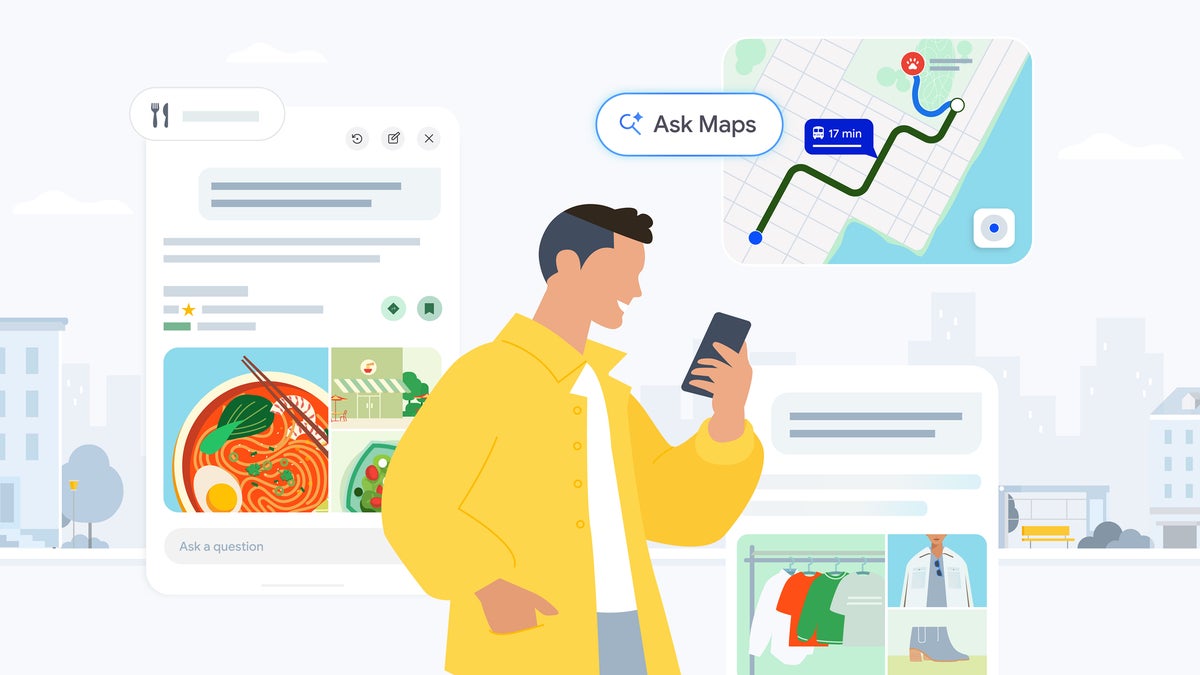
Ask Maps now handles food ordering, hotel research and live transit in one conversation. | Image by Google
Google announced a batch of Ask Maps upgrades today, including food ordering, hotel booking and live transit delays. If you own one of the best Android phones, this is the biggest change to Maps since March.
It is arriving on the Pixel 10 Pro and the iPhone 17 Pro Max alike, so this is no Pixel perk.
The announcement came straight from Google in a blog post and it builds on the conversational Ask Maps feature that first rolled out back in March, and Google is not being shy about how it rates the thing.
Ask Maps also expanded into Australia, Brazil, Canada, Indonesia, Japan and Mexico, on top of more than 150 countries and territories in English. That is a lot of ground covered for a feature that is barely five months old.
Here is what the agentic part actually does: you can ask Maps to order a specific dish for pickup on your way home, and it will find open restaurants along your route that serve it, factoring in things like your saved places and any dietary needs.
Once you pick a spot, Ask Maps adds the dish to your cart so all you have to do is review it and pay. Google says ordering is rolling out with Square and Toast, with Uber Eats coming later.
The same agentic layer handles hotels and events. Ask for a reasonably priced, top-rated hotel near your conference and it compares live prices and checks availability, and it will surface everything from concerts to comedy shows with ticket links attached.
Google is also co-developing something called the Universal Commerce Protocol for Food with its partners, which is essentially a shared standard for passing orders between apps and restaurant systems, and that tells you where this is heading.
For what it is worth, we saw the ordering piece coming. Code strings pointing at in-app food ordering turned up in the Maps app in July, and roughly five weeks later it is official.
So where does that leave everyone else? Apple Maps is not starting from zero, since iPhone users have been able to order food and make reservations straight from a place card through Apple Business Connect for a couple of years now.
The difference is who does the work. Apple Maps hands you the button, while Ask Maps is meant to walk the whole errand from craving to cart, and that is the real gap between them. Waze users are in the odder spot here, since Waze is Google's own app and it is getting none of this.
In our own navigation comparison we came down on Google Maps for the sheer depth of its place data, though that has never fully translated into US market share. Data we cited in January put the US split at 55% Apple Maps to 45% Google Maps among iPhone owners.
Personal Intelligence is the part that will get people talking. You can choose to connect Ask Maps to Gmail so it factors in your flight or dinner reservation without you having to spell out your plans first.
Google says the Gmail connection is off by default and that turning it on is your call. Calendar and other apps are coming later, but Gmail is the only connection on the table right now.
The transit widget is the piece I am most interested in. It sits inside Ask Maps and shows up-to-the-minute delays for your bus, train, subway or ferry on what amounts to a virtual departure board.
Tell Maps is the quieter addition. You can suggest edits by speaking, typing a quick note or uploading a photo of a storefront sign, and Maps will read the new hours off the image and ask you to confirm before it submits anything.
The rollout is split like this:
So if you are outside the US, the commerce half of this announcement won't be available to you yet. Google says more countries are coming over time, though.
I am a bit torn. The transit widget is the kind of small, useful thing I will end up using constantly, and the storefront-photo trick for updating hours is smart in a way that respects people's time. What I would personally love to see next is this same treatment for transit ticketing.
It is arriving on the Pixel 10 Pro and the iPhone 17 Pro Max alike, so this is no Pixel perk.
Google Maps just got a lot more hands-on
The announcement came straight from Google in a blog post and it builds on the conversational Ask Maps feature that first rolled out back in March, and Google is not being shy about how it rates the thing.
Ask Maps is Google Maps' biggest transformation in over a decade.
Miriam Daniel, VP and GM of Google Maps, Google blog post, August 6, 2026
How far should Maps go on your behalf?
23 Votes
All the way, order and pay for me
13.04%
Up to checkout, I press the last button
13.04%
Suggestions only, I handle the rest
30.43%
Directions only, keep the errands out of it
43.48%
Maps is quietly turning into a checkout screen
Here is what the agentic part actually does: you can ask Maps to order a specific dish for pickup on your way home, and it will find open restaurants along your route that serve it, factoring in things like your saved places and any dietary needs.
Ask Maps finds a restaurant along your route and fills the cart for you. | Video by Google
The same agentic layer handles hotels and events. Ask for a reasonably priced, top-rated hotel near your conference and it compares live prices and checks availability, and it will surface everything from concerts to comedy shows with ticket links attached.
For what it is worth, we saw the ordering piece coming. Code strings pointing at in-app food ordering turned up in the Maps app in July, and roughly five weeks later it is official.
So where does that leave everyone else? Apple Maps is not starting from zero, since iPhone users have been able to order food and make reservations straight from a place card through Apple Business Connect for a couple of years now.
The difference is who does the work. Apple Maps hands you the button, while Ask Maps is meant to walk the whole errand from craving to cart, and that is the real gap between them. Waze users are in the odder spot here, since Waze is Google's own app and it is getting none of this.
Ask Maps can read your Gmail now, if you let it
Personal Intelligence is the part that will get people talking. You can choose to connect Ask Maps to Gmail so it factors in your flight or dinner reservation without you having to spell out your plans first.
Google says the Gmail connection is off by default and that turning it on is your call. Calendar and other apps are coming later, but Gmail is the only connection on the table right now.
Live transit, plus a Maps that takes your word for it
The transit widget is the piece I am most interested in. It sits inside Ask Maps and shows up-to-the-minute delays for your bus, train, subway or ferry on what amounts to a virtual departure board.
The transit widget updates your wait time minute by minute when a ride runs late. | Video by Google
Tell Maps is the quieter addition. You can suggest edits by speaking, typing a quick note or uploading a photo of a storefront sign, and Maps will read the new hours off the image and ask you to confirm before it submits anything.
Who gets this, and where
The rollout is split like this:
- Live everywhere Ask Maps works: the transit widget, more personalized responses and conversation memory.
- US only for now: food ordering, hotel and event discovery and conversational contributions.
- Newly added markets: Australia, Brazil, Canada, Indonesia, Japan and Mexico, plus 150+ countries and territories in English.
So if you are outside the US, the commerce half of this announcement won't be available to you yet. Google says more countries are coming over time, though.
What all of this changes for me
I am a bit torn. The transit widget is the kind of small, useful thing I will end up using constantly, and the storefront-photo trick for updating hours is smart in a way that respects people's time. What I would personally love to see next is this same treatment for transit ticketing.
If you want to go deeper on this one:
- Our Pixel 10 Pro review, for how Google's own flagship handles all this AI
- Our iPhone 17 Pro Max review, if you are weighing the other side of the fence
- Come hang out with me on X and Threads for hot takes and the behind-the-scenes stuff that does not make it into the articles


Popular stories





Latest News



Things that are NOT allowed:
To help keep our community safe and free from spam, we apply temporary limits to newly created accounts: