Google has finally silenced one of Android 17's most repetitive nags. The latest QPR1 Beta adds a simple "Don't ask me again" checkbox to the mobile data warning that pops up every time you flip the toggle. Pixel 10 Pro beta testers can use it now, and it should reach every eligible Pixel with the September Feature Drop.
Google quietly added a way to skip the warning
I was scrolling through r/Android when I noticed a post that blew up over something almost comically small, a single checkbox. The flood of replies told me just how much this tiny issue had been getting under people's skin.
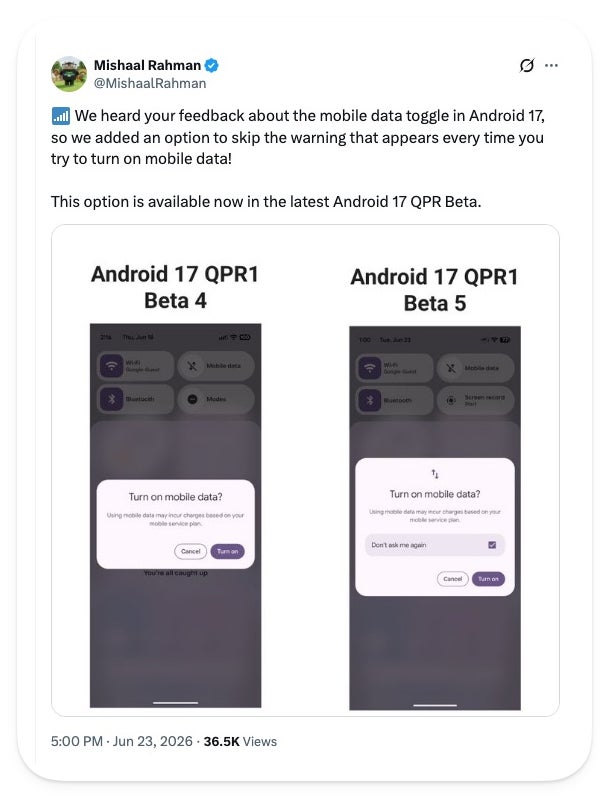
Google's Mishaal Rahman, who now runs Android community engagement, confirmed on X that the latest beta finally lets you mute the mobile data warning for good.
We heard your feedback about the mobile data toggle in Android 17, so we added an option to skip the warning that appears every time you try to turn on mobile data! This option is available now in the latest Android 17 QPR Beta.
Mishaal Rahman, Android community engagement at Google, X, June 23, 2026
The change arrived in Android 17 QPR1 Beta 5, build CP31.260608.007, which dropped on June 23. It's a plain checkbox inside the "Turn on mobile data?" dialog, so one tap and the prompt stops coming back.
Which Android nag do you most want Google to kill next?
214 Votes
The Wi-Fi toggle, it should fully shut Wi-Fi off
45.79%
The volume limit warning that keeps popping up
32.24%
The mobile data prompt, glad it's finally going
8.88%
The toggles are fine, Google should stop fiddling
13.08%
Where this nag came from and why people want more
Here's the backstory: Android 17 split mobile data and Wi-Fi into separate Quick Settings toggles, after years of the two being fused into one Internet tile. That gave everyone the one-tap mobile data button they wanted, and we covered Google's tangled history with these toggles a while back.
Recommended For You
The catch is that every tap on that button fired the "Turn on mobile data?" warning, so the convenience came with yet another thing to click on. This checkbox is Google patching the friction its own redesign created.
The old dialog on the left, and the new skip-the-warning checkbox on the right in Android 17 QPR1 Beta 5. | Image by Mishaal Rahman via X
The thread barely paused to celebrate before turning into a wishlist, with people begging Google to fix the Wi-Fi toggle the same way so it fully shuts Wi-Fi off, and to retire the volume warning too.
If you're on a Galaxy S26 Ultra or another One UI phone, this barely touches you, since Samsung runs its own toggle setup. This is really stock Android catching up to conveniences other skins sorted out long ago.
Do you have this on your phone yet?
Short answer for most people: not yet. The checkbox lives in Android 17 QPR1 Beta 5, so unless you're in the beta, you'll wait for the September Feature Drop to reach stable.
That drop covers the Pixel 6 series and up, including the Pixel 6 and 6 Pro that sat out the last beta. Jumping into the beta for one checkbox isn't worth it, since these builds still ship with bugs.
A small fix I hope is the first of many
I've got Beta 5 on my own Pixel, and the funny part is this checkbox does almost nothing for me, because I rarely toggle mobile data by hand. Still, I get why it struck a nerve, since plenty of people flip that switch constantly and a warning on every tap turns a one-second action into a chore.
What I'm hoping is that Google treats this as a starting point. The Wi-Fi toggle that won't fully turn Wi-Fi off is right there, and if one checkbox can quiet a nag, the rest can follow.
More on Pixel and Android while you wait:
Our full Pixel 10 Pro review breaks down where it shines
See our Galaxy S26 Ultra review and how it handles the basics
On the Visible+ Pro plan, you get access to 5G Ultra Wideband data on Verizon's fastest network. Along with unlimited roaming across Mexico and Canada, 2 days of Global Pass per month, 3x hotspot speeds, 4K streaming, and Smartwatch service.
Johanna Romero is a Senior News Writer at PhoneArena, covering mobile technology news across Android, iOS, wearables, and the Google ecosystem she knows best. Drawing on 15 years in IT and tech support from 2007 to 2022, she brings a user-friendly eye for the practical features and lesser-known tricks readers care about. Google named her an official #TeamPixel member in 2022, and she also reviews the latest devices on her YouTube channel, JoJo the Techie.
A discussion is a place, where people can voice their opinion, no matter if it
is positive, neutral or negative. However, when posting, one must stay true to the topic, and not just share some
random thoughts, which are not directly related to the matter.
Things that are NOT allowed:
Off-topic talk - you must stick to the subject of discussion
Offensive, hate speech - if you want to say something, say it politely
Spam/Advertisements - these posts are deleted
Multiple accounts - one person can have only one account
Impersonations and offensive nicknames - these accounts get banned
To help keep our community safe and free from spam, we apply temporary limits to newly created accounts:
New accounts created within the last 24 hours may experience restrictions on how frequently they can
post or comment.
These limits are in place as a precaution and will automatically lift.
Moderation is done by humans. We try to be as objective as possible and moderate with zero bias. If you think a
post should be moderated - please, report it.
Have a question about the rules or why you have been moderated/limited/banned? Please,
contact us.














Things that are NOT allowed:
To help keep our community safe and free from spam, we apply temporary limits to newly created accounts: