Google Calendar is scrapping its longtime 11-color cap for individual events, and anyone who color-codes their life just won big, with each event now able to carry up to 200 custom colors, 24 ready-made swatches and a full RGB picker on the web. The rollout is live now across the Pixel 10 Pro, the rest of the best Pixel phones and rivals like the iPhone 17 Pro Max.
What Google just changed for event colors
For years, Google Calendar limited you to 11 colors when recoloring a single event, even as its wider calendar palette offered more. That changes now.
In its announcement on the Workspace Updates blog, Google bumped the per-event palette to 24 default colors, with a full RGB picker on the web and through the Calendar API unlocking up to 200 shades per event. It is on by default with no admin toggle, and it reaches every Google Workspace customer, Workspace Individual subscriber and personal Google account. Rapid Release domains started seeing it on June 17, 2026, with Scheduled Release following on June 29.
How much will 200 event colors actually change your Calendar?
39 Votes
Huge, I color-code everything and needed this
41.03%
Nice, but the 24 defaults are plenty for me
25.64%
I'll use it once and forget it exists
17.95%
I don't color-code my calendar at all
15.38%
Why the color cap actually mattered
If you only use Calendar for the odd reminder, this barely registers. But for anyone who leans on color to sort work, family, gym and side projects, the old 11-color event limit was a daily annoyance that outlasted even Calendar's big Material 3 redesign.
Recommended For You
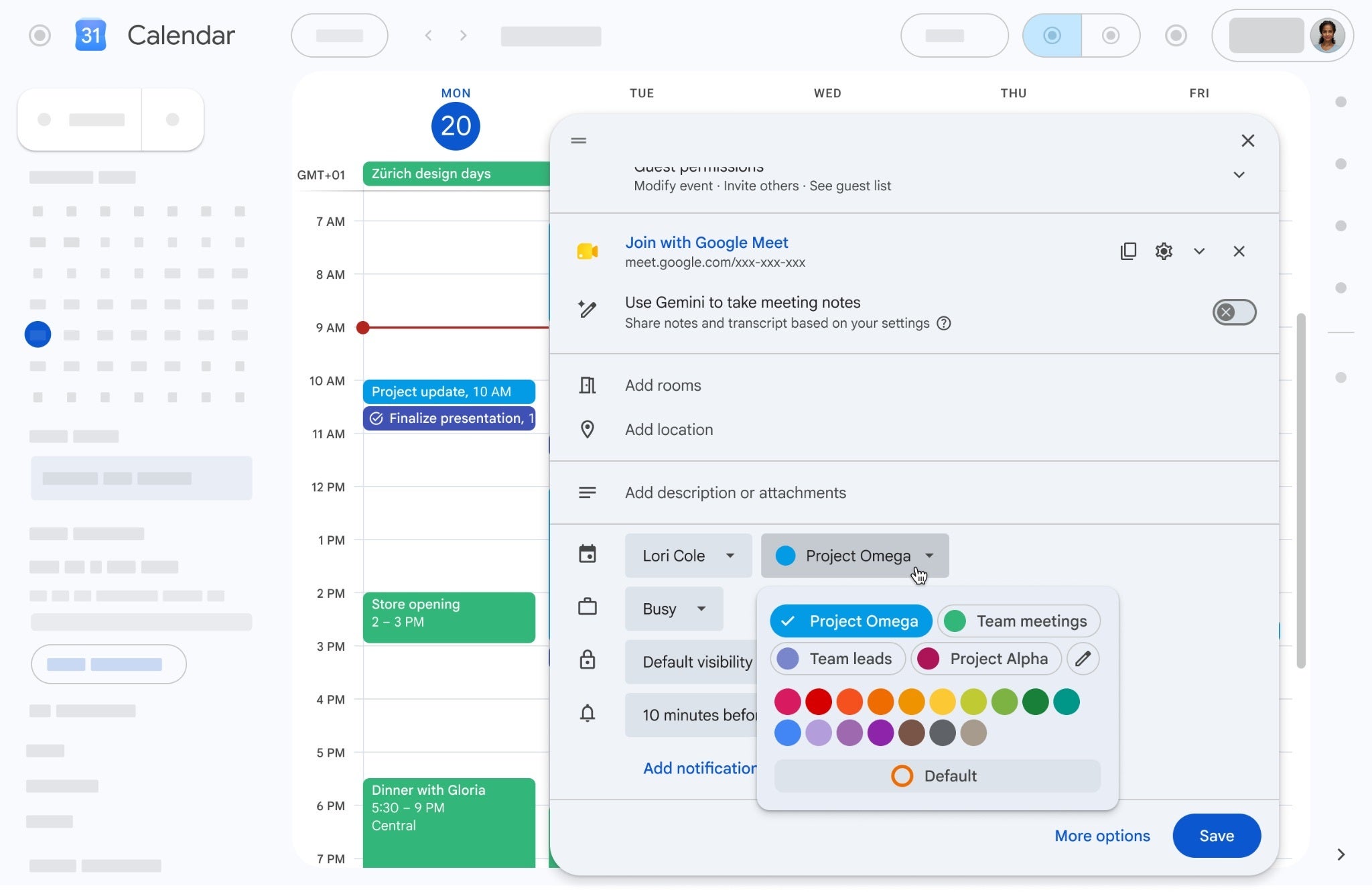
The upgraded event color picker sits in the event editor, with 24 default swatches and an edit option for custom shades. | Image by Google
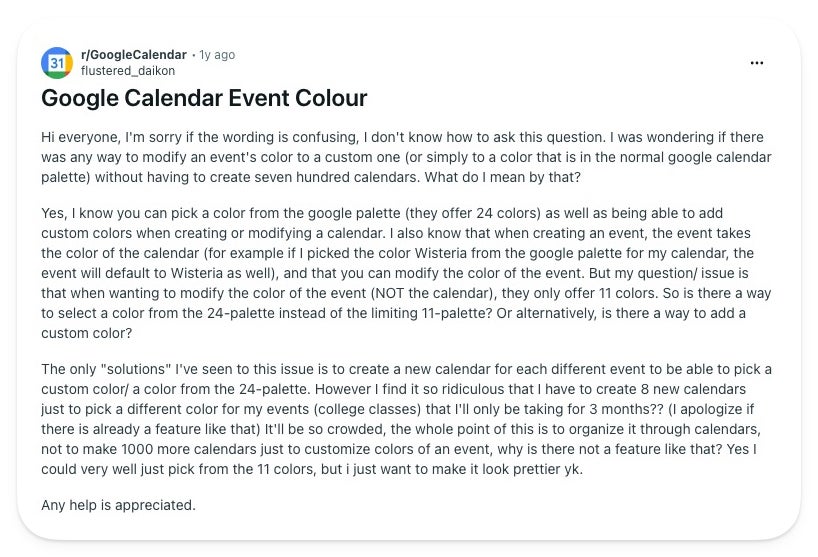
On Reddit, one user spelled out the exact frustration, asking how to give an event a custom color without spinning up dozens of throwaway calendars just to borrow their colors.
A Reddit user asking for a way past the 11-color event cap without making throwaway calendars. | Image by flustered_daikon via Reddit
Apple Calendar users know this trap firsthand. Per Apple's own support pages, color there lives on the calendar, not the event, so recoloring one item means moving it to a differently colored calendar.
So if you organize life on an iPhone 17 Pro Max with Apple Calendar, this update does not reach you, and that workaround stays your reality for now.
Who it helps, and how to set it
The clear winners are heavy planners and students juggling overlapping schedules, the exact crowd that was faking calendars just to unlock more colors. With 200 shades available, you can map a color to a meaning and trust it at a glance.
Here's how to set a custom event color
Open or create an event in Google Calendar on the web.
Click the color menu in the event editor.
Pick one of the 24 default swatches, or use the edit option for the full picker.
Choose your shade and save.
On phones you get the wider set of defaults, while the full RGB picker stays a web and API feature.
Where I land on this
I process my week far better when everything is color-coded, so jumping from 11 to 200 options is a small upgrade I will actually use daily.
My one worry is whether these colors survive the trip to other calendars. I have fought with Apple Calendar on my Mac, where custom colors refuse to match across devices, and a richer Google palette only helps if it shows up the same everywhere it syncs. If Google nails that, the 11-color era will not be missed.
More from the Google corner:
We walked through Calendar's switch to dark mode and a Material Design 3 look on the web.
Google also answered a long-overdue request to add birthdays right in the app.
For more hot takes and behind-the-scenes coverage, come follow @jojothetechie on X and Threads.
Mint Mobile's 6-month plans now cost $10/mo
$10
/mo
$35
$25 off (71%)
Mint Mobile is celebrating its 10-year anniversary with a special offer on its six-month subscription plans. For a limited time, you can get your preferred tier (6GB, 17GB, 23GB or unlimited) for just $10/mo. That saves you between 50% and 71% on the carrier's mobile plans, making it way easier to recommend.
Johanna Romero is a Senior News Writer at PhoneArena, covering mobile technology news across Android, iOS, wearables, and the Google ecosystem she knows best. Drawing on 15 years in IT and tech support from 2007 to 2022, she brings a user-friendly eye for the practical features and lesser-known tricks readers care about. Google named her an official #TeamPixel member in 2022, and she also reviews the latest devices on her YouTube channel, JoJo the Techie.
A discussion is a place, where people can voice their opinion, no matter if it
is positive, neutral or negative. However, when posting, one must stay true to the topic, and not just share some
random thoughts, which are not directly related to the matter.
Things that are NOT allowed:
Off-topic talk - you must stick to the subject of discussion
Offensive, hate speech - if you want to say something, say it politely
Spam/Advertisements - these posts are deleted
Multiple accounts - one person can have only one account
Impersonations and offensive nicknames - these accounts get banned
To help keep our community safe and free from spam, we apply temporary limits to newly created accounts:
New accounts created within the last 24 hours may experience restrictions on how frequently they can
post or comment.
These limits are in place as a precaution and will automatically lift.
Moderation is done by humans. We try to be as objective as possible and moderate with zero bias. If you think a
post should be moderated - please, report it.
Have a question about the rules or why you have been moderated/limited/banned? Please,
contact us.




Things that are NOT allowed:
To help keep our community safe and free from spam, we apply temporary limits to newly created accounts: