Just three days ago, we told you about a bug found on the brand-spanking-new iPhone 18 Pro. The issue occurred when iPhone 18 Pro users used Face ID to unlock an app that they had protected with Face ID.
How to protect your apps with Face ID
Before we address the bug, let’s discuss how an iPhone user can use Face ID to protect sensitive apps from hackers and attackers breaking in.
In iOS 18, released in 2024, Apple added a feature that allows iPhone users to add extra protection for certain apps by requesting that facial recognition be used to authenticate the identity of the person opening an app on your iPhone.
Arranging Face ID to stand guard, blocking strangers from opening certain apps on your iPhone is quite simple. Long-press on the home screen icon of the app you want biometrically protected, and one of the features in the menu that pops up on the screen will be “Require Face ID.”
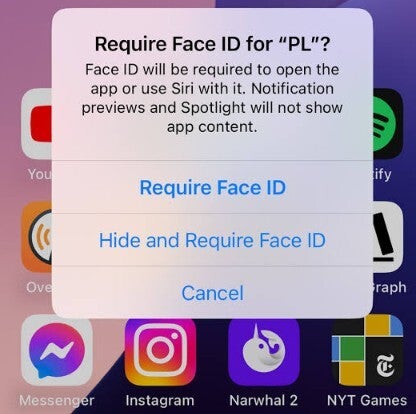
Once you press that option, you will see a box with three options. The first, "Require Face ID," means that the only way to open the protected app is to have your identity verified by the facial recognition feature, or by typing in your passcode.
The second option is “Hide and Require Face ID.” Not only does this setting protect the app by demanding that the user pass through Face ID to open the app, it also hides the icon from showing up on the phone’s display. The icon is also removed from the App Library and no one will know you’ve installed this app on your iPhone but you.
Recommended For You
To make the icon visible again, you’ll need to tap the Hidden boxes in the App Library and long-press on the icon. That will allow you to tap a button that makes the app’s icon show up once again on the home screen.
You can remove the Face ID protection for this app with a long press on the app’s home screen icon followed by pressing the “Don’t Require Face ID” option.
While this is a pretty good way to protect your sensitive apps from getting hacked, the Face ID bug affecting iPhone 18 Pro users made this a difficult process to use. Thanks to the bug, an iPhone 18 Pro user who had to use Face ID to open a protected app could not do so.
Instead, iPhone 18 Pro users impacted by the bug found that Face ID failed to work on their iPhone, leaving them with a button that said, “Try Face ID Again."
The bug caused iPhone 18 Pro units to freeze and then reboot
Now here’s the bad part. For those with the bug, tapping on that button again led their iPhone to freeze, preventing the user from being able to enter any touch input. As if all this wasn’t bad enough, after a few seconds, the device would then reboot.
There is no reason to run to the Apple Store if you're impacted by this bug
Apple has now told 9to5Mac that a software update will fix this mess, and we can now expect Apple to release it early next week. Now that we know for sure that it is a software issue, those affected by this bug have no reason to make a mad dash to their nearest Apple Store, seeking to replace their phone with a replacement model.
Time out to pat myself on the shoulder
One iPhone 18 Pro user claimed that he was getting a replacement unit from Apple, but as I wrote last Monday, “My crystal ball tells me to expect Apple to release an update soon to fix this Face ID bug.”
Setting up an app to get proptected by Face ID. | Image by TapSmart
With my crystal ball working, perhaps I should take a look at the point spreads for this weekend’s NFL games. Anyway, if the Face ID bug is affecting you, hold on. An update to fix the problem is coming soon.
Alan, an ardent smartphone enthusiast and a veteran writer at PhoneArena since 2009, has witnessed and chronicled the transformative years of mobile technology. Owning iconic phones from the original iPhone to the iPhone 15 Pro Max, he has seen smartphones evolve into a global phenomenon. Beyond smartphones, Alan has covered the emergence of tablets, smartwatches, and smart speakers.
A discussion is a place, where people can voice their opinion, no matter if it
is positive, neutral or negative. However, when posting, one must stay true to the topic, and not just share some
random thoughts, which are not directly related to the matter.
Things that are NOT allowed:
Off-topic talk - you must stick to the subject of discussion
Offensive, hate speech - if you want to say something, say it politely
Spam/Advertisements - these posts are deleted
Multiple accounts - one person can have only one account
Impersonations and offensive nicknames - these accounts get banned
To help keep our community safe and free from spam, we apply temporary limits to newly created accounts:
New accounts created within the last 24 hours may experience restrictions on how frequently they can
post or comment.
These limits are in place as a precaution and will automatically lift.
Moderation is done by humans. We try to be as objective as possible and moderate with zero bias. If you think a
post should be moderated - please, report it.
Have a question about the rules or why you have been moderated/limited/banned? Please,
contact us.














Things that are NOT allowed:
To help keep our community safe and free from spam, we apply temporary limits to newly created accounts: