
Apple rolls out silent firmware update for this premium iPad accessory
This silent update arrives for the latest Air and Pro keyboards.
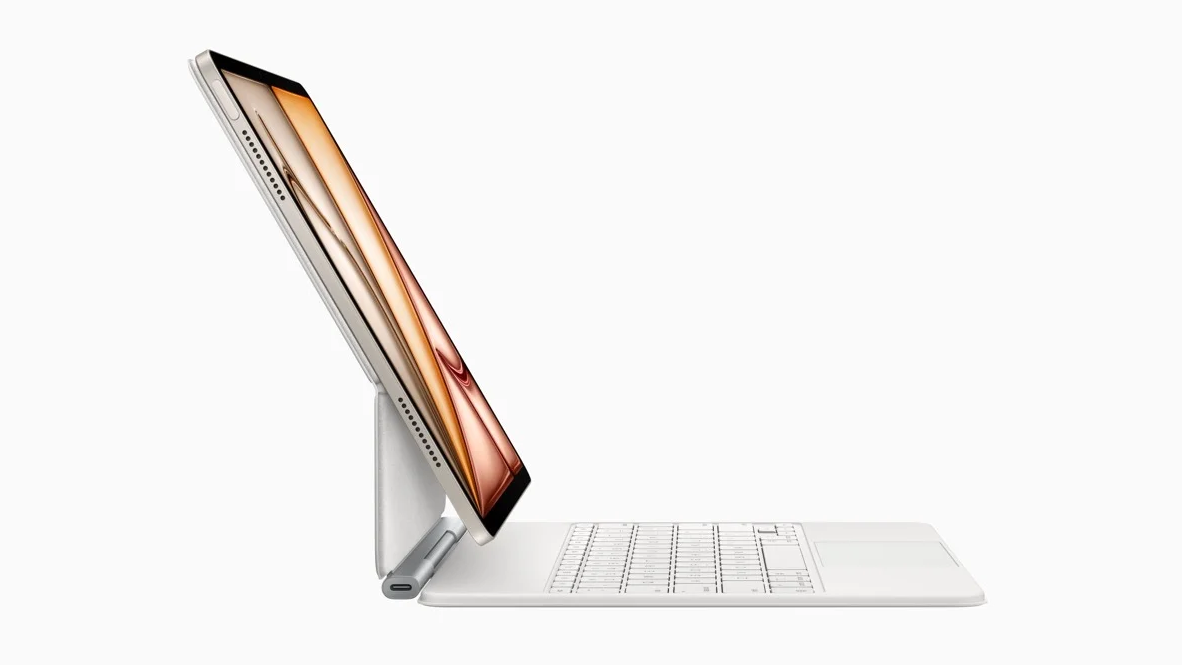
If you own one of the latest iPads and use it with a Magic Keyboard, your typing setup might be getting a silent upgrade today. Apple has started rolling out a firmware update for several of its keyboard models, specifically for the newer iPad Air and iPad Pro devices.
It is time for a little maintenance for your iPad accessories. In a new report, it was spotted that Apple is pushing out a firmware update to four specific Magic Keyboard models. Unlike iOS updates that demand your attention with a notification badge, this one is happening quietly in the background.
The update targets the keyboards designed for the latest generation of tablets, meaning the ones with the M3 and M4 chips. While Apple hasn't released a detailed list of patch notes (which is pretty standard for these types of accessories), updates like this usually squash bugs, improve connectivity, or fix little glitches that might have been annoying you.
Here are the specific models receiving the update and the version numbers you should look for:
If you have one of these, the update installs itself automatically while the keyboard is attached to your iPad. You can’t force it to happen, but it typically kicks in when the device is idle.
You might be wondering why a keyboard needs software updates at all. It's hard to say, since Apple has not provided any release notes on these updates, so we don't know for sure what it entails.
I am generally a fan of "it just works" updates that don't require me to press a button or wait for a reboot. However, the lack of a "Update Now" button for accessories like the Magic Keyboard (and AirPods) can be a little frustrating if you are the type of person who likes to be on the bleeding edge immediately.
That said, it is good to see Apple maintaining these accessories long after launch. If you have been experiencing any weird trackpad lag or connection drops, this might be the fix you have been waiting for. I haven't noticed any major issues with my units personally, but stability improvements are always welcome in my book.
A silent update?
It is time for a little maintenance for your iPad accessories. In a new report, it was spotted that Apple is pushing out a firmware update to four specific Magic Keyboard models. Unlike iOS updates that demand your attention with a notification badge, this one is happening quietly in the background.
iPad Magic Keyboard firmware details
Here are the specific models receiving the update and the version numbers you should look for:
- Magic Keyboard for iPad Air 13-inch (M3): Version 1024.320.771
- Magic Keyboard for iPad Air 11-inch (M3): Version 1024.320.771
- Magic Keyboard for iPad Pro 13-inch (M4): Version 1872.544.772
- Magic Keyboard for iPad Pro 11-inch (M4): Version 1872.544.772
If you have one of these, the update installs itself automatically while the keyboard is attached to your iPad. You can’t force it to happen, but it typically kicks in when the device is idle.
What is in this update?
Apple has released:
— Aaron (@aaronp613) January 20, 2026
Magic Keyboard for iPad Air 13-inch (M3) firmware 1024.320.771
Magic Keyboard for iPad Air 11-inch (M3) firmware 1024.320.771
Magic Keyboard for iPad Pro 13-inch (M4) firmware 1872.544.772
Magic Keyboard for iPad Pro 11-inch (M4) firmware 1872.544.772
You might be wondering why a keyboard needs software updates at all. It's hard to say, since Apple has not provided any release notes on these updates, so we don't know for sure what it entails.
However, we can guess these are probably bug fixes to ensure that the connection between your iPad and the keyboard remains instant and reliable. Since these Magic Keyboards are premium devices with trackpads and backlighting, this could also be an update to ensure the power management and multi-touch gestures work properly.
If you are curious to see if you are already running the latest software, there is an easy way to check. With your keyboard attached, just open your iPad Settings, tap on General, select About, and then tap on Magic Keyboard. If the numbers match the list above, you are all set.
How does the Magic Keyboard fit into your daily workflow?
12 Votes
It turns my iPad into a full laptop replacement.
58.33%
I only attach it when I have a lot of typing to do.
16.67%
It serves mostly as a heavy-duty stand for watching content.
0%
I prefer using a lighter folio case or just the iPad itself.
25%
It just works
I am generally a fan of "it just works" updates that don't require me to press a button or wait for a reboot. However, the lack of a "Update Now" button for accessories like the Magic Keyboard (and AirPods) can be a little frustrating if you are the type of person who likes to be on the bleeding edge immediately.
That said, it is good to see Apple maintaining these accessories long after launch. If you have been experiencing any weird trackpad lag or connection drops, this might be the fix you have been waiting for. I haven't noticed any major issues with my units personally, but stability improvements are always welcome in my book.


Popular stories



Latest News






Things that are NOT allowed:
To help keep our community safe and free from spam, we apply temporary limits to newly created accounts: