Android 17 just picked up a feature that could keep your video calls steady in a packed stadium or crowded conference hall, and it barely got any attention. The update can automatically shift calls in apps like WhatsApp or Zoom onto a premium 5G lane, and Pixel 10 Pro owners on T-Mobile are among the first who can use it.
What changed in Android 17
Android 17rolled out to Pixel phones a few weeks ago, and most of the attention went to flashier additions like app bubbles and screen reactions. However, a new report flagged a quieter change buried in the changelog.
Android 17 can now automatically move voice and video call traffic from apps like WhatsApp or Zoom onto a premium 5G lane, without the developer changing a line of code. Google confirmed the feature in its own documentation, so this is already live, not a rumor.
Picture your video call dropping out at a packed concert. Would you pay extra for a 5G lane that fixes that?
17 Votes
I'd pay extra to save an important call from dropping
0%
Carriers charge enough already, this should be included
52.94%
Only if it's bundled in free, not a brand new fee
11.76%
My calls are fine as is, I wouldn't notice a difference
35.29%
Where rivals and carriers stand
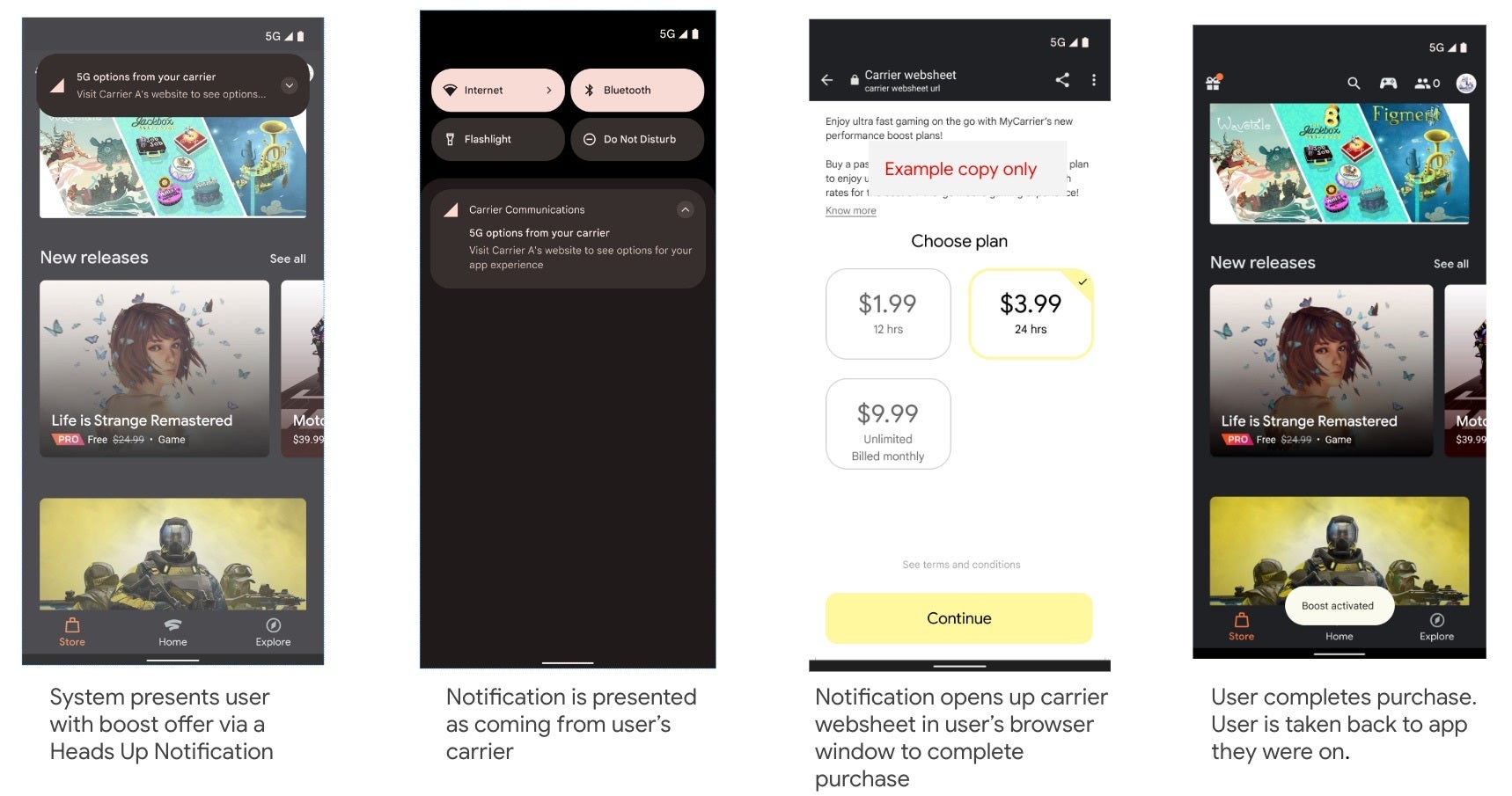
This isn't Android's first swing at 5G network slicing, splitting a 5G connection into dedicated lanes with different speeds. Android 12 and 13 kept the whole thing enterprise-only, and Android 14 then opened it to regular users, though developers still had to build their own purchase flow for it, a clunky ask most understandably skipped. Still, Android 17 removes that step completely.
Recommended For You
On the carrier side, T-Mobile runs a video calling lane, and Verizon has something similar called Enhanced Video Calling, limited to iPhone users for now. Galaxy owners shouldn't expect this soon, though, as Samsung's version of Android 17 usually arrives months later.
The upsell flow Android 14 required before a user could buy premium network access. | Image by Google
Who benefits, and how it works
This helps less by phone model and more by location. Think a packed stadium or crowded train platform, where phones compete for the same signal. If your carrier and plan both support a lane, your call traffic gets pulled out of that fight automatically.
How the call routing works
The system already tracks when a call in an app like WhatsApp or Zoom starts.
While the call is active, it recognizes that app and moves its traffic onto the dedicated lane if your carrier offers one.
Once you hang up, that app's data goes back to the regular network.
None of this works without a supported plan, though. So, without one, your phone has nothing extra to route into, and the call behaves like it does today.
Why I'm not celebrating just yet
I like that Google built this at the platform level instead of leaving it to each app to handle. Any video app you use benefits without doing anything on its end.
Still, I'm keeping my expectations grounded here. The original report flags that carriers get a new thing to upsell, something I've watched turn into a line item on someone's bill before. I'd rather wait and see how T-Mobile, Verizon and AT&T actually price this, though I'd genuinely love to be proven wrong on this one.
Johanna Romero is a Senior News Writer at PhoneArena, covering mobile technology news across Android, iOS, wearables, and the Google ecosystem she knows best. Drawing on 15 years in IT and tech support from 2007 to 2022, she brings a user-friendly eye for the practical features and lesser-known tricks readers care about. Google named her an official #TeamPixel member in 2022, and she also reviews the latest devices on her YouTube channel, JoJo the Techie.
A discussion is a place, where people can voice their opinion, no matter if it
is positive, neutral or negative. However, when posting, one must stay true to the topic, and not just share some
random thoughts, which are not directly related to the matter.
Things that are NOT allowed:
Off-topic talk - you must stick to the subject of discussion
Offensive, hate speech - if you want to say something, say it politely
Spam/Advertisements - these posts are deleted
Multiple accounts - one person can have only one account
Impersonations and offensive nicknames - these accounts get banned
To help keep our community safe and free from spam, we apply temporary limits to newly created accounts:
New accounts created within the last 24 hours may experience restrictions on how frequently they can
post or comment.
These limits are in place as a precaution and will automatically lift.
Moderation is done by humans. We try to be as objective as possible and moderate with zero bias. If you think a
post should be moderated - please, report it.
Have a question about the rules or why you have been moderated/limited/banned? Please,
contact us.










![Another batch of Galaxy S26 series users in the US are getting a nice surprise today [UPDATED]](https://m-cdn.phonearena.com/images/article/183643-wide-two_350/Another-batch-of-Galaxy-S26-series-users-in-the-US-are-getting-a-nice-surprise-today-UPDATED.webp)
Things that are NOT allowed:
To help keep our community safe and free from spam, we apply temporary limits to newly created accounts: