PhoneArena is looking for new authors! To view all available positions, click here.
  • Home
  • News
  • Android 4.2 ROM has a quick settings menu

Android 4.2 ROM has a quick settings menu

Posted: , by Michael H.

Categories:

Share:

Discuss 15
Android 4.2 ROM has a quick settings menu
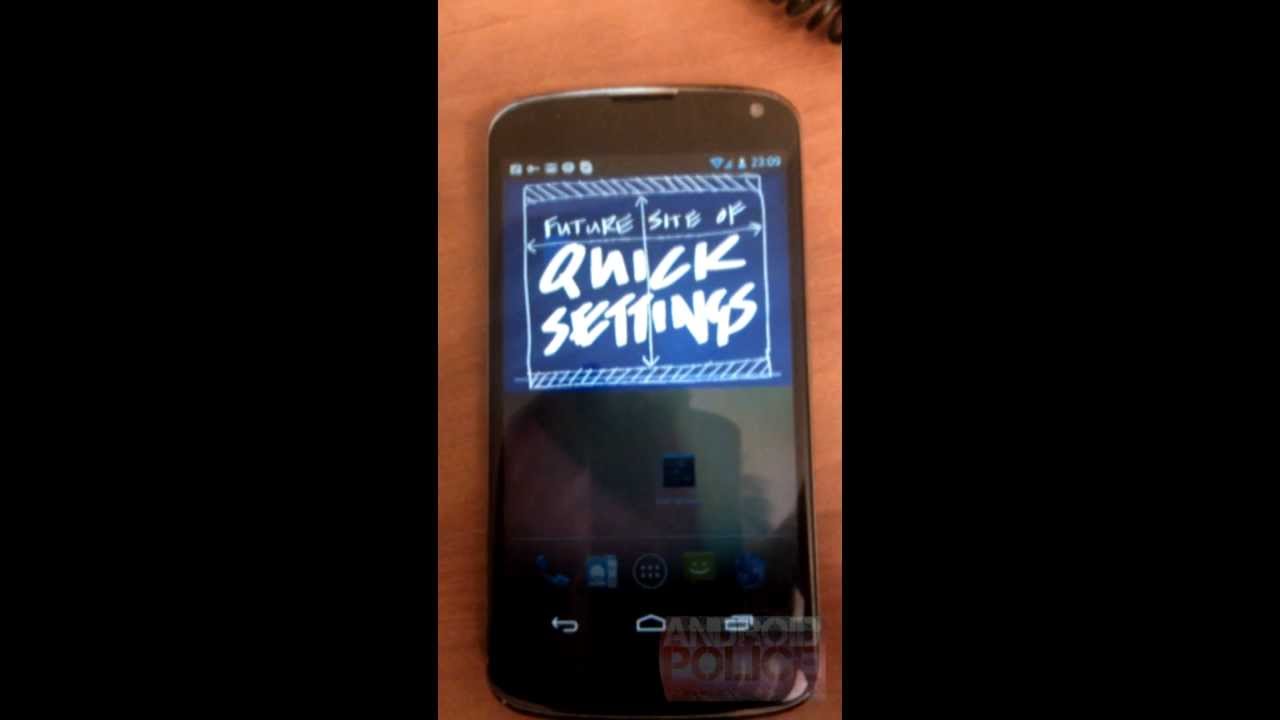
We've been fooled by Android 4.2 talk before, so we're taking this news with a big grain of salt, but it seems like an interesting idea. Apparently, the boys at Android Police got their hands on a ROM of Android 4.2 that was said to have been pulled from an LG Nexus 4.

It seems that there is a new option where if you swipe down a second time after pulling down the notification tray, there is a placeholder for a "quick settings menu". It's unclear what that will be, but the early assumption is that it will give access to settings like WiFi and Bluetooth toggles.

That seems reasonable at first, but it seems like a silly way for Google to implement such a system. There are already apps in the Play Store, as well as multiple manufacturer UIs and custom ROMs that have set the standard to have those buttons be nested permanently in the notification tray. So, why would Google buck this trend to implement a system that keeps the settings hidden and forces users to dig to get at them? 

It doesn't really make sense, so we're hoping there is more to this than meets the eye. What do you guys think?


Share:

Discuss15

15 Comments

  • Options
    Close


Want to comment? Please login or register.

1. antmiu2 posted on 15 Oct 2012, 22:43 6

for now its just a sign

11. doejon posted on 16 Oct 2012, 03:19 2

i think that the 4.2 update will just be a minor update and lime pie will come next year

2. Berzerk000 posted on 15 Oct 2012, 22:44 2

Seems like a nice addition to the stock OS. Perhaps they could have implemented it more elegantly, but this is in no way the final build of the update; they could very well change it around before the rumored launch date of the Nexus.

It doesn't seem too complicated, 2 swipes towards the bottom and you get quick settings.

3. maxican16 posted on 15 Oct 2012, 22:52 3 1

I think this is a better implementation than custom ROMs and Touchwiz. Instead of scrolling left and right to reach all my toggles, I will [hopefully] be able to access them all on one screen. The left / right swipe gesture has been reserved for swiping away notifications, and wouldn't stick with Google's new, consistent theme.

If Google plays it smart and allows the quick settings shade to be customized to the users liking, it's a double win. They could add it to the opening tutorial introduced with ICS.

10. dsDoan posted on 16 Oct 2012, 02:25 1

What all options do you need constant instant access to? The current max of 6 (CM10) is more than I use, personally.

13. maxican16 posted on 16 Oct 2012, 09:38

To my knowledge there isn't a limit. You can move the toggles left and right to access those off the screens. But, it has been awhile since I've tried CM.

IMO, it's more cumbersome to swipe left and right than to make two simple swipes down. Try it.. it's simple. They could also add a two finger swipe to access Quick Settings with only one gesture (but I'd prefer they still keep the double swipe as the option).

I like having all my settings quick to hand.

15. dsDoan posted on 17 Oct 2012, 00:49

By maximum of 6, I meant the maximum that you see on screen without needing to swipe.

I use 4 myself: Wifi, Tether, Screen brightness (which I set to toggle between fully lit, and fully dim), and Torch (LED flashlight mode).

I use the WiFi and tether toggles throughout the day, and I toggle screen to dim when I'm going to sleep, and bright again when I wake. The Torch toggle isn't used every day, but it's something that comes in handy when I do need a quick light. So these are features that I use on a daily basis (excluding Torch).

I can see the double swipe down being useful for toggle options that aren't used as often, but for the ones that I know I'm going to use multiple times throughout every day, I'd much rather have them be right there in the notification menu.

4. Synack posted on 15 Oct 2012, 23:10 2 1

Doesn't seem very intelligent. Just take note from many other sources like AOKP and Cyanogenmod for example where it's just nested inside the original dropdown notification area. I mean we would have to teach people to swipe down TWICE just like we taught them to swipe down once for the first time around with the pulldown menu.

And only people who actually know about this feature would use it.

5. The_Innovation posted on 15 Oct 2012, 23:14 1 2

You know, these former Soviet Union nations and their teases using unreleased phones are getting annoying already. How do these random countries get these phones in their hands and no one in the States can?

6. Iconia posted on 15 Oct 2012, 23:52 2

What will happen if I swipe three times? ;-)

9. dsDoan posted on 16 Oct 2012, 02:21 1

The same thing that happens if you swipe two times, now.

14. maxican16 posted on 16 Oct 2012, 09:39

Infinite loop to the notifications and back.

7. Luuthian posted on 16 Oct 2012, 00:10 2

I don't see why this is that inconvienent... Personally I think they won't bake those buttons into the notification bar because they want to reserve as much room as possible for their new live notification system.

8. rizevnarastek posted on 16 Oct 2012, 01:38 1

I think the idea is great... Hope they make it visually attractive (which they surely will) and make it speedy enough to work if you just fast doubble swipe down OR they could change the "settings" icon that's embeded besides the clock, to show this screen.

12. JunkCreek posted on 16 Oct 2012, 05:57

hardly get the bucks hardly get the the phones hardly get the 4.2 even 4.0. life is a hard. strange, it was easier last year.

Want to comment? Please login or register.

Hot Phones

  • Samsung Galaxy S4Samsung Galaxy S4
  • Apple iPhone 5Apple iPhone 5
  • Samsung GALAXY Note IISamsung GALAXY Note II
  • HTC OneHTC One
  • Sony Xperia ZSony Xperia Z
  • Google Nexus 4Google Nexus 4
  • LG Optimus GLG Optimus G
  • Nokia Lumia 920Nokia Lumia 920