Samsung's One UI 9.5 interface is expected to be released early next year. Since One UI 9.0 disseminated Android 17 to compatible Samsung Galaxy phones, the upcoming version of One UI will be less about Android and more about individual features.
What to expect from the new "Shorten" feature for Samsung Keyboard in One UI 9.5
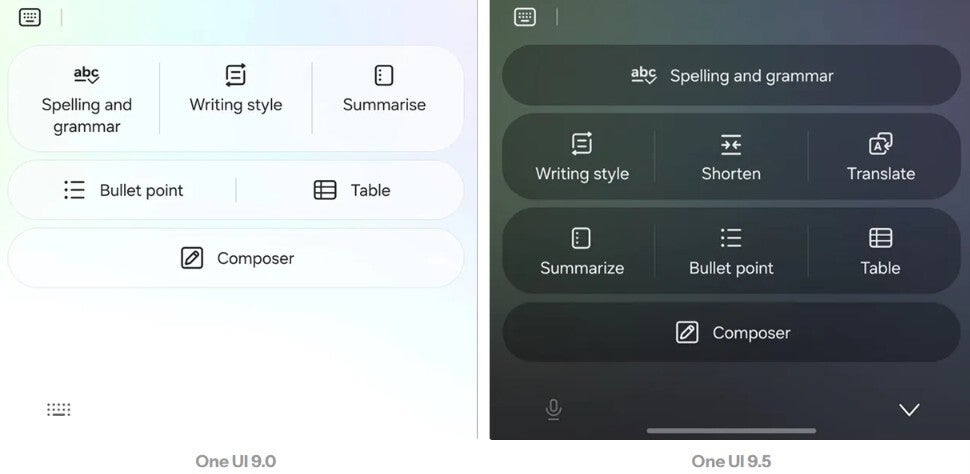
Shorten will use Galaxy AI to remove superfluous text while keeping the meaning of the original (and obviously too lengthy) prose. This will allow users to reduce the size of long emails, messages, and other written content without having to rewrite the text.
Shorten might sound self-explanatory, but not any more or less than the second One UI 9.5 Samsung Keyboard feature: Translate. As you might imagine, this would be a way for the user to translate text between two languages using Galaxy AI tools in Samsung Keyboard.
To be sure, Samsung Keyboard already offers a translation feature, so this appears to be another way to translate text using Sammy's QWERTY.
Recommended For You
Since both features are already available on Gboard, Samsung's goal here is rather transparent. It wants Galaxy users to keep using the default Samsung Keyboard rather than have users install Gboard on their Galaxy handsets.
Here are some of the other changes expected for One UI 9.5
Other previously mentioned changes coming in One UI 9.5 include a redesigned calendar app, a feature that designs customizable widgets that could work with Google's Gemini-driven Create My Widget, automation for Bixby, and a possible premium Galaxy AI subscription.
We should have a better idea of what features to expect for One UI 9.5 when the beta program kicks off later this month or in December. As we said, with Android 17 less of a focus, this update might be more exciting for Galaxy device users.
Which Galaxy devices will get the One UI 9.5 beta, and the stable version of One UI 9.5 first
The One UI 9.5 beta program should debut first for the Galaxy S26 line. The first phones to get the stable version of One UI 9.5 will be the Galaxy S27 series, set to launch in early 2027.
Comparing the Galaxy AI menu for Samsung Keyboard in One UI 9.0 and One UI 9.5. | Image by Android Authority
Samsung used to release the next round-number version of One UI with its Galaxy S flagship models. This changed in 2025, leaving Samsung to debut the next version of Android together with the next round-number version of One UI with its newest foldable models in the summer.
The .5 iteration of One UI now launches with the release of the flagship Galaxy S line at the start of the new year.
Why I prefer the Gboard QWERTY over the default iOS keyboard
Unlike some smartphone users, I like a QWERTY that is cluttered with keys that offer multiple functions, an individual numbers row, and more. The way I have the Gboard QWERTY set up for my Pixel 6 Pro is customized perfectly for my favorite typing experience. Unlike iOS, which requires you to switch between keyboard pages to go from letters to numbers, or to add certain symbols and punctuation, I can long-press a key on my Gboard QWERTY and type what I need.
Poll
0 Votes
Which potential Samsung 2027 phone has you excited the most?
My Gboard keyboard has an emoji shortcuts bar followed by a toolbar, the dedicated numbers bar, and the QWERTY layout. Every letter key doubles with a long-press to become a symbol or punctuation. For example, if I want the dollar sign, I can long-press on the letter "d." It makes typing so much easier.
Don't miss out; check out these other articles now:
Get a free Galaxy A17 with Straight Talk. To claim this deal, you need to pair the phone with activation on a Silver Unlimited Plan or higher. This tier costs $45 per month. Offer valid through 01/10/27 while supplies last online.
Alan, an ardent smartphone enthusiast and a veteran writer at PhoneArena since 2009, has witnessed and chronicled the transformative years of mobile technology. Owning iconic phones from the original iPhone to the iPhone 15 Pro Max, he has seen smartphones evolve into a global phenomenon. Beyond smartphones, Alan has covered the emergence of tablets, smartwatches, and smart speakers.
A discussion is a place, where people can voice their opinion, no matter if it
is positive, neutral or negative. However, when posting, one must stay true to the topic, and not just share some
random thoughts, which are not directly related to the matter.
Things that are NOT allowed:
Off-topic talk - you must stick to the subject of discussion
Offensive, hate speech - if you want to say something, say it politely
Spam/Advertisements - these posts are deleted
Multiple accounts - one person can have only one account
Impersonations and offensive nicknames - these accounts get banned
To help keep our community safe and free from spam, we apply temporary limits to newly created accounts:
New accounts created within the last 24 hours may experience restrictions on how frequently they can
post or comment.
These limits are in place as a precaution and will automatically lift.
Moderation is done by humans. We try to be as objective as possible and moderate with zero bias. If you think a
post should be moderated - please, report it.
Have a question about the rules or why you have been moderated/limited/banned? Please,
contact us.












Things that are NOT allowed:
To help keep our community safe and free from spam, we apply temporary limits to newly created accounts: