A cybersecurity researcher by the name of Jeremiah Fowler discovered a huge data breach that exposed 184 million records including email addresses, passwords and login links. The data. found by Fowler last May, is in plain text making the breach an extremely serious one. To top it off, the data breached is connected to some major platforms tied to big consumer tech names like Apple, Google, Facebook and Microsoft. The data in the breach was also related to government and financial platforms.
Security researcher found that the trail went cold
In other words, you'd better hope that your email address, passwords, and login links were not included. In the past, Fowler has been able to work backwards and discover the source of the data and how it ended up online. But with this particular data breach, the trail went cold which prevented a researcher like Fowler from discovering who the data belonged to and how it made its way online. That makes the whole situation worse.
Fowler says, "As far as the risk factor here, this is way bigger than most of the stuff I find, because this is direct access into individual accounts. This is a cybercriminal’s dream working list." That's because the information leaked could lead to identity theft and other forms of fraud. If you use the same password for your Hulu account and your banking account, a data breach like this could be extremely serious.
Samples of the breached data revealed they were taken from popular online platforms
Fowler collected a sample of 10,000 records of the 184 million involved in the data breach; he discovered many accounts from popular online platforms such as Apple, Amazon, Netflix, and PayPal. A search through the data for the keyword "bank" revealed 187 mentions and "wallet" turned up 57 times giving Fowler, the researcher, a valid reason to believe that the data breach also revealed records from financial and banking platforms. Also discovered were 220 email addresses connected with .gov domains bringing concern about national security into the mix.
Interestingly, Wired, a publication that reports on cybercrime, and its parent company Condé Nast, were victims of the breach as 2.3 million email addresses from them were leaked along with hundreds of thousands of names, physical addresses and phone numbers.
Here are some recommendations that will make your personal data more secure against a data breach
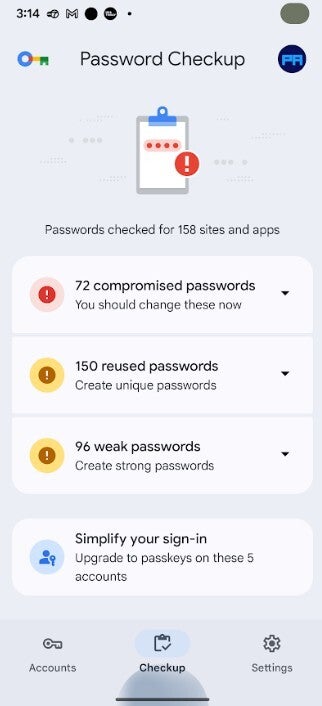
Google’s Password Checkup feature can scan your saved passwords to see if any have been compromised. | Image credit-PhoneArena
Teresa Murray, who directs the Consumer Watchdog office of the U.S. Public Interest Research Group, said that too many people are becoming lazy when it comes to protecting themselves against this kind of attack. She stated, "This is perhaps a kick in the pants for some people who’ve been a little bit lax in doing some of the things we talk about." Murray does have some suggestions and recommendations about things you can do to protect your personal data from such a data breach.
Recommended For You
Do you use multiple-factor authentication?
33 Votes
Yes. I don't leave home without it.
72.73%
No. If someone steals the code, I'm screwed.
27.27%
Her first suggestion is to change your passwords now and change them regularly. Don't reuse the same passwords or create passwords that are close to ones you have used in the past. Your primary email and financial accounts should be protected by the most unique and difficult to crack passwords. You should also freeze your credit files with Equifax, Experian and TransUnion until you need to make a major purchase. This won't affect your credit score but will make it harder for criminals to open new accounts in your name.
Another idea is to add an extra layer of protection by enabling multi-factor authentication. With this feature enabled, even if your login credentials are stolen by a cybercriminal, he would need access to your phone to receive a code that needs to be typed in to open an app. You can also use Google’s Password Checkup which scans your saved passwords to see if they have been compromised in data breaches, reused on multiple sites, or are just too weak to protect you.
To use Password Checkup on Android, go to Settings > Google services-All services > Autofill > Autofill with Google > Google Password Manager > Checkup. In Chrome, open the app and tap your profile icon in the upper right. Go to Passwords (key icon) > Checkup.
Tello Halloween Promo: $10GB for $10/mo
Don’t miss this scary-good deal: 10 GB for $10/mo. Save $5/mo for your first 3 months. Offer valid now through November 9, 2026.
Alan, an ardent smartphone enthusiast and a veteran writer at PhoneArena since 2009, has witnessed and chronicled the transformative years of mobile technology. Owning iconic phones from the original iPhone to the iPhone 15 Pro Max, he has seen smartphones evolve into a global phenomenon. Beyond smartphones, Alan has covered the emergence of tablets, smartwatches, and smart speakers.
A discussion is a place, where people can voice their opinion, no matter if it
is positive, neutral or negative. However, when posting, one must stay true to the topic, and not just share some
random thoughts, which are not directly related to the matter.
Things that are NOT allowed:
Off-topic talk - you must stick to the subject of discussion
Offensive, hate speech - if you want to say something, say it politely
Spam/Advertisements - these posts are deleted
Multiple accounts - one person can have only one account
Impersonations and offensive nicknames - these accounts get banned
To help keep our community safe and free from spam, we apply temporary limits to newly created accounts:
New accounts created within the last 24 hours may experience restrictions on how frequently they can
post or comment.
These limits are in place as a precaution and will automatically lift.
Moderation is done by humans. We try to be as objective as possible and moderate with zero bias. If you think a
post should be moderated - please, report it.
Have a question about the rules or why you have been moderated/limited/banned? Please,
contact us.














Things that are NOT allowed:
To help keep our community safe and free from spam, we apply temporary limits to newly created accounts: