In iOS 27, Apple can create super secure passwords that you don't need to know or remember
The Password app in iOS 27 will create passwords that it adds automatically to your apps and websites.
App in iOS 27 creates super secure passwords that even you don't know | Image by PhoneArena
Apple's iOS 27 is going to bring some new features to iPhone users that they will love. Of course, on the top of that list is Siri AI. My take on it so far is that at this stage of the iOS 27 Beta, Siri is not yet the AI assistant that Gemini is on my Pixel 6 Pro. But iPhone users, used to receiving internet links, or those 'Do you want me to use ChatGPT?' prompts, will love Siri AI.
Siri AI should improve by the time stable iOS 27 is released
Yeah, Siri AI is only going to get better by the time Apple releases the stable version of iOS 27. And if you're not entirely satisfied with Siri as an AI assistant yet, you can limit your use to setting up alarms and timers. When you need a regular AI LLM, turn to the iOS variant of the Gemini app or the ChatGPT app.
When I choose a oassword for an app or website, I...
15 Votes
...try to make a super hard password I can't remember
26.67%
...take the easy way out by reusing a current password
33.33%
...make an easy passcode using a birthdate or 1234
0%
...make a new, different password for each site
40%
If you have a query you'd like answered via AI on your iPhone, and for now you'd prefer to skip Siri AI, I'd recommend using the following apps, all of which I've used on my iPhone 15 Pro Max:
Besides Siri AI, iOS 27 will help prevent you from making a huge mistake when it comes to passwords. When you do create a password for an app or website, you're always caught between reusing one that you know because you use it often, or creating a brand-new one, that you're sure to forget. The former is not a secure method of password creation, while the latter is.
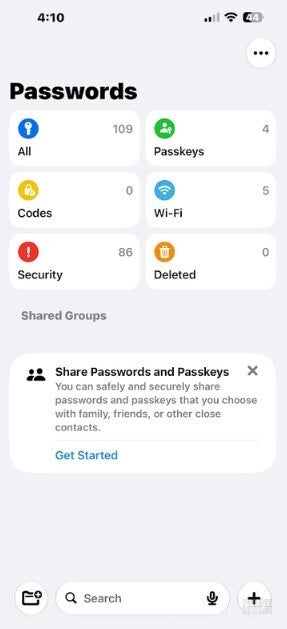
Agentic AI can automatically strengthen your passwords in iOS 27. | Image by PhoneArena
Once a reused password gets compromised, the remaining apps and websites that are protected by that same password can fall like dominos. To protect you, iOS 27 can alert you when you have a compromised password, and use an agentic Apple Intelligence feature within the Passwords app to get you fixed up.
The Passwords app is protected by Face ID, Touch ID or your device's passcode
First, you must be running iOS 27 Beta 3. Open the Passwords app and Press on passwords near the bottom of the screen. Using Face ID, Touch ID, or your device's passcode, you'll be sent to the Password screen. Tap the Security box in the bottom left, and you'll see how many passwords you use have been compromised, and the apps and the websites that use a compromised password.
Agentic AI will give you strong passwords
The Passwords app can sign in to apps and websites, and save new strong passwords to keep prying eyes from accessing these sites. This happens without you having to do anything except make sure that Autofill Passwords and Passkeys is enabled on your phone. To do that, go to Settings > General > Autofill & Passwords.
Once you set this up, every time you go to open one of these sites, the Passwords app will enter the new credentials. This is a great example of how agentic AI is going to change how things get done.
When you think about it, this is exciting news. Agentic AI changes artificial intelligence from a tool that gives you directions telling you what to do to a teammate that works on your behalf to reach a certain goal. This happens without you lifting a finger.
What the future looks like
The whole idea behind agentic AI is to get things done without human intervention. This might scare some people, but personally, I like it. Imagine a future where you can give an AI platform the task of setting up a vacation for the family in Kissimmee, Florida.
After giving AI the number of people going on the vacation, and their ages, you receive an itinerary that takes into account every moment of the trip. So far, that's nothing special. But if you're happy with the travel plan, you tell AI to "Book it," and that's when everything goes into motion in the background.
Everything is handled without your involvement. Plane tickets, both ways, are purchased, and hotel reservations are made. Park tickets are bought, and everything has been taken care of. This is the exciting future we have to look forward to, and we can get a taste of it today.


Popular stories


Latest News






Things that are NOT allowed:
To help keep our community safe and free from spam, we apply temporary limits to newly created accounts: