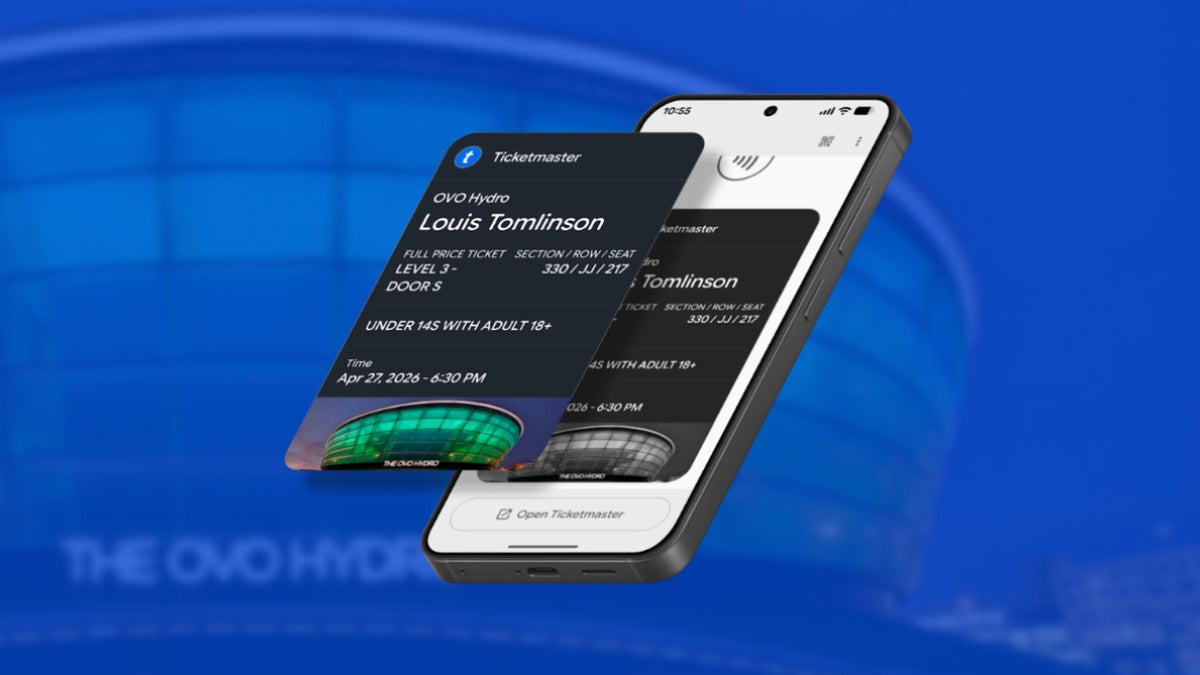
Ticketmaster is rolling out customizable Google Wallet passes for Android, letting artists and venues brand event tickets with custom imagery and up to 12 action links covering parking info, entry guidelines, seat upgrades, and more. If your Pixel 10 Pro Fold, Galaxy S26 Ultra, or any other Android phone is where you keep your Ticketmaster tickets, those plain-looking passes are about to get a lot more useful.
What Ticketmaster's Google Wallet upgrade actually includes
Ticketmaster's official business blog announced the rollout this week, billing itself as the first ticketing partner to offer enhanced, customizable passes through Google. The update is client-side, meaning venues, artists, and sports teams using Ticketmaster configure these passes. Fans get the result automatically.
With options like custom imagery and action links, tickets become more than proof of entry. They become a reliable source of event information and a direct connection to fans throughout the event lifecycle.
Ticketmaster, official business blog, June 25, 2026
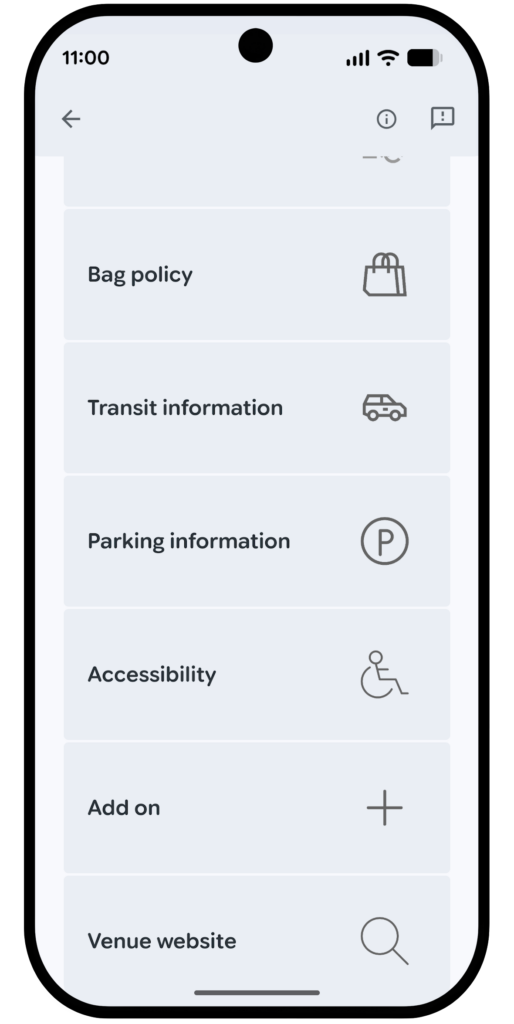
The customization options include a hero image (tour artwork, season branding, festival lineup visuals) and up to 12 action links. Those links can point to parking maps, entry guidelines, merchandise pages, seat upgrade prompts, in-seat food and drink ordering, and a direct link to the venue's own mobile app.
Recommended For You
What would you want most on a Ticketmaster Google Wallet pass?
12 Votes
Parking and entry info comes first for me
41.67%
Seat upgrades and merch links, please
8.33%
Artist or team branding makes it special
8.33%
Just the QR code, I keep it simple
41.67%
Android event tickets have been overdue for exactly this
The new action links on a Ticketmaster Google Wallet pass include bag policy, transit info, parking, accessibility and more. | Image by Ticketmaster
Apple Wallet has had support for branded passes with contextual action links for years, so iPhone users attending concerts have generally had the richer ticket experience. For most Android users, Google Wallet passes were functional and not much more. It's one of those small quality-of-life differences that tends to surface on event day, when you're trying to find the entry gate with spotty signal and thousands of people filing in around you.
This brings the Google Wallet ticket experience broadly in line with what Apple Wallet has offered. It also fits the broader improvements we've been covering as Google continues to build Wallet into something worth keeping open.
Nothing to configure on your end, but there is a catch
For users, this is fully automatic. A Ticketmaster ticket in Google Wallet simply shows up looking different once an organizer has configured the new pass format. No app update to run, nothing to opt in to.
The catch is that adoption depends on each Ticketmaster client choosing to build these out through TM1, Ticketmaster's back-end platform. Ticketmaster is the first partner to make enhanced passes available through Google, but whether the events you actually attend use them depends entirely on how many organizers bother to set it up.
Good feature, but the rollout is very on-brand
This is a useful upgrade for anyone who keeps Ticketmaster tickets in Google Wallet. Having parking info, your entry gate, or seat upgrade options directly on the pass you're already opening is a real improvement over hunting through your email in a dead signal zone. I'm glad it's here.
That said, "first ticketing partner" is something of a mixed compliment. It also means other platforms haven't done this yet, and how quickly it shows up at events you actually attend will matter a lot more than the announcement itself.
With Ticketmaster, "available" and "widely available" tend to mean very different things in practice. Still, I'm rooting for this one to become the norm quickly.
Johanna Romero is a Senior News Writer at PhoneArena, covering mobile technology news across Android, iOS, wearables, and the Google ecosystem she knows best. Drawing on 15 years in IT and tech support from 2007 to 2022, she brings a user-friendly eye for the practical features and lesser-known tricks readers care about. Google named her an official #TeamPixel member in 2022, and she also reviews the latest devices on her YouTube channel, JoJo the Techie.
A discussion is a place, where people can voice their opinion, no matter if it
is positive, neutral or negative. However, when posting, one must stay true to the topic, and not just share some
random thoughts, which are not directly related to the matter.
Things that are NOT allowed:
Off-topic talk - you must stick to the subject of discussion
Offensive, hate speech - if you want to say something, say it politely
Spam/Advertisements - these posts are deleted
Multiple accounts - one person can have only one account
Impersonations and offensive nicknames - these accounts get banned
To help keep our community safe and free from spam, we apply temporary limits to newly created accounts:
New accounts created within the last 24 hours may experience restrictions on how frequently they can
post or comment.
These limits are in place as a precaution and will automatically lift.
Moderation is done by humans. We try to be as objective as possible and moderate with zero bias. If you think a
post should be moderated - please, report it.
Have a question about the rules or why you have been moderated/limited/banned? Please,
contact us.








Things that are NOT allowed:
To help keep our community safe and free from spam, we apply temporary limits to newly created accounts: