Digging through TV settings menus to fix a dim picture or muddy dialogue is one of those chores nobody signed up for. Google is now handing that job over to Gemini on Google TV, though rivals like Amazon Fire TV have nothing to sweat yet, because the rollout starts and ends with five TCL models.
Gemini will now fix your picture and sound for you
Google announced that starting today, you can talk to Gemini on select TCL Google TVs to adjust picture and sound settings, troubleshoot audio or video issues and jump straight into specific settings menus. Just press and hold the mic button on the remote or say "Hey Google" and ask away.
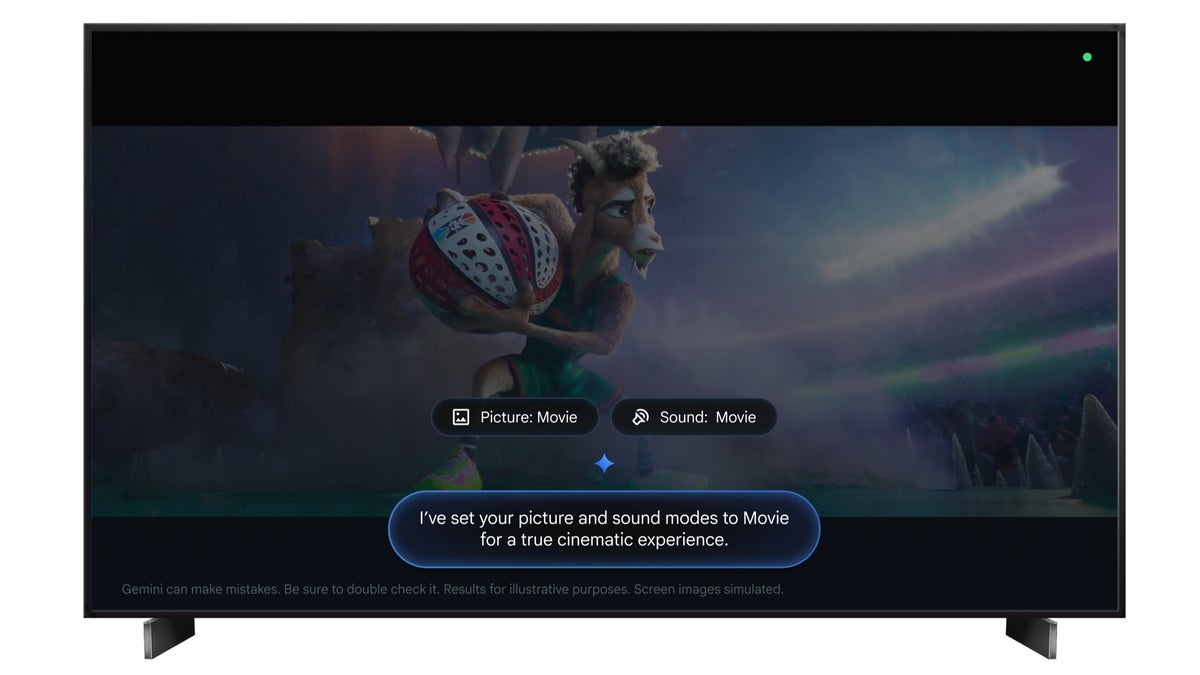
The examples Google shared range from direct commands like "Set picture mode to Sport" or "Increase the bass" to plain descriptions of a problem, such as "The screen is too dark" or "I can't hear the dialogue clearly." You can even hand it a vibe, asking Gemini to make movie night feel more cinematic, and it will pick the right picture and sound modes for you.
You no longer have to dig through settings menus to optimize your viewing experience—just press and hold the microphone button on your remote (or say 'Hey Google') to chat with Gemini and get the help you need.
— Yash K., Google TV Community Manager
Recommended For You
Only five TCL models make the cut
The feature arrives via a TCL system update rolling out over the next few weeks, and it covers the QM9K, X11L, QM9L, QM8L and RM9L in the US. Your set will also need to run Android TV OS 14 or newer.
Here is how to check if the update has reached your TV:
Open Settings on your TCL Google TV
Go to System, then About
Select System update
How do you handle your TV's picture and sound settings?
133 Votes
I calibrate everything myself, no assistant needed
90.98%
I set it once on day one and never touch it again
6.02%
Defaults all the way, I wouldn't know what to change
0%
Telling Gemini to fix it sounds perfect to me
3.01%
A great update that most Google TV users can't touch
The catch is reach. Google says there are over 300 million active Google TV and Android TV devices, and this rollout touches exactly five TV models in a single country.
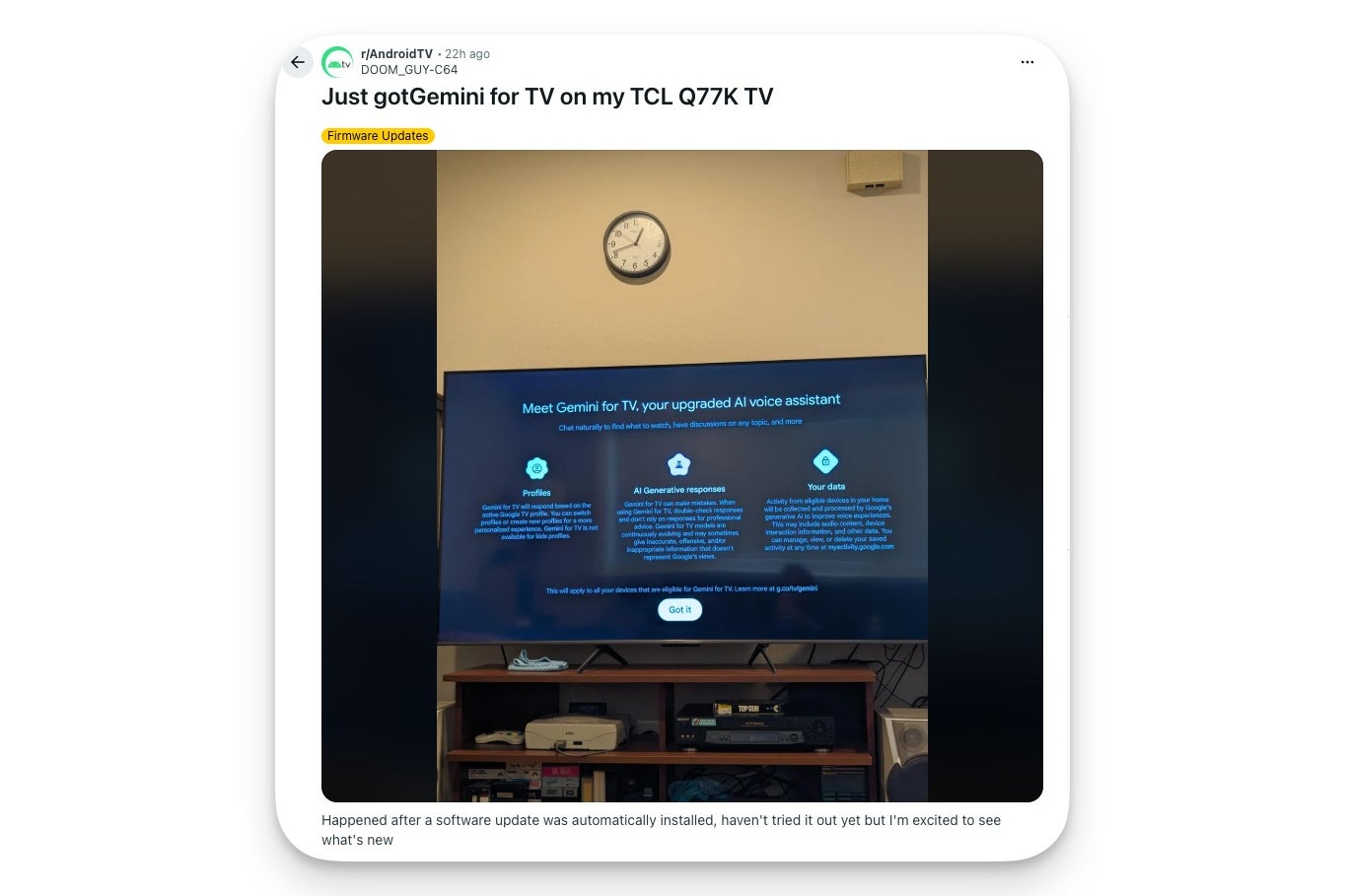
The mood among early adopters seems upbeat, too. One TCL owner shared their excitement on Reddit after Gemini for TV landed on their Q77K set, which bodes well for how these voice-driven settings will be received once they reach more living rooms.
A TCL TV owner shares their excitement after Gemini for TV arrived on their set. | Image by DOOM_GUY-C64 via Reddit
However, if you watch through a Google TV Streamer or any other streaming box, you are left out entirely, since the settings Gemini is adjusting live inside the TV itself and not the dongle. That one stings for the rest of us, but it makes sense to TCL owners as they are getting a genuinely useful upgrade.
I guess all we can do is celebrate the win for those eligible and hope the exclusivity window stays short.
Soccer fans get something too
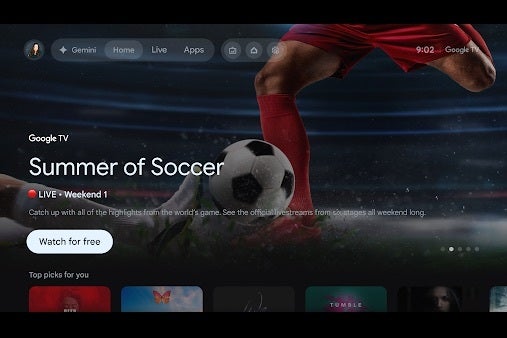
In a separate announcement, Google said the Sports topic page on Google TV becomes the home of soccer's biggest global tournament starting tomorrow (June 12). You will find live matches, upcoming schedules, highlights and post-game breakdowns from apps like FOX One, Tubi and YouTube TV, with the hub running through July 19.
The Sports topic page puts live matches, schedules and highlights in one place from June 11 to July 19. | Image by Google
Unlike the Gemini settings trick, this one is not locked to specific hardware, so streaming box owners are covered here.
Should Fire TV and Apple TV owners care?
If your living room runs on an Amazon Fire TV stick or an Apple TV box, nothing here affects you today. But features like this rarely stay exclusive for long, so consider it a preview of where TV voice assistants are headed, and a reason to keep an eye on what Amazon and Apple do next.
Six-month unlimited plan is now 57% off
$90
$210
$120 off (57%)
Mint Mobile is now allowing you to get whichever plan you like for either three, six, or 12 months for just $15/mo. If you go for the six-month unlimited service, for instance, you'll now have to pay just $90 upfront instead of $210.
Johanna Romero is a Senior News Writer at PhoneArena, covering mobile technology news across Android, iOS, wearables, and the Google ecosystem she knows best. Drawing on 15 years in IT and tech support from 2007 to 2022, she brings a user-friendly eye for the practical features and lesser-known tricks readers care about. Google named her an official #TeamPixel member in 2022, and she also reviews the latest devices on her YouTube channel, JoJo the Techie.
A discussion is a place, where people can voice their opinion, no matter if it
is positive, neutral or negative. However, when posting, one must stay true to the topic, and not just share some
random thoughts, which are not directly related to the matter.
Things that are NOT allowed:
Off-topic talk - you must stick to the subject of discussion
Offensive, hate speech - if you want to say something, say it politely
Spam/Advertisements - these posts are deleted
Multiple accounts - one person can have only one account
Impersonations and offensive nicknames - these accounts get banned
To help keep our community safe and free from spam, we apply temporary limits to newly created accounts:
New accounts created within the last 24 hours may experience restrictions on how frequently they can
post or comment.
These limits are in place as a precaution and will automatically lift.
Moderation is done by humans. We try to be as objective as possible and moderate with zero bias. If you think a
post should be moderated - please, report it.
Have a question about the rules or why you have been moderated/limited/banned? Please,
contact us.







Things that are NOT allowed:
To help keep our community safe and free from spam, we apply temporary limits to newly created accounts: