No matter if you are for or against AI-edited images, you can't escape the fact that this is where phone photography is headed. But while Google’s Gemini image tools are already strong, there’s still that annoying step of having to prompt the AI to make the adjustments you want.
Google knows this, and it's doing something about it
The Nano Banana Pro model delivered major improvements to image quality and editing functions when compared to the Gemini 3 Pro Image. The model demonstrates exceptional results, even when it is met with intricate image editing tasks. But if you need to annotate an image, highlight an area, or leave markup notes, you still have to open another app.
That's exactly the workflow Google is trying to fix according to the latest leaks.
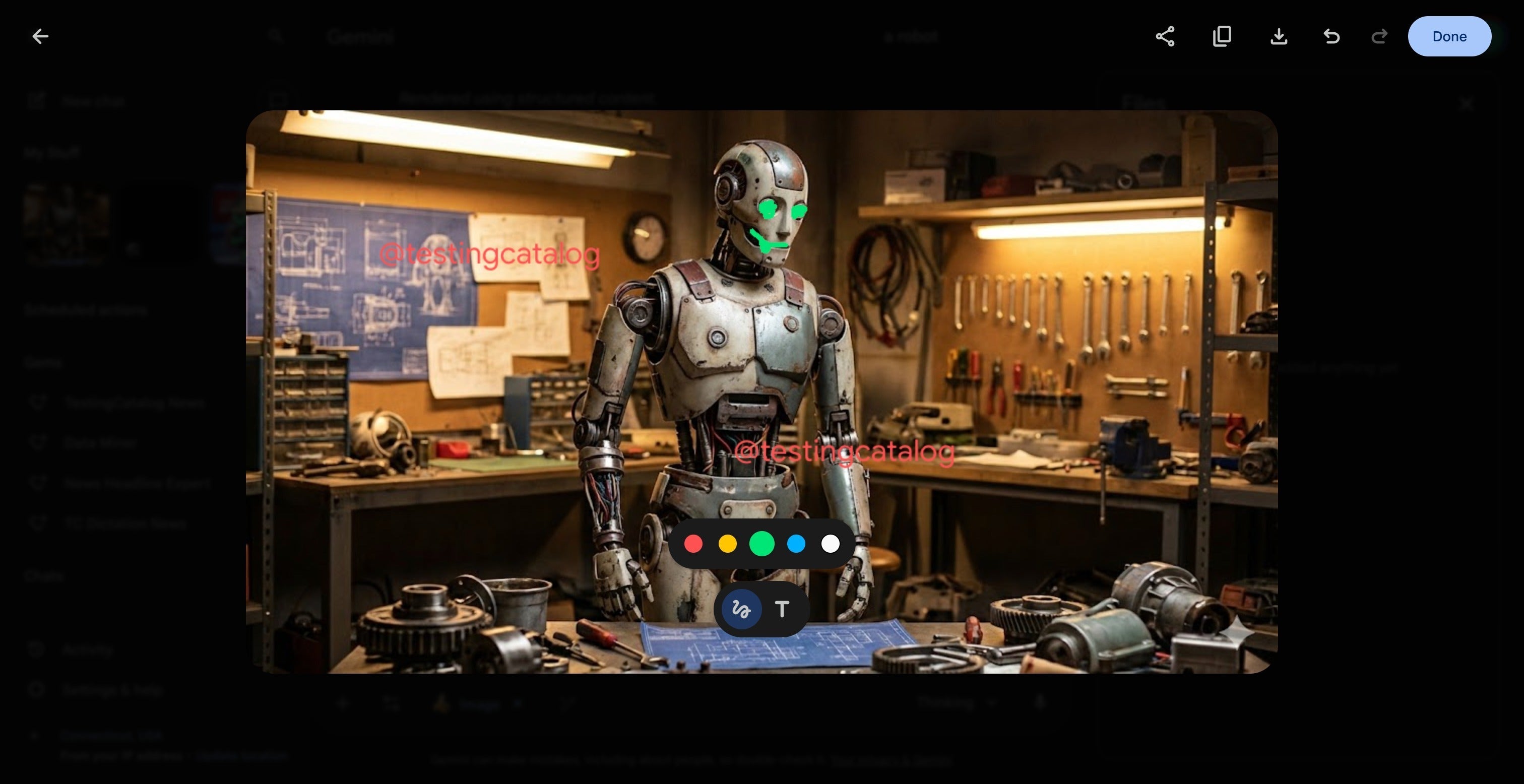
Leaker TestingCatalog has shared that Google is now building image annotation tools directly into Gemini for the web. Users would be able to draw on images, circle elements and add text layers inside the same interface used to generate and edit images. That eliminates the extra step of having to export an image and work on it elsewhere.
This follows earlier findings from the Gemini mobile app, where markup-related UI elements were already buried in the code. Now we’re seeing the same capability move to the browser experience, which is where most users perform heavier edits.
Do you use Gemini to edit your photos?
5 Votes
Yes, I use Gemini or AI tools often
60%
Sometimes, but I still prefer manual edits
20%
Rarely, only when I need something quick
0%
No, I don’t trust AI with my photos
20%
A more intuitive way to tell Gemini what to change
The mobile version shows pop-up windows, which indicate that annotations could be tied to localized, prompt-based editing. In other words, instead of describing an edit in text, users could mark the area visually and then tell Gemini what to do next.
Recommended For You
This would make complex prompts far easier to execute. Users can use visual markers to show which areas of their image require editing.
This solves one of the main problems with current AI image tools, which leave a lot of the process to guesswork, leading to too many incorrect assumptions. The ability to visual mark a specific area would give Gemini a clearer, more controlled way to interpret instructions, especially for edits involving small details or multiple overlapping elements.
A small feature, but one that feels big
The ability to annotate directly on an image might sound minor, but for AI image tools, it’s huge. Most users rely on external markup apps when they want to highlight a region or point out exactly what needs to be changed. Integrating that step into Gemini would streamline the entire editing workflow.
It also makes the tool much more beginner-friendly. Instead of crafting perfect prompts, users could simply mark what they want fixed.
Google hasn’t announced this feature yet, but with annotation UI appearing on both mobile and web, the testing phase looks well underway. When it arrives, Gemini’s editing process could become dramatically more intuitive and much more powerful.
Six-month unlimited plan is now 57% off
$90
$210
$120 off (57%)
Mint Mobile is now allowing you to get whichever plan you like for either three, six, or 12 months for just $15/mo. If you go for the six-month unlimited service, for instance, you'll now have to pay just $90 upfront instead of $210.
Aleksandar is a tech enthusiast with a broad range of interests, from smartphones to space exploration. His curiosity extends to hands-on DIY experiments with his gadgets, and he enjoys switching between different brands to experience the latest innovations. Prior to joining PhoneArena, Aleksandar worked on the Google Art Project, digitizing valuable artworks and gaining diverse perspectives on technology. When he's not immersed in tech, Aleksandar is an outdoorsman who enjoys mountain hikes, wildlife photography, and nature conservation. His interests also extend to martial arts, running, and snowboarding, reflecting his dynamic approach to life and technology.
COMMENTS (0)
COMMENTS (0)
All comments need to comply with our
Community Guidelines
PhoneArena Community Rules
A discussion is a place, where people can voice their opinion, no matter if it
is positive, neutral or negative. However, when posting, one must stay true to the topic, and not just share some
random thoughts, which are not directly related to the matter.
Things that are NOT allowed:
Off-topic talk - you must stick to the subject of discussion
Offensive, hate speech - if you want to say something, say it politely
Spam/Advertisements - these posts are deleted
Multiple accounts - one person can have only one account
Impersonations and offensive nicknames - these accounts get banned
To help keep our community safe and free from spam, we apply temporary limits to newly created accounts:
New accounts created within the last 24 hours may experience restrictions on how frequently they can
post or comment.
These limits are in place as a precaution and will automatically lift.
Moderation is done by humans. We try to be as objective as possible and moderate with zero bias. If you think a
post should be moderated - please, report it.
Have a question about the rules or why you have been moderated/limited/banned? Please,
contact us.













Things that are NOT allowed:
To help keep our community safe and free from spam, we apply temporary limits to newly created accounts: