Google Photos looks like it's finally adding a way to switch off its shimmer effect, the animated outline that flashes over your photos to nudge you into making a sticker. A new report spotted the toggle in a recent app version, so anyone on a Pixel 10 Pro or iPhone tired of the flashing should get an out soon.
Google Photos is building an off switch for the shimmer
The shimmer landed on iOS first and reached Android earlier this year, and people have wanted it gone almost as long. It pops up over your photos a few seconds after you open them, whether or not you ever make stickers.
Now a new report has dug up a toggle in Google Photos version 7.82 that finally turns it off. It comes from a teardown of unreleased code, so it isn't live yet and Google could still change course, but it looks to be on the way.
What's your move when an app like Google Photos turns on a feature you didn't ask for?
12 Votes
I hunt down the off switch the second I notice it
50%
I learn to ignore it and move on with my day
16.67%
I give it a fair go before deciding to ditch it
25%
It pushes me toward a different app entirely
8.33%
Why an off switch matters more than it sounds
On paper, an off switch for a sparkly animation sounds minor. The complaints behind it aren't, though. On Google's own supportforums, people have said the constant flashing gives them headaches or makes them feel nauseous, which turns a small flourish into a real accessibility problem for some.
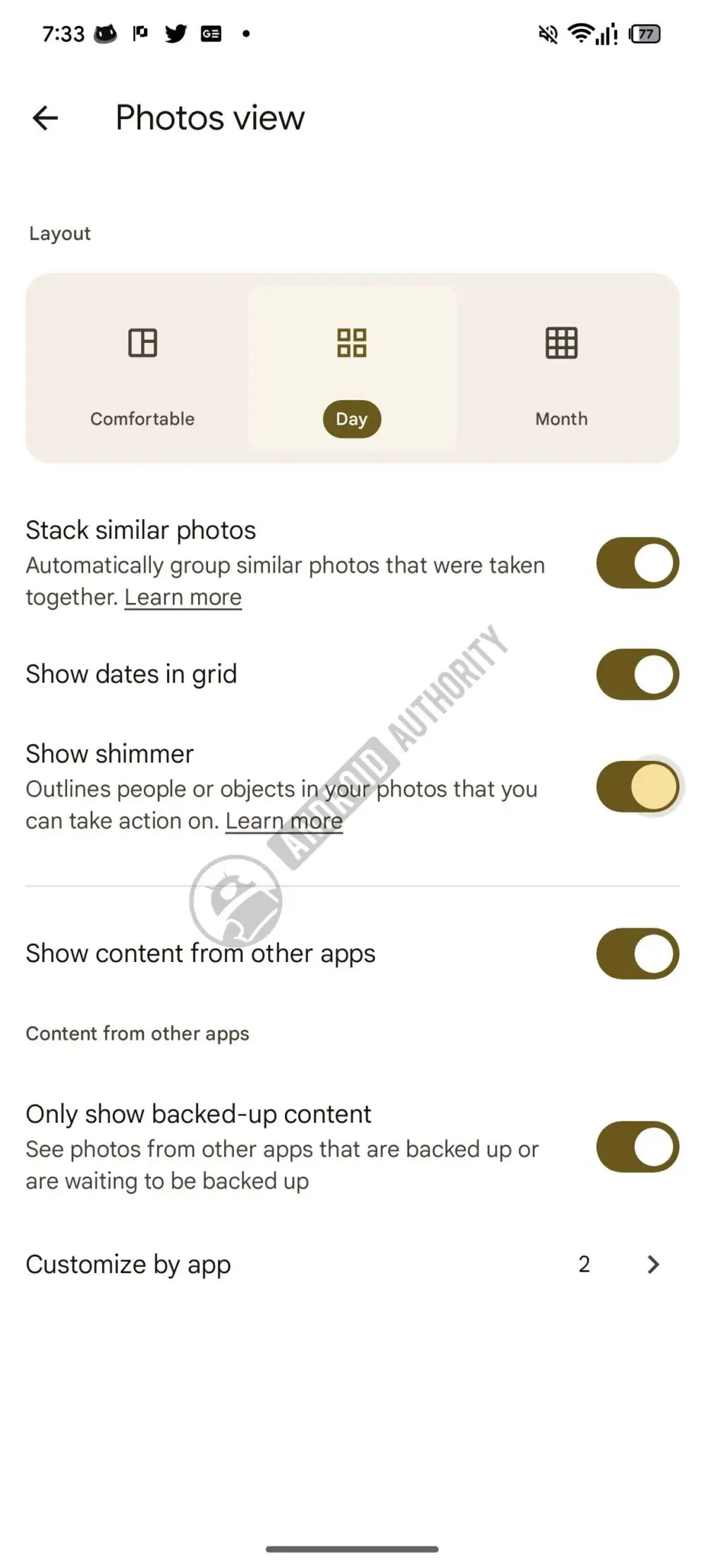
The new 'Show shimmer' toggle spotted in the Google Photos settings. | Image by Android Authority
The teardown screenshot shows the new 'Show shimmer' toggle in the Photos view menu, set to outline people or objects you can act on, and it appears to be on by default. Google has done this before, of course. When the app added Photo Stacks, we covered how that one also shipped switched on with its toggle buried in settings.
Recommended For You
If you're not on Google Photos, this is obviously not something that will affect you. Stick with Samsung Gallery on a Galaxy or Apple's Photos app on an iPhone and there's no shimmer at all, so this only matters if you use Google's app.
Who actually gets relief here
The people who'll feel this most never make stickers and just want to look at their photos without something blinking at them. If you're sensitive to motion or fine animations, even better, since the prompt will stop firing every few seconds.
Once it rolls out, the switch lives under Settings, then Preferences, then Photos view. Turning it off won't kill the shimmer completely, though. You'll still see it when you long-press a photo to make a sticker.
I'm glad it's coming, but it's overdue
Adding the toggle is the right call, and credit where it's due for listening. Still, it's hard to feel too thankful for an off switch to a problem Google made, especially when some people said it was making them feel ill.
The pattern is the part that gets me, though. Google keeps turning these flashy extras on by default and waiting for the pushback before handing over a way out when starting them off and letting fans opt in would spare everyone the trouble. I'd take a calmer gallery and fewer animated nudges any day, and I'm hoping this is a sign of more to come.
Want more? Follow me, @jojothetechie, on X and Threads, where I drop hot takes and behind-the-scenes coverage.
Get iPhone 18 Pro with Visible, get $480 off!
$719
/mo
$1199
$480 off (40%)
On the Visible+ Pro plan, you get access to 5G Ultra Wideband data on Verizon's fastest network. Along with unlimited roaming across Mexico and Canada, 2 days of Global Pass per month, 3x hotspot speeds, 4K streaming, and Smartwatch service.
Johanna Romero is a Senior News Writer at PhoneArena, covering mobile technology news across Android, iOS, wearables, and the Google ecosystem she knows best. Drawing on 15 years in IT and tech support from 2007 to 2022, she brings a user-friendly eye for the practical features and lesser-known tricks readers care about. Google named her an official #TeamPixel member in 2022, and she also reviews the latest devices on her YouTube channel, JoJo the Techie.
A discussion is a place, where people can voice their opinion, no matter if it
is positive, neutral or negative. However, when posting, one must stay true to the topic, and not just share some
random thoughts, which are not directly related to the matter.
Things that are NOT allowed:
Off-topic talk - you must stick to the subject of discussion
Offensive, hate speech - if you want to say something, say it politely
Spam/Advertisements - these posts are deleted
Multiple accounts - one person can have only one account
Impersonations and offensive nicknames - these accounts get banned
To help keep our community safe and free from spam, we apply temporary limits to newly created accounts:
New accounts created within the last 24 hours may experience restrictions on how frequently they can
post or comment.
These limits are in place as a precaution and will automatically lift.
Moderation is done by humans. We try to be as objective as possible and moderate with zero bias. If you think a
post should be moderated - please, report it.
Have a question about the rules or why you have been moderated/limited/banned? Please,
contact us.









Things that are NOT allowed:
To help keep our community safe and free from spam, we apply temporary limits to newly created accounts: