The way you use Google Maps will soon be changed forever
Within weeks, Google should release an update to Google Maps that adds Gemini-based capabilities.

Google has released a support page discussing all of the ways that you can use Gemini with Google Maps to make a fantastic app even better. You will be able to tell whether your Google Maps app has received the new Gemini-based features by checking out the microphone icon in the search bar at the top of the display. If it looks like a microphone, sorry, you do not have the new Gemini capabilities yet. On the other hand, if you see the Gemini sparkle icon in blue inside a circle, congrats! You have the update.
Google's support page shows you how to use Gemini on Google Maps
Gemini replaces Google Assistant on Google Maps and it works on all forms of navigation that can be handled by the Google Maps app including driving, public transportation, cycling, and walking. When you need to activate Gemini, you can use the "Hey Google" hotword. Using Gemini you can have Google Maps do the following:
Get help with Google Maps
- Basic navigation controls:
- "Navigate home"
- "Stop navigating"
- "Add stop"
- "Mute guidance"
- "Avoid tolls"
- "Show alternative routes"
- Basic route answers: Get information about your route. For example:
- "What's my next turn?"
- "When will I arrive?"
- “What’s the weather like at my destination?”
- "What's my next stop?"
- Report issues: Submit reports about your route. For example:
- "There’s traffic on the road."
- "There’s construction up ahead."
- "There's a car breakdown that’s causing congestion."
Search and get information about places.
- Search:
- Perform searches along your route.
- Find places near you or your destination.
- Refine search results and add stops.
- Place answers:
- Get information about your destination or search results.
- Ask about specific places and landmarks.
Example: "When does {Place Name} close?"
Call or text someone
- "Call Mom."
- "Send a text to Larry” or "Send an SMS to Sergey.”
Play Music
- "Play some jazz" or “Stop playing music.”
Use other apps with Gemini
- "Summarize my latest emails."
- "When’s my next meeting?"
- "Play music with Spotify."
Google has created a video showing how helpful Gemini can be while you're using Google Maps. Questions that you naturally might ask if you were on the phone with a restaurant, such as "What's parking like?" can be answered by Gemini.
Landmark-based navigation is coming to Google Maps. Yay!
Earlier this month we told you that landmark-based navigation is coming to Google Maps. If you're a long-time PhoneAreader reader, you might recall my complaint about Google Maps using distances to tell you when to make a turn. Apple Maps would use stop signs and traffic lights. So, a direction on Google Maps that says, "turn right in 500 feet" might say, "turn right at the second stop sign" on Apple Maps. To me, the latter instruction is much better.
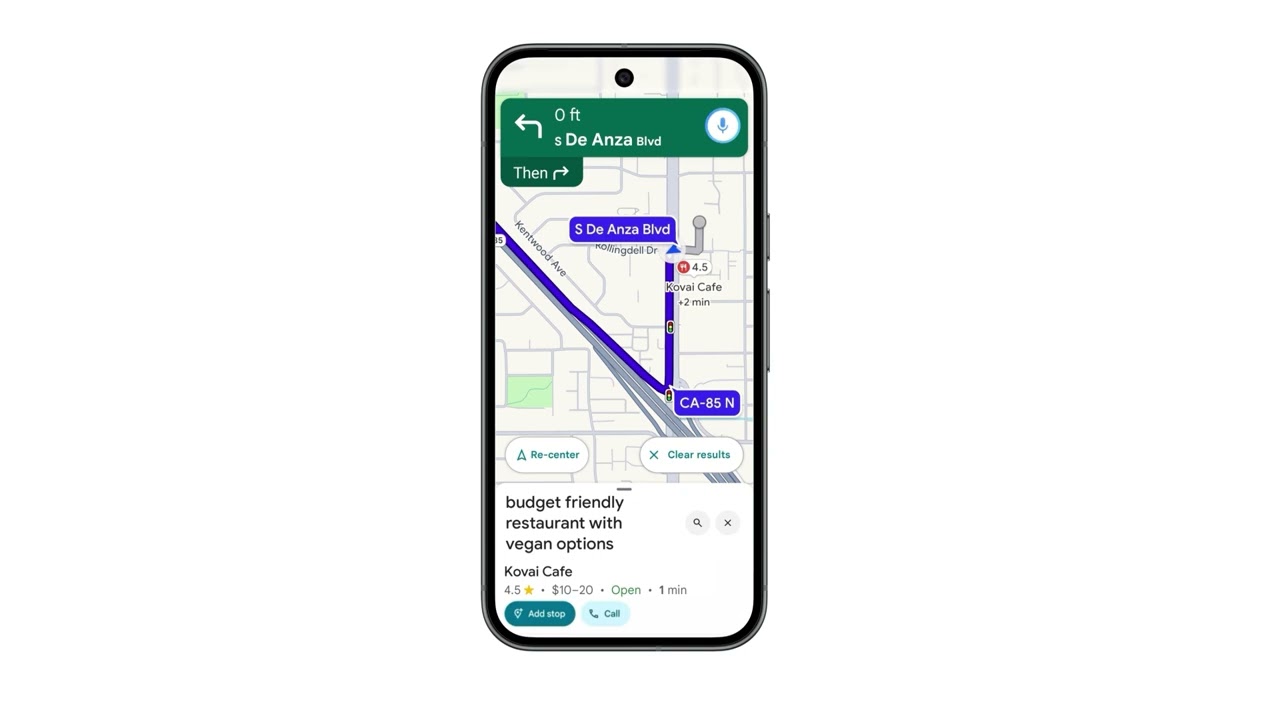

Google Maps has copied Apple Maps by using stop signs and traffic lights as landmarks. But soon, you might hear Google Maps tell you "Turn right after the Thai Siam Restaurant" instead of "Turn right in 500 feet." Generated by AI, this landmark-based navigation will also appear on the app as you follow the route on the map to your destination. Google will filter out buildings with low visibility to make sure that the landmark being used can be easily spotted by you.
New Gemini features for Google Maps have yet to arrive on my Pixel 6 Pro or iPhone 15 Pro Max
At the start of November, Google said that Gemini for Google Maps navigation would be made available in the coming weeks for the Android and iOS versions of Google Maps. So far, it has yet to appear on my Pixel 6 Pro running Android 16 QPR2 Beta 3.2, and my iPhone 15 Pro Max powered by iOS 26.2 Beta 3.
Are you looking forward to landmark-based navigation?
31 Votes
Absolutely! It will make driving using Maps much easier.
67.74%
Nah. I can figure out where 500 feet is.
32.26%
While Google Maps is the default navigation app on Android phones, that s not the case with iOS. If you need to install Google Maps on your iPhone, tap on this link to download it from the App Store. Yes, Google Maps and Apple Maps can co-exist on the same iPhone.


Popular stories




Latest News



Things that are NOT allowed:
To help keep our community safe and free from spam, we apply temporary limits to newly created accounts: