Google's redesigned finance app for Android is off beta, ready to make you some money
With Gemini AI integration, the Google Finance app keeps track of your stocks.
Google takes beta designation off redesigned Finance app | Image by PhoneArena
For those of you who like to keep track of your portfolio throughout the day, Google has removed the beta label from its redesigned Google Finance app for Android. You can install the app on your Android phone by tapping on this link, which will take you to the Google Play Store listing for the app.
Google's redesigned financial app is now out of beta
The redesigned Google Finance app tracks the overall market, individual stocks, industry news, and AI-driven analysis. Tap the Markets tab at the bottom of the app to see how the Dow Industrials, the S&P 500, the Nasdaq, the Russell, and the Volatility Index (VIX) are doing.
Press on any of the small charts that show how each index has performed for the day, and you'll have the ability to see a chart of that index over various time frames. These range from as short as one day, to as long as five years, with one last chart (MAX) showing the index's overall performance from day one to now.
As you scroll down, you'll see major news stories that explain why the market is moving as it is. If you want to see how your individual stocks are doing, tap the Lists tab, and you'll see the list of stocks that you set up yourself. Let's say that on Wednesday you were out and about, enjoying a cup of Joe at your local Starbucks, and you were wondering how your 10 shares of Apple were faring.
Check the list of stocks you created to see where they are trading
You open the Google Finance app, tap the Lists tab, and see that Apple dropped 6.15% during the day and rose .40% in after-hours trading. You gag on your coffee, and because you want to know more, you tap on the Apple name on your list. That takes you to the Google Finance page for Apple, where you see that the stock declined $18.02 for the day.
Which app will you use to track your stocks?
16 Votes
Google Finance
37.5%
App associated with my online broker
12.5%
CNBC app
0%
Yahoo Finance
12.5%
Another source
37.5%
Quickly, you compute that your odd lot purchase of 10 Apple shares has declined in value by $180.20 in one day, a pretty big single-day move for your small investment. You wonder what happened. Did Apple decide to replace the iPhone with the Newton?
With Gemini on board, you can take a deep dive through the news to see what is really happening
Scrolling down, you see some news headlines for Apple, and you read that Apple hiked prices on some devices due to the higher prices the company is paying for some memory and storage chips. Reading more, you see that the expansion of AI data centers is creating huge demand for high-bandwidth memory (HBM) chips and NAND storage chips, leading to shortages and higher prices for both if any supply can be found.
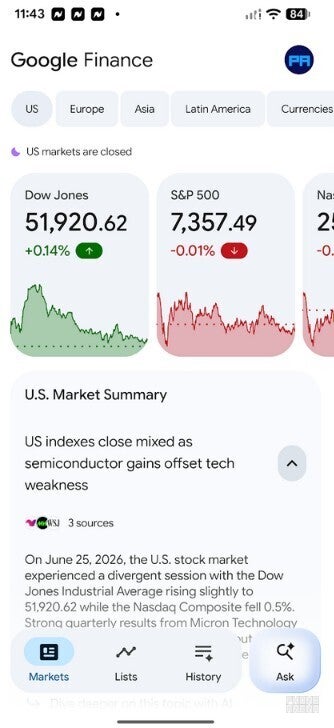
Check out the overall market with the Google Finance app. | Image by PhoneArena
If you really want to take a deep dive so you can understand what happened to Apple on Wednesday, the last tab is called "Ask." You can tap it to ask Gemini questions about the overall market or an individual stock. Because Gemini can read your display on all compatible Android phones, you could show the AI assistant the chart of Apple found in the Google Finance app, and ask for some analysis.
You should find the Google Finance app to be very useful if you're a trader or investor
Using Gemini to get news and analysis on the market might even help you find your next big winner. By the way, if the Google Finance name seems familiar, the app was available from the Play Store until March 2015. Of course, at that time it did not have any of the AI features that the app now has.
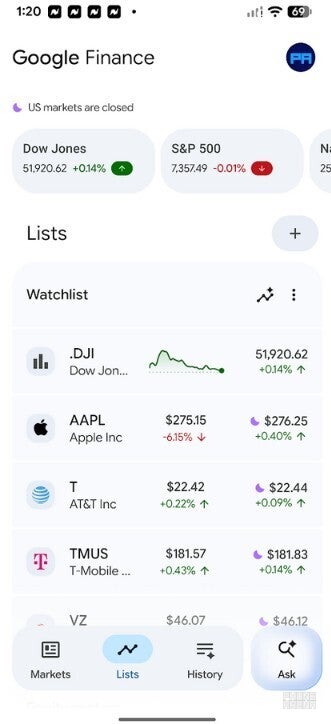
Check the current stock prices of the shares you own. | Image by PhoneArena
Even if you weren't so thrilled with the Google Finance app back then, the app should be more useful to you now with the Gemini integration. While the Google Finance app will debut only on Android, Google did say that it will have a version of the app available for iOS later this year.
The Google Finance app is great for those who want to see not only where their stocks are currently trading, but also want to know why they are trading at that price.


Popular stories


Latest News

Things that are NOT allowed:
To help keep our community safe and free from spam, we apply temporary limits to newly created accounts: