Update to the Google Clock app makes the timer and stopwatch more useful, easier to monitor
A server-side update to the Google Clock app is rolling out right now.

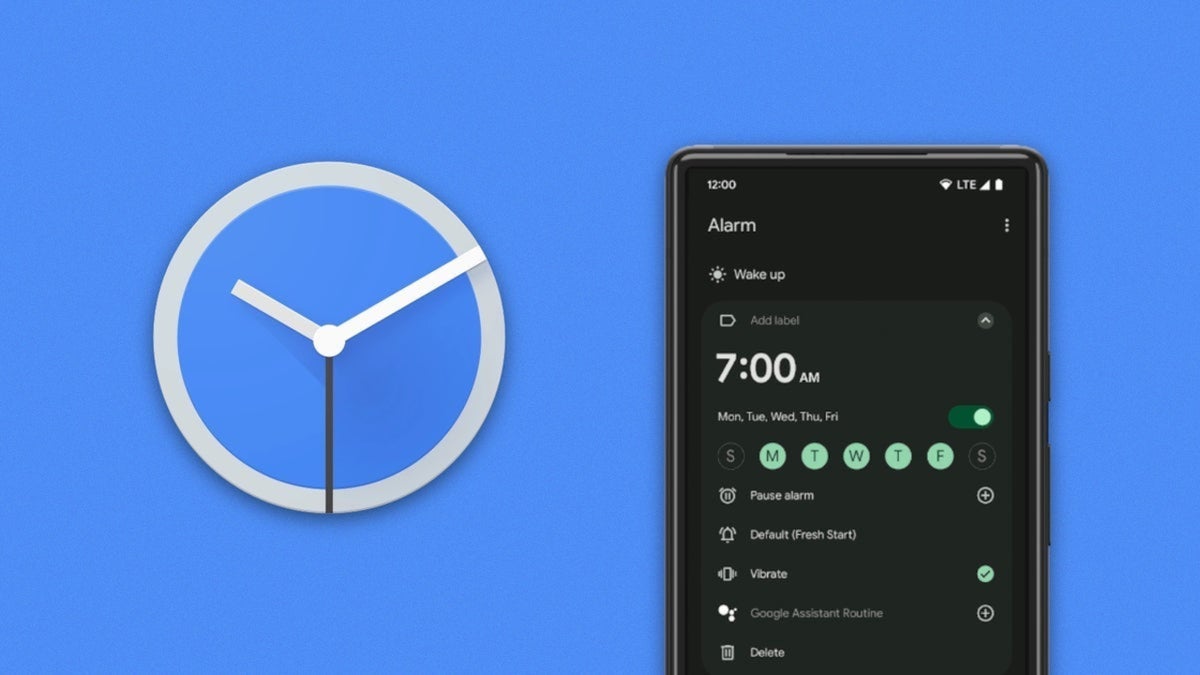
Live Update for Google Clock's timer and stopwatch | Image by PhoneArena
There are several things about Pixel handsets that make me partial to the brand. I love the Pixel's focus on stock Android, the desire to be proactive with help from Gemini rather than reactive, the focus on using AI as a useful tool, the quarterly Pixel drops, and the ability users have to customize the device.
That's not to say that there aren't any issues. Pixels do have a reputation for offering underwhelming battery life and, (especially when first released) having a series of annoying bugs that Google doesn't always fix in a rapid fashion.
Google is known for fine-tuning its apps to make them more useful and easier to use
But one thing that Google does do constantly is fine-tune its apps to make them more useful and easier to use. It's the little things added to apps that you might not appreciate at first, but eventually you do. For example, this past March, Google added colorful new icons for the local weather conditions of the cities you track in the Clock app's World Clock.
Since I write about Huawei often, I have the time in Shenzhen listed on my phone. That is the city in China where the company is headquartered. Next to the listing for Shenzhen in the Google Clock app on my Pixel 6 Pro is the local weather, hot (80 degrees) and cloudy. The listing shows a "cloudy" icon so that I can quickly understand what the weather conditions are in this city.
Sure, this might be considered useless information since I have no plans to visit Huawei right now. Yet, there's something fulfilling about having this information readily available at my fingertips. I can't be the only one who thinks like this, can I?
Google Clock will now support Live Updates for the stopwatch and timer
Version 9.0 of the Google Clock app changes what you see on your phone when you have a stopwatch or timer running and you exit the Google Clock app. You will now see a clock icon highlighted in the status bar. When you tap on this icon, a Live Update view appears with controls that you can use.
With the update, the always-on display will show you the real-time status of your timer
Previously, the icon in the status bar would appear, you'd see a notification for the timer or stopwatch, or the timer/stopwatch would be running in the At a Glance widget. Now, you'll be able to see the new Live Updates for the timer and stopwatch on both the lock screen and always-on display (AOD). And what is cool is that with this Google Clock update, the AOD will now show the timer in real time instead of appearing to be frozen.
Even if you have the correct version of the Google Clock app, Google still needs to flip the switch on a server-side update
As we said, this feature requires you to be running version 9.0 of the Google Clock app. You can check the version you have on your Android phone by going to Settings > Apps > See all apps. Scroll down to Clock and tap on it. This will take you to the Google Clock App info page and if you scroll all the way to the bottom of the display, you will see the version number of the Google Clock app that is on your phone.
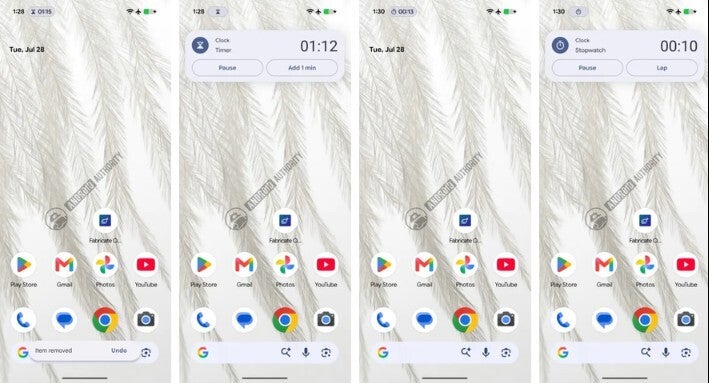
The chip shows up in the status bar and when tapped, a Live Update for the timer and stopwatch appears. | Image by Android Authority
If you see that you are running version 9.0 of the Clock app, don't start celebrating just yet. Google is using a server-side rollout, which means that even if your phone has the correct version of the Clock app installed, it still is up to Google to flip the switch to turn it on.
I currently have version 9.0 of the Google Clock app installed on my Pixel 6 Pro running Android 17 QPR1 Beta 7. Even though that is the version needed for the new Live Updates feature to appear, it is not showing up on my phone just yet. Hopefully, it will arrive in just a few days.

Popular stories

Latest News


Things that are NOT allowed:
To help keep our community safe and free from spam, we apply temporary limits to newly created accounts: