Gmail on the desktop, iPhone, and iPad allows you to create custom labels. Up until now, this was a feature that Android users browsing their Gmail app did not have. However, Android Authority was able to take a recent version of Gmail for Android (v.2025.12.29.855765709.Release) and enable new options that will allow Android users to create, edit, and delete labels from the app. At last, Gmail for Android users will reach label-parity with iPhone, iPad, and desktop Gmail users.
Google is testing custom labels for the Gmail for Android app
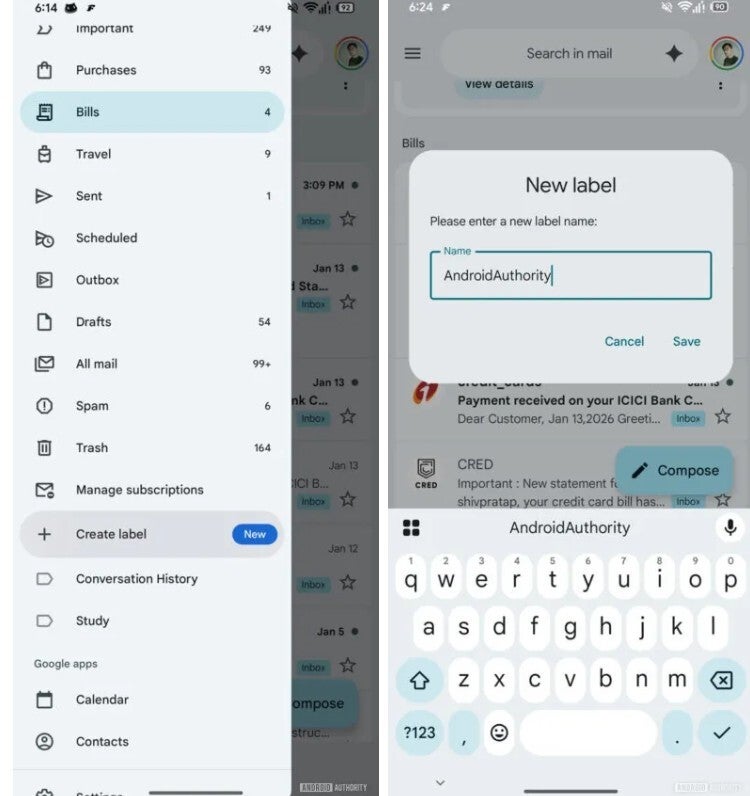
Google is testing the custom label feature for the Android Gmail app by adding a Create label option in the app's main sidebar menu. Tap on that listing and you'll be prompted to come up with the name for a custom label you want to add to your Gmail for Android app. If you have an iPhone, you can add a custom label to your Gmail for iOS app by opening the app, tapping the hamburger icon on the left of the search bar at the top of the screen. From the sidebar, tap on + Create New. On the next paghe, you'll type in the name of the label you want to add and tap on "done."
Creating a custom label on the Gmail for Android app. | Image credit-Android Authority
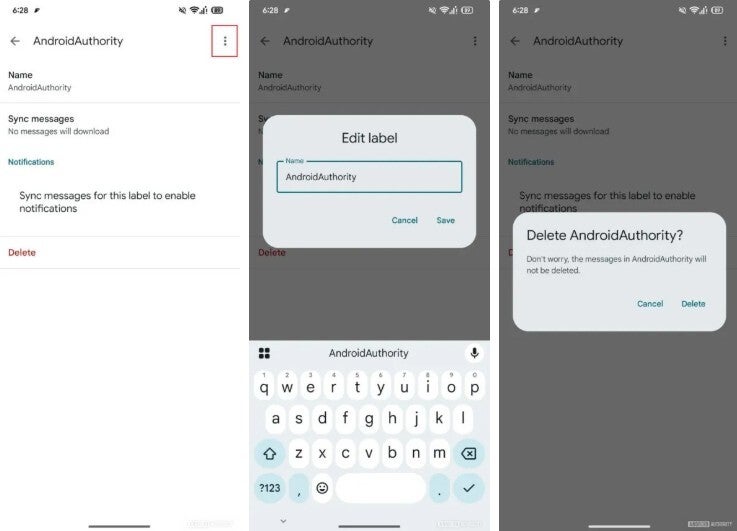
To edit or delete a custom label on Gmail for Android, you'll tap the hamburger menu again, press Settings > Inbox > Manage labels. Follow these directions and you'll be able to rename a custom label. On iOS you can go to Settings > Inbox customizations > Labels. Select the label you want to edit and tap on the arrow at the end of the listing. To change the spelling, under the section that starts with Name, to the right of the label name you want to change is a small arrow. Tap it and there will be a bar at the top that you can use to type the edited label name in. When you're done, press the blue "done" box at the bottom right of the screen.
Only you can access your custom Labels
On the other hand, to delete a custom label, go to Settings > Inbox customizations > Labels. Select the label you want to edit and tap on the arrow at the end of the listing. On the next page will be, in red, the words "Delete" followed by the custom label you want to remove, Tap on it to see another prompt that will allow you to confirm the deletion.
Deleting a custom label on the Gmail for Android app. | Image credit-Android Authority
Keep in mind that you can only rename or delete labels you've made yourself. Still, if you created a custom label for Gmail on the iOS or desktop versions, you'll be able to delete it or edit the label on Android. Google has published a support page called "Create & manage labels in Gmail" for those using Gmail on their iPhone, iPad, or desktop computer. Only you can access your labels. The people you email cannot get them, and when you delete an email, it is not just removed from your inbox, but it is also removed from your Label.
The difference between folders and labels
Before you get terribly excited about this new feature, there is a possibility that Google could decide not to add this feature to the Gmail for Android app. Even if that is the case, the custom labels will certainly remain available for iPhone and iPad users along with those who create custom labels on the desktop version of Gmail.
Recommended For You
Do you want customizable labels for the Gmail for Android app?
17 Votes
Yes. It would be a great tool.
82.35%
No. I can do this on my desktop if I want.
11.76%
I don't know yet.
5.88%
Labels are more flexible than folders because a label is a tag rather than a container. As a result, using a folder, a file can be in just one place. When you use labels to tag an email, you can put multiple tags or labels on it. For example, on an emailed invoice from your carrier (let's say Verizon), you can file it under wireless service, Verizon, and Outages.
Tello Halloween Promo: $10GB for $10/mo
Don’t miss this scary-good deal: 10 GB for $10/mo. Save $5/mo for your first 3 months. Offer valid now through November 9, 2026.
Alan, an ardent smartphone enthusiast and a veteran writer at PhoneArena since 2009, has witnessed and chronicled the transformative years of mobile technology. Owning iconic phones from the original iPhone to the iPhone 15 Pro Max, he has seen smartphones evolve into a global phenomenon. Beyond smartphones, Alan has covered the emergence of tablets, smartwatches, and smart speakers.
A discussion is a place, where people can voice their opinion, no matter if it
is positive, neutral or negative. However, when posting, one must stay true to the topic, and not just share some
random thoughts, which are not directly related to the matter.
Things that are NOT allowed:
Off-topic talk - you must stick to the subject of discussion
Offensive, hate speech - if you want to say something, say it politely
Spam/Advertisements - these posts are deleted
Multiple accounts - one person can have only one account
Impersonations and offensive nicknames - these accounts get banned
To help keep our community safe and free from spam, we apply temporary limits to newly created accounts:
New accounts created within the last 24 hours may experience restrictions on how frequently they can
post or comment.
These limits are in place as a precaution and will automatically lift.
Moderation is done by humans. We try to be as objective as possible and moderate with zero bias. If you think a
post should be moderated - please, report it.
Have a question about the rules or why you have been moderated/limited/banned? Please,
contact us.










Things that are NOT allowed:
To help keep our community safe and free from spam, we apply temporary limits to newly created accounts: