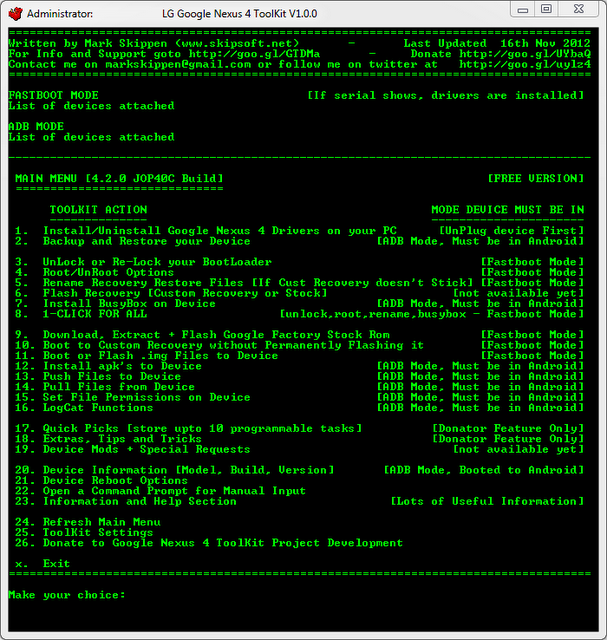
For those of you that love to live in the Android mod community, the Nexus 4 is getting the same treatment that the Galaxy Nexus had before it. There is a new ToolKit to help you easily do all those great things like unlocking the bootloader, rooting, and backing up your phone.
This is a full-featured ToolKit, just like you'd expect and it has all the good options, because this is a Nexus device.
This means you can:
Unlock/Re-Lock the Bootloader
Backup/Restore Data
Perform a Full Nandroid Backup
Root Stock Jelly Bean builds (up to 4.2.0 JOP40C)
Download Google Stock Image directly to correct ToolKit folder for extracting and flashing (no need to move it manually anymore)
Flash Google Stock Image to phone
Boot into CWM Touch Recovery without Flashing it
Boot or Flash .img Files directly from your PC
Install a single apk or multiple apk's to your phone
Reboot Phone to Fastboot Mode or Android from fastboot mode
It's all command line, but it's all pretty easy to follow along. If you'd like to give it a shot, you will need to be using Windows, and you can grab it at the source.
Mint Mobile is now allowing you to get whichever plan you like for either three, six, or 12 months for just $15/mo. If you go for the six-month unlimited service, for instance, you'll now have to pay just $90 upfront instead of $210.
Michael Heller is known for his clear and informative articles on mobile technology. He explores important topics such as the rollouts of 5G networks and the advancements in mobile payments, offering readers insights into the evolving tech landscape.
COMMENTS (4)
COMMENTS (4)
All comments need to comply with our
Community Guidelines
PhoneArena Community Rules
A discussion is a place, where people can voice their opinion, no matter if it
is positive, neutral or negative. However, when posting, one must stay true to the topic, and not just share some
random thoughts, which are not directly related to the matter.
Things that are NOT allowed:
Off-topic talk - you must stick to the subject of discussion
Offensive, hate speech - if you want to say something, say it politely
Spam/Advertisements - these posts are deleted
Multiple accounts - one person can have only one account
Impersonations and offensive nicknames - these accounts get banned
To help keep our community safe and free from spam, we apply temporary limits to newly created accounts:
New accounts created within the last 24 hours may experience restrictions on how frequently they can
post or comment.
These limits are in place as a precaution and will automatically lift.
Moderation is done by humans. We try to be as objective as possible and moderate with zero bias. If you think a
post should be moderated - please, report it.
Have a question about the rules or why you have been moderated/limited/banned? Please,
contact us.










Things that are NOT allowed:
To help keep our community safe and free from spam, we apply temporary limits to newly created accounts: