Motorola DROID BIONIC Webtop Adapter Hands-on

As we’ve seen already, you’ll need to pay $100 and more if you want to experience Motorola’s Webtop experience with the Motorola DROID BIONIC. Indeed pricey for some people, fortunately a simpler solution is available that won’t drain your pockets if you’re interested. Flaunting an easy to swallow price of only $29.99, the snap-on Webtop Adapter for the Motorola DROID BIONIC is the simplest and most inexpensive solution that offers Webtop’s functionality.
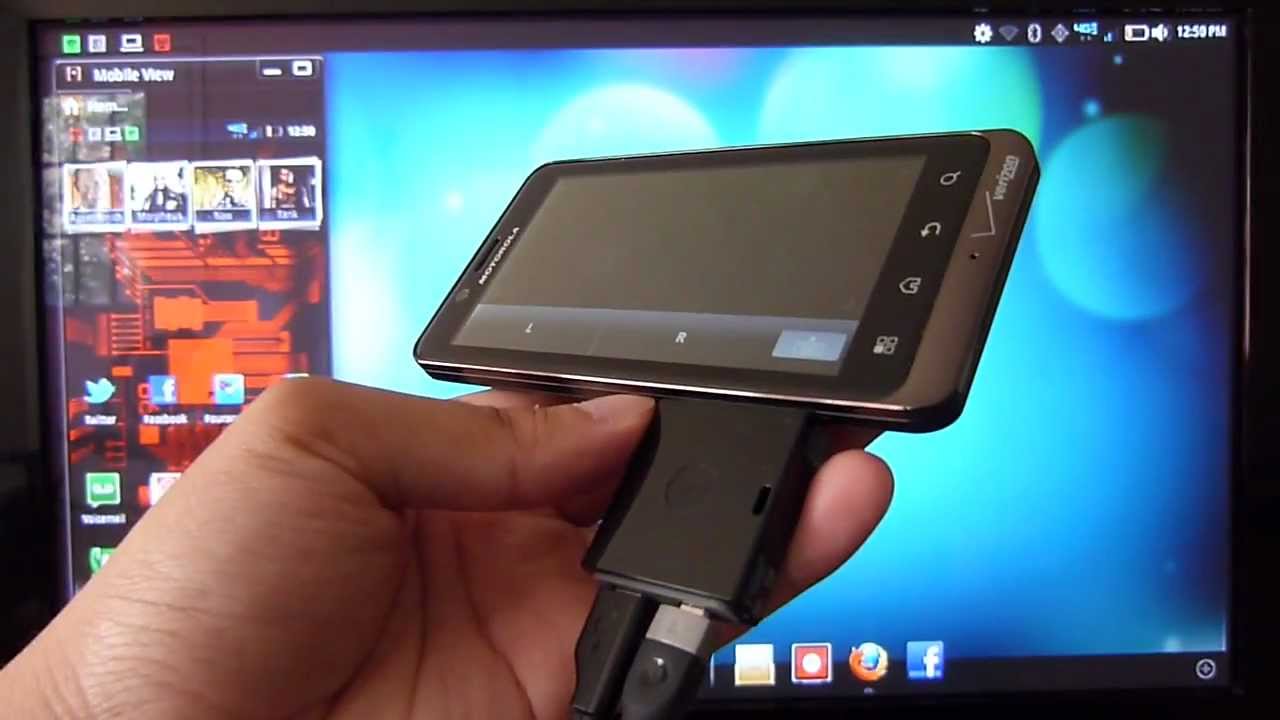
Aside from missing out with the HD Station’s expandability with its available full sized USB ports, the Webtop Adapter for the Motorola DROID BIONIC still offers all the wealth of functionality as its fuller sized sibling. At first, we’re a bit hesitant to attach the adapter to the handset – mainly due to the fact that it’s only held in position by the handset’s microUSB and microHDMI ports. Nevertheless, it manages to stick onto the smartphone very tight with no evidence of any wiggle in between. Of course, the last piece of the puzzle is to connect our high-definition television to the adapter with a microHDMI cable, which isn’t included with the packaging.
Once all of that is out of the way, we’re able to get Motorola’s Webtop experience to run on the big screen. However, it makes us wonder why all of these optional accessories are needed to gain the Webtop experience since the handset sports a microHDMI-out port already. Nonetheless, it’s a quick fix for those who don’t want to shell out the moolah for things like the Lapdock or HD Station.
Aside from missing out with the HD Station’s expandability with its available full sized USB ports, the Webtop Adapter for the Motorola DROID BIONIC still offers all the wealth of functionality as its fuller sized sibling. At first, we’re a bit hesitant to attach the adapter to the handset – mainly due to the fact that it’s only held in position by the handset’s microUSB and microHDMI ports. Nevertheless, it manages to stick onto the smartphone very tight with no evidence of any wiggle in between. Of course, the last piece of the puzzle is to connect our high-definition television to the adapter with a microHDMI cable, which isn’t included with the packaging.
Once all of that is out of the way, we’re able to get Motorola’s Webtop experience to run on the big screen. However, it makes us wonder why all of these optional accessories are needed to gain the Webtop experience since the handset sports a microHDMI-out port already. Nonetheless, it’s a quick fix for those who don’t want to shell out the moolah for things like the Lapdock or HD Station.

Popular stories
Latest News
Things that are NOT allowed:
To help keep our community safe and free from spam, we apply temporary limits to newly created accounts: