Back when Android 2.2 Froyo first came to light oh so long ago, it made the process of tethering simple, seamless, and most importantly, downright easy. Essentially, all you really need to do was go under the wireless section in the Android options menu and enable tethering – whether it be the usual wired USB connection or the much more flexible mobile hotspot option. However, as we’ve come to see, carriers aren’t quite as accepting of this out-of-the-box tethering method, which didn’t require handset owners to add on carrier plans to gain the feature.
Although there are still some Android smartphones that allow owners to tether without having the carrier intervention, others aren’t quite as fortunate since the feature is locked out – well, that’s unless you add the appropriate add-on feature to your account. Even with that, we’re still left having to watch out how much we chomp day, especially when unlimited data plans are a thing of the past. Rather, tiered plans are now being offered instead, and at the same time, they make us realize that we need to watch out how much data we use per month.
Recommended For You
Well folks, if data isn’t a problem seeing you’re still on a grandfathered unlimited plan or simply have a huge data allotment with your plan, we’ve got a quick and easy solution to get tethering on your Android powered smartphone. Above all, the best part is that the process of getting tethering without some kind of monthly subscription can be obtained with two free apps on Google Play. Furthermore, you don’t need to go through the hassle of rooting your smartphone before gaining this highly prized feature. Honestly, we check out plenty of smartphones around the office, and for some of us, tethering is a crucial element in making us mobile. On top of that, peace of mind is at hand when we tether – as opposed to hitching a ride on some kind of open Wi-Fi hotspot at the local café or something else.
With that people, here are 2 easy steps to get free tethering on your Android smartphone:
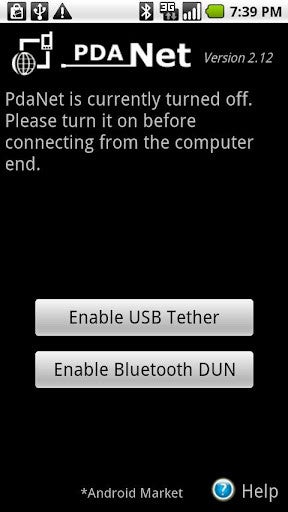
Easy enough, right? For real people, those all the steps needed in getting tethering on your device without forking over monthly fees to your carrier. First and foremost, we have June Fabric’s ever-popular PDAnet app, which has been around for ages – even as far back as the good old Windows Mobile days. In fact, they provide tethering to a variety of platforms beside Android, like BlackBerry, Palm OS, and iOS (this one requires you to jailbreak your iPhone).
As long as you’re getting data on your Android smartphone, PDAnet enables you to share that connection with your computer via USB or Bluetooth connections. On your PC though, you’ll need to install the appropriate driver for your specific phone, but the installation process normally gets it done for you – so yeah, it’s yet another painless process. Of course, you can surf the web, but just know that you won’t be able to access any secured web sites, such as checking Gmail. In order to surf all web sites, you’re required to make a one-time purchase to buy the full version of PDAnet, which isn’t that bad at $15.95. For some smartphones, PDAnet also offers the wireless option of tethering via Bluetooth.
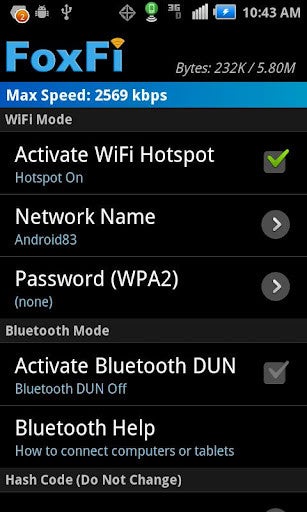
So there you have it folks, that’s one way to get tethering up and running without your carrier getting involved, but it’s not the only option out there. Whereas PDAnet is wonderful with wired tethering, there is another one that might prove to be more flexible for people. Naturally, we like PDAnet for the fact that it’s a direct connection being used by a single device, but the app Fox-Fi delivers tethering via mobile hotspot functionality – something that has its own set of benefits.
Again, the process is simple with this one, seeing that all you need to do is download and install the app. However, it’s worth noting that not all Android smartphones are supported by the app, but the ones that are, there’s no rooting required whatsoever in getting wireless tethering to work. We’ve used an LG Viper 4G LTE for Sprint to test it out, and just like that, we managed to get wireless tethering to work ASAP. Aside from assigning a specific SSID for our network, the only other thing we modified with the app’s setting is the WPA2 password. Once those items are squared away, we’re able to use our laptop and leech off the Viper’s 3G connection.
There you have it folks, these are two free downloadable apps that bring tethering without the need to pay monthly fees through your carrier. Yes, there’s a $16 cost to gain PDAnet’s full functionality of surfing secured sites, but still, that’s only a one-time cost to you. Moreover, Fox-Fi might not be supported by many Android smartphones, but for the ones that are, it’s sweet just being able to share your data connect via mobile hotspot functionality.
Try Noble Mobile for only $10
Get unlimited talk, text, & data on the T-Mobile 5G Network plus earn cash back for data you don’t use.
A discussion is a place, where people can voice their opinion, no matter if it
is positive, neutral or negative. However, when posting, one must stay true to the topic, and not just share some
random thoughts, which are not directly related to the matter.
Things that are NOT allowed:
Off-topic talk - you must stick to the subject of discussion
Offensive, hate speech - if you want to say something, say it politely
Spam/Advertisements - these posts are deleted
Multiple accounts - one person can have only one account
Impersonations and offensive nicknames - these accounts get banned
To help keep our community safe and free from spam, we apply temporary limits to newly created accounts:
New accounts created within the last 24 hours may experience restrictions on how frequently they can
post or comment.
These limits are in place as a precaution and will automatically lift.
Moderation is done by humans. We try to be as objective as possible and moderate with zero bias. If you think a
post should be moderated - please, report it.
Have a question about the rules or why you have been moderated/limited/banned? Please,
contact us.





Things that are NOT allowed:
To help keep our community safe and free from spam, we apply temporary limits to newly created accounts: