How to take a screenshot on the LG G4
The LG G4 has received a warm welcome: the fact that we have a flagship that offers something different in the form of its genuine leather back cover, as well as the excellent camera and improved performance, are features that make the G4 stand out.
The rear-position physical keys might be a bit confusing
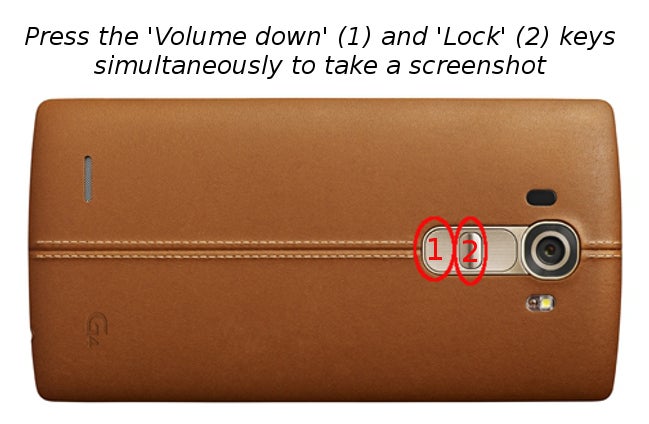
The LG G4 also comes with the signature for LG rear-positioned physical buttons - the volume keys and the lock/power key between them. This might be a bit confusing for those who are trying to capture what's on the display and take a screenshot on the LG G4.Luckily, taking a screenshot on the LG G4 is not a complicated task at all and all it takes is to simultaneously press the volume down and power/lock key. You will hear a sound imitating the closing of a shutter, and you'll see that a screenshot is captured (a notification appears with the option to quickly share that screenshot). That's how easy it is to take a screenshot on the LG G4.


Popular stories

Latest News


Things that are NOT allowed:
To help keep our community safe and free from spam, we apply temporary limits to newly created accounts: