New Google prompt makes it easier to complete the second step of a two-step verification
Google announced today that soon, two-step verification of your Google sign-in will become easier. Previously, the second step of the security feature required you to tap a security key, or enter a verification code that was sent to your phone. Now, there is a third way to verify the second step using a simple prompt.
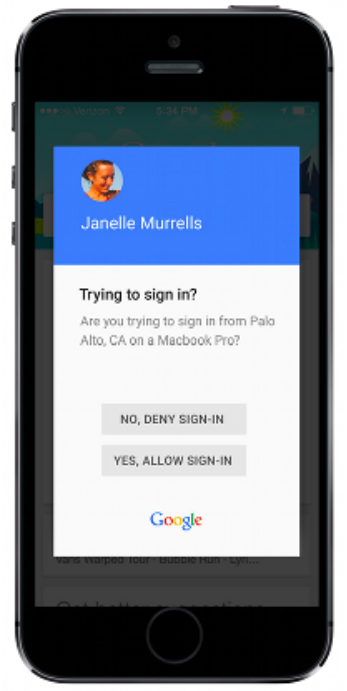
The prompt asks if you are trying to sign in to Google from the city where the log-in is being attempted from, and also mentions the name of the device that the sign-in is being attempted on. Underneath that information are two prompts. One denies the sign-in attempt while the other allows it to take place. Obviously you will know which one to tap.
By going to My Account and then
Sign-in & Security >
Signing in to Google >
2-Step Verification, you can select any of the options you'd prefer for the second step of the verification process. Google's blog appears to call this feature Google prompt, and users must have a data connection for it to work. In addition, Security Keys and Google prompt cannot be both enabled at the same time.
The update will hit all Android users over the next three days through a Google Play Services update, and iOS users will need to have the Google Search app installed to use Google prompt.
source:
Google via
9to5Google
Read the latest from Alan Friedman















Things that are NOT allowed:
To help keep our community safe and free from spam, we apply temporary limits to newly created accounts: