Google Messages continues to get better and better
With one new feature rolling out to Beta testers and another new feature apparently on the way, Google Messages is improving every day.
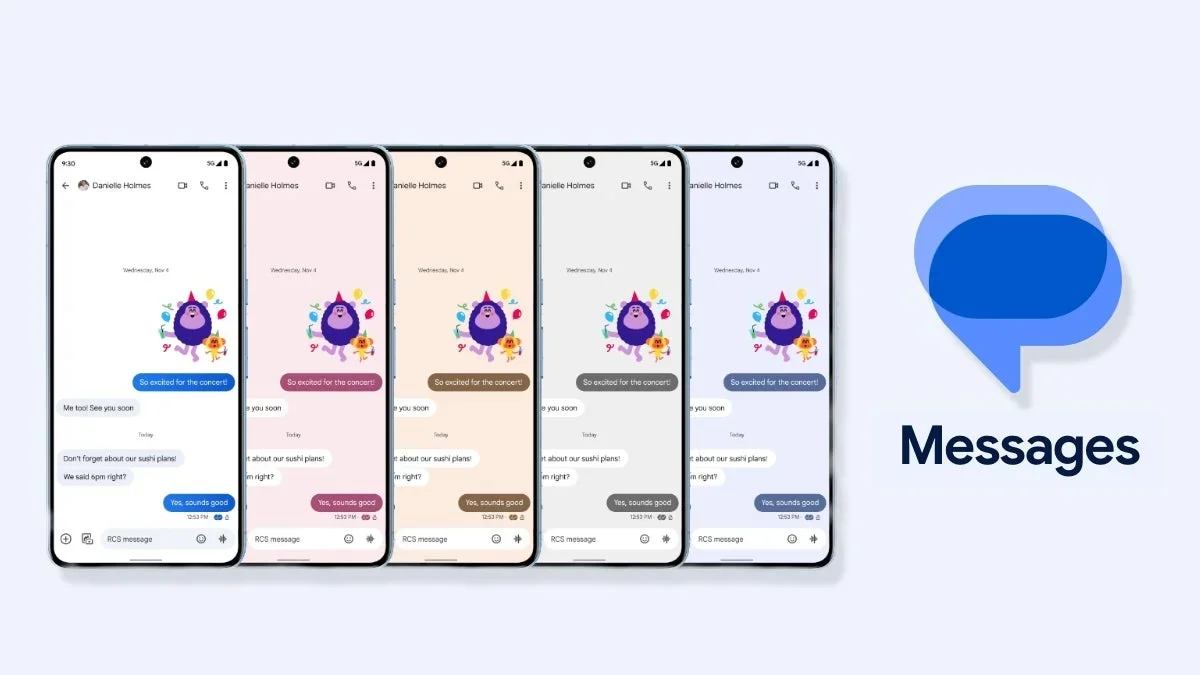
Google continues to make Google Messages better. | Image by PhoneArena
Earlier today we told you that Google, tinkering as always with the Google Messages app, removed a step from the process of creating a new group when you want to communicate by chat with more than one person at the same time. But that wasn't the only change that Google made to the Messages app. Back in August 2024, Google started testing a redesign of read receipts for the Google Messages app. Now, those Beta testing the Messages app are seeing the new-look read receipts in action.
Google Messages finally ditches the Double Bubble read receipt for Beta testers
No longer found outside the text bubble, the new location has the read receipts inside the bubble, but in the lower right corner of the text enclosure. And the read receipts are no longer made up of two small circles (also known as the "Double Bubble" design); instead, the new look is made up of one circle that is in one of four states:
- A circle with an ellipsis inside means that the message is in the process of being sent.
- A circle with a single check means that the message has been sent.
- A circle with double check marks means that the message has been delivered.
- A solid circle with double check marks means that the message has been read.
How to tell if your message was encrypted end-to-end
Swiping the text bubble to the left will show you the time that a message was sent and also reveals whether the message was encrypted end-to-end (E2EE). If you swipe the text bubble to the left and see a lock with a line through it, the message was not encrypted. On the other hand, if you see the lock without a line through it, the message was sent via E2EE or end-to-end encrypted. The new look was spotted on the Google Messages app running version 20260220_01_RC00.

Note the read receipt in the lower right and the E2EE status next to the time when the text bubble is swiped to the left. | Image by PhoneArena
In more exciting news, it appears that Google Messages will soon be able to share your real-time location with others. While the app currently will share a one-time location, it is a static address that doesn't change even if you are moving around, and truthfully, it is not useful. But code discovered in Google Messages version
messages.android_20260220_01_RC00.phone.openbeta_dynamic shows that Google is working on "Real-time Location" for Google Messages.
When the "Real-time Location" feature is enabled in Google Messages, you'll probably have to give location permission first. Then you can choose to have your location available to be seen in chats for:
- 1 hour
- Today only
- Custom duration
Once "Real-time Location" is running in Google Messages, a banner will appear at the top of the chat stating that live location sharing is on and it even reveals how much time remains before the feature shuts off. What's cool about this feature is that it will work even if the person you're sharing your location with doesn't have it enabled on his phone.
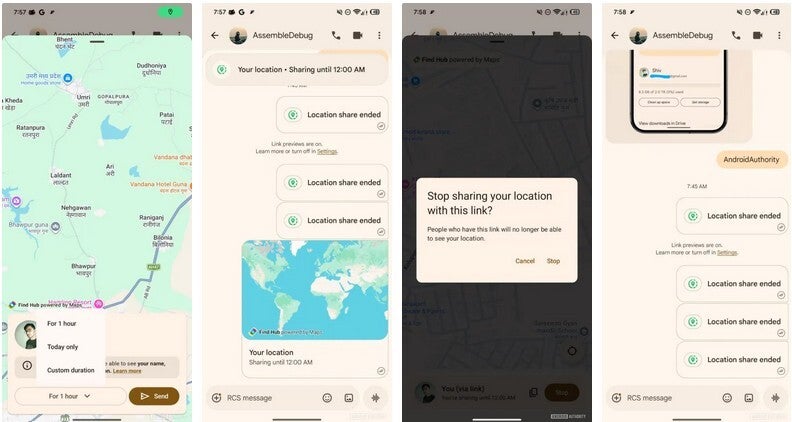
Real-time live location sharing on Google Messages. | Image by Android Authority
Sharing your live location in real time using Google Messages
If the other party has the Google Find Hub app installed, the live location sharing link opens in the app. Should the other party not have the Find Hub installed, the link opens in a web browser, showing the live location of the sender in real time. This allows the feature to work even if the other person isn't using the same version of the Google Messages app that you are using. It also means that both of you can be using different devices. To turn off location sharing, you tap the banner at the top of the conversation and tap on "Stop" from the bottom.
Do you use Google Messages or another messaging app?
180 Votes
I use Google Messages, of course.
83.89%
I use a third-party Android messaging app.
16.11%
Google has taken the Messages app a long way from being a simple texting and messaging app thanks to all of the updates it is making. In this regard, it reminds me of how Google has made Google Maps much more than a mapping and navigation app.


Popular stories


Latest News






Things that are NOT allowed:
To help keep our community safe and free from spam, we apply temporary limits to newly created accounts: