WhatsApp has introduced a new tool that is said to protect your privacy.
Protect your data from unauthorized access
In addition to offering end-to-end encryption for all your personal messages, WhatsApp already provides plenty of privacy-related features such as App Lock, Chat Lock, read receipts, and others. Meta is expanding the list by introducing a new extreme-protection feature called Strict Account Settings to WhatsApp.
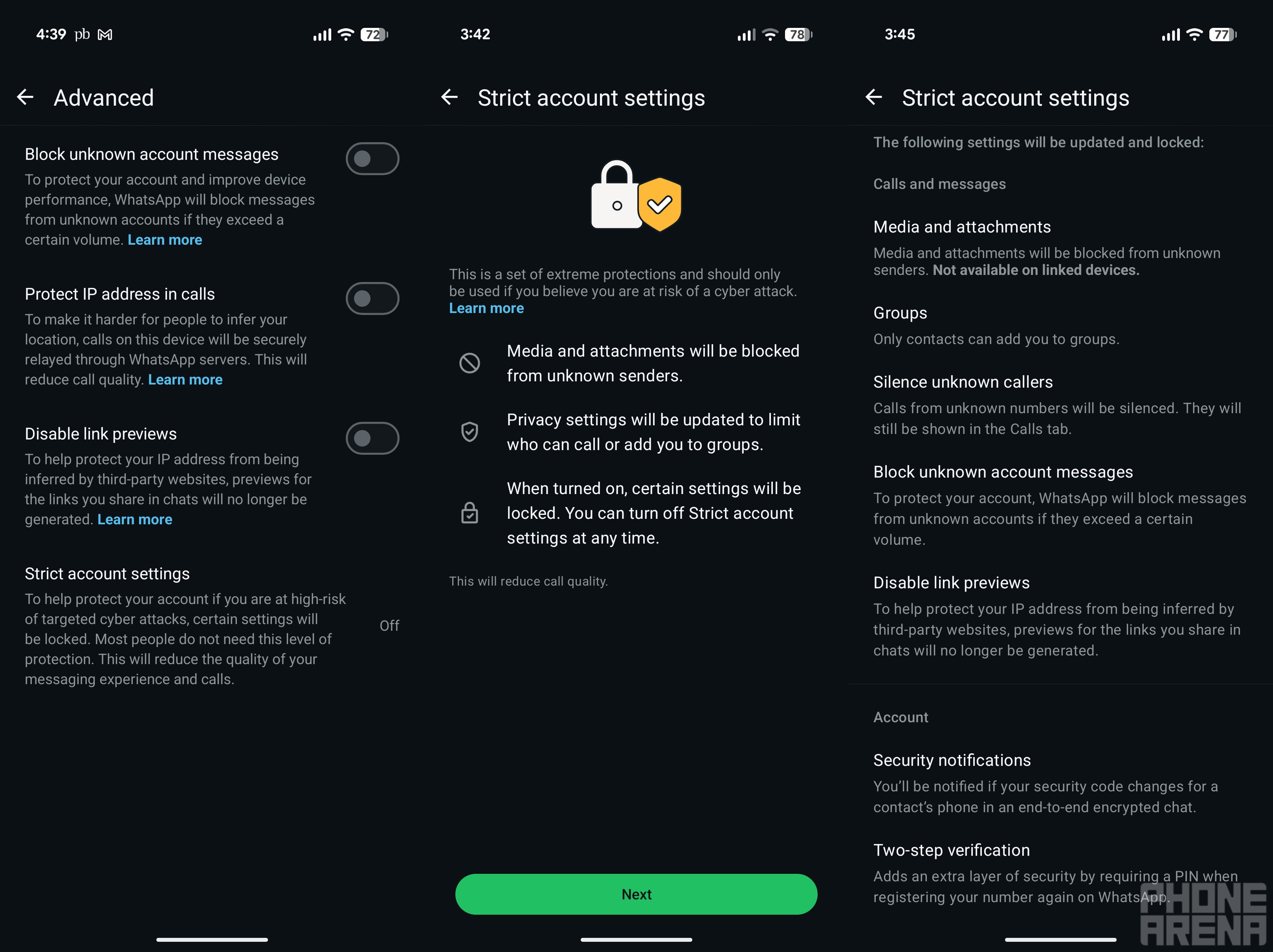
It has been introduced to protect you from sophisticated cyberattacks. Once you enable it, WhatsApp will automatically block any media and attachments you receive from unknown accounts. Additionally, the platform will silence calls from unknown contacts, disable link previews, and prevent unknown contacts from adding you to groups.
The option is turned off by default. Here's how to enable it:
Open the WhatsApp Settings menu and then navigate to Privacy > Advanced > Strict account settings
Choose Next
Tap Turn On and then select Turn On again from the popup to confirm.
Under the Advanced section, there are separate toggles for disabling link previews and blocking messages from people you don't know. That means you also have the option to enable just these privacy settings instead of the Strict Account Settings, which add an extreme protection layer to your account.
Recommended For You
Which of these messaging apps gives the highest priority to users' privacy?
32 Votes
WhatsApp.
21.88%
Signal.
43.75%
Session - Private Messenger.
3.13%
Telegram.
25%
Threema.
6.25%
The feature is coming at an interesting time
Strict Account Settings option in WhatsApp. | Image by PhoneArena.
The timing of the Strict Account Settings feature rollout is interesting. That's because it was just a few days ago that a lawsuit was filed against Meta, claiming that WhatsApp personal messages aren't fully end-to-end encrypted and can easily be read by Meta employees. Elon Musk also took advantage of the situation to promote X's Chat feature, posting that, unlike WhatsApp and even Signal, Chat on X is fully secure. However, WhatsApp head Will Cathcart denied all the claims in the lawsuit and further stated that it was filed just to seek attention.
That said, if you use WhatsApp, I highly recommend enabling the new setting. To further strengthen your privacy, you can also take advantage of the Lockdown Mode feature if you have an Apple device. And if you own an Android smartphone, like me owning the Pixel 10, you can enable the Advanced Protection Mode that was introduced to the platform last year with Android 16.
Meta says that it will start rolling out the feature in the coming weeks. It's worth noting that you can enable or disable it only through your primary device, not through WhatsApp Web.
Get iPhone 18 Pro with Visible, get $480 off!
$719
/mo
$1199
$480 off (40%)
On the Visible+ Pro plan, you get access to 5G Ultra Wideband data on Verizon's fastest network. Along with unlimited roaming across Mexico and Canada, 2 days of Global Pass per month, 3x hotspot speeds, 4K streaming, and Smartwatch service.
Aman Kumar is a news writer at PhoneArena covering Google Pixel phones, Android features, AI-powered smartphone tools, and mobile tech news. Before joining PhoneArena, he spent over five years writing about consumer technology for publications like MakeUseOf, How-To Geek, and Guiding Tech. His current daily drivers are the Pixel 10 and Samsung Galaxy S26 Plus, while his red iPhone SE (2nd gen) remains a personal favorite. Aman also appreciates bold smartphone experiments and still considers the Nokia N-Gage one of the industry’s most iconic designs.
A discussion is a place, where people can voice their opinion, no matter if it
is positive, neutral or negative. However, when posting, one must stay true to the topic, and not just share some
random thoughts, which are not directly related to the matter.
Things that are NOT allowed:
Off-topic talk - you must stick to the subject of discussion
Offensive, hate speech - if you want to say something, say it politely
Spam/Advertisements - these posts are deleted
Multiple accounts - one person can have only one account
Impersonations and offensive nicknames - these accounts get banned
To help keep our community safe and free from spam, we apply temporary limits to newly created accounts:
New accounts created within the last 24 hours may experience restrictions on how frequently they can
post or comment.
These limits are in place as a precaution and will automatically lift.
Moderation is done by humans. We try to be as objective as possible and moderate with zero bias. If you think a
post should be moderated - please, report it.
Have a question about the rules or why you have been moderated/limited/banned? Please,
contact us.













Things that are NOT allowed:
To help keep our community safe and free from spam, we apply temporary limits to newly created accounts: