Pixels are great, but I believe Samsung devices have an edge over them when it comes to the level of customization options both offer. For instance, the ability to add third-party apps to the lock screen has long been present on Galaxy phones but is yet to be made available on Google phones. But it appears that the Big G has finally started giving priority to the customization department of its smartphones, as two interesting features have been spotted in the latest Android Canary build.
Create a custom lock screen clock
Google recently released the Android Canary build 2608 for Pixel 6 and newer hardware. It comes with some noticeable changes, with one being the ability to design your own lock screen clock.
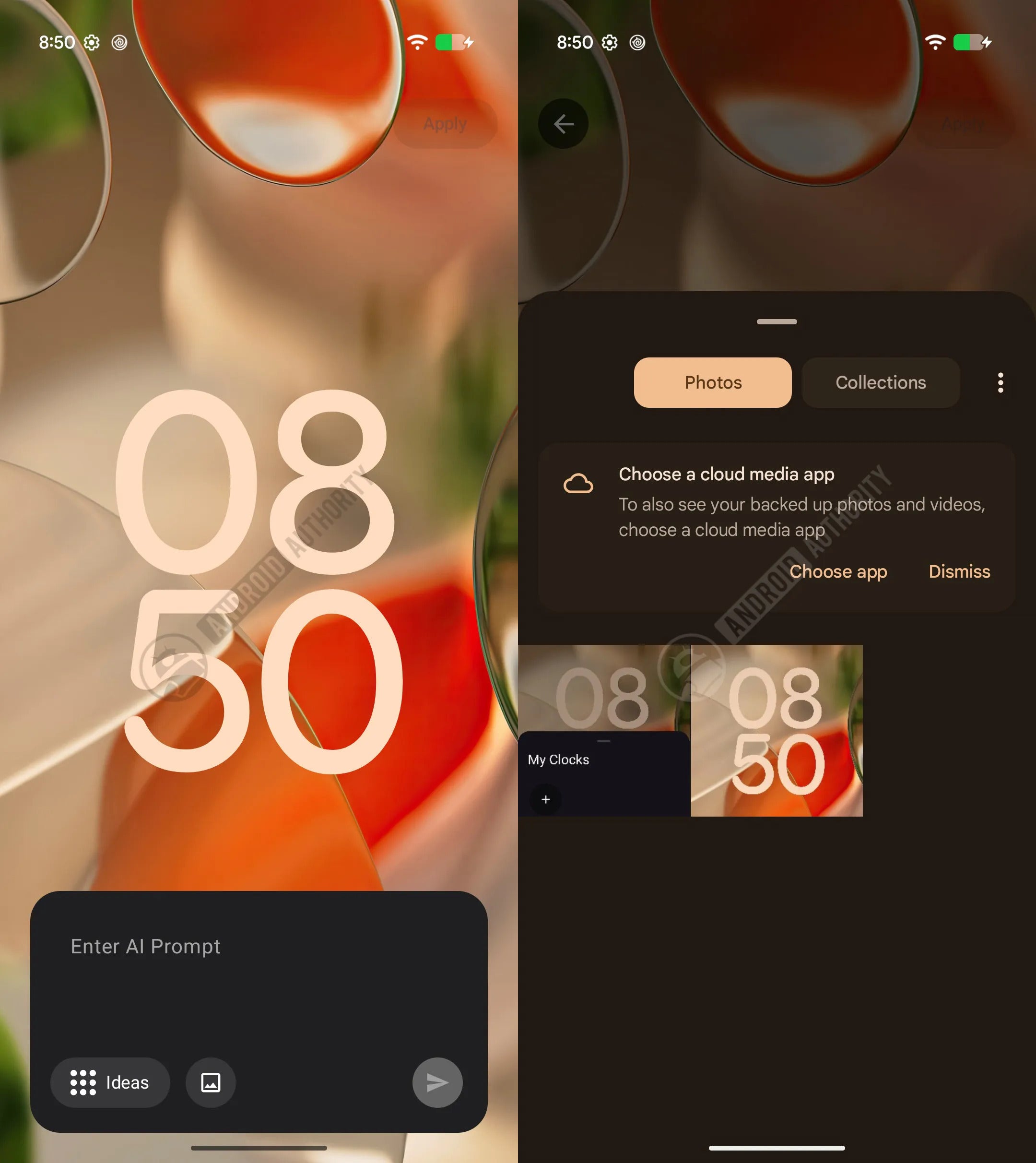
Pixel phones already offer plenty of clock faces (eight, to be exact), along with the ability to change their color and style. But in the latest Canary build, a new feature has reportedly been spotted, which gives you the option to use AI to create your own clock for the lock screen. The surfaced images suggest that you would simply have to enter a prompt to the AI model specifying the type of clock you want.
There are two additional tabs in the AI prompt window: Ideas and Images. Using the Ideas tab will most likely allow the AI to come up with some clock style suggestions. Tapping the Images tab reportedly opens the gallery from where you can choose an image that you want to use as a reference for the clock design you want the AI to create.
Recommended For You
Custom lock screen clock. | Image by Android Authority
Unfortunately, only the UI of this really interesting feature seems to be working at the moment, as running it reportedly returns a "Service not connected" error. This suggests that it is most likely a server-side capability that is still in its early phase of development and will most likely become available in the near future.
What's the biggest advantage of Galaxy phones over Pixel?
162 Votes
Customization capabilities.
22.22%
Hardware.
25.31%
One UI features.
48.15%
Chinese OEMs offer better customization.
4.32%
Better manage the notification icons in the status bar
Another important change that has been spotted in the latest Android Canary build is the capability to control the visibility of notification icons in the status bar. On Pixel phones, currently, the status bar gets filled with icons from apps from which you have received notifications. However, Google appears to be working on giving Pixel users the option of customizing the notification icon visibility.
Strings related to it have reportedly been spotted. You could get three choices: All, Priority Only, and None. Selecting the "All" option displays all the notification icons, which is basically the current state.
The "Priority Only" option would show only the priority notifications, which would most likely be determined by Android's built-in notification classification system. The "None" option, as you would have already guessed, will not display any notifications in the status bar.
Samsung already offers both these features
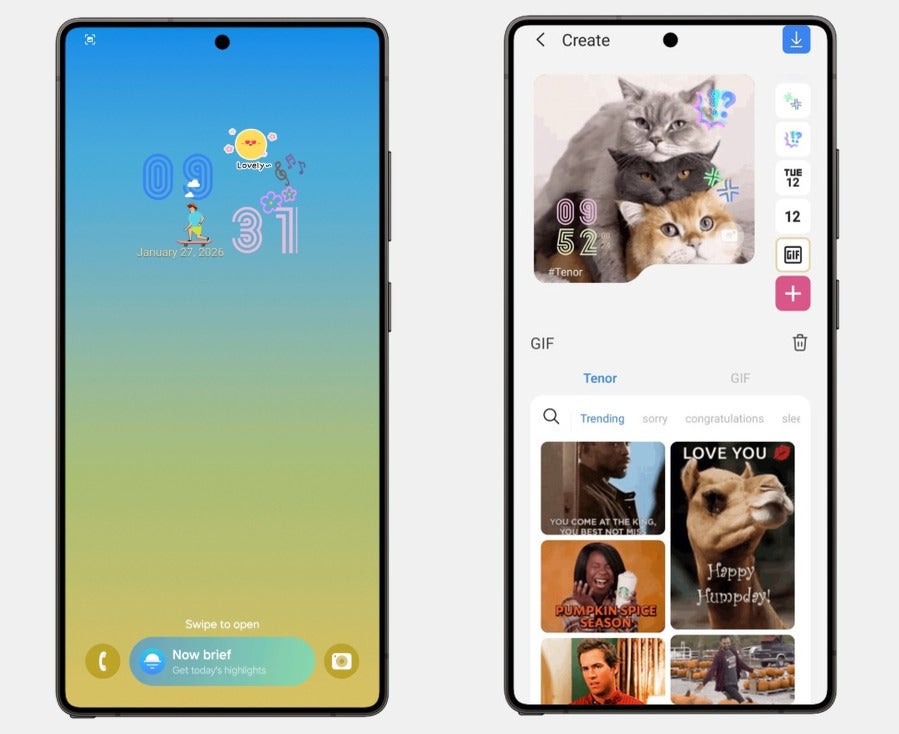
Pixel is playing a catch-up game with Samsung here. In the Good Lock app that is available for Galaxy phones, you get a module called ClockFace that offers a big world of clock customization. There are plenty of faces to choose from, and you can even customize them further by changing their font, color, design, and more.
ClockFace module of Good Lock app. | Image by Galaxy Store
However, the numbers are still limited. With the AI-powered clock designing facility that Pixel seems to be creating, you could get the option to create an endless number of designs. This could ultimately give Pixel phones an edge over the Galaxy devices.
When it comes to the notification customization option discussed above, Pixel is actually playing a catch-up game against many Android OEMs. Samsung, OnePlus, and Xiaomi all offer almost similar features, though their names are different on different brands. For instance, in OnePlus handsets, you have the option to choose between "Show icon," "Show number," and "Do not show," whereas in Samsung, you select between "Icons," "Dot," and "None."
Customization has never been a selling point of Pixel phones
Thanks to the availability of Good Lock, which is an official Samsung app, Galaxy phones have always won the customization battle against Pixel phones. It's not only me; users on public forums like Reddit also believe the same.
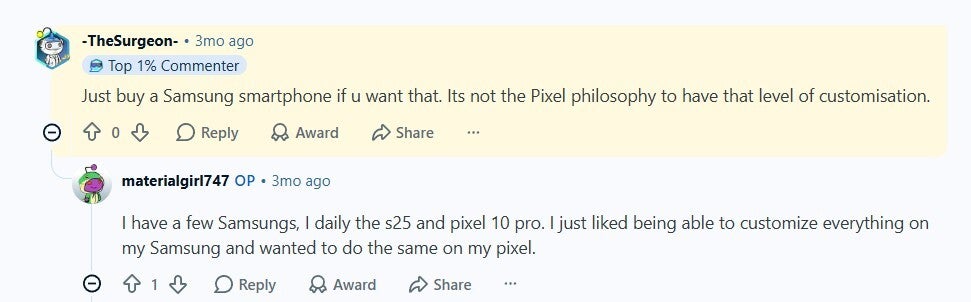
Reddit user praising Samsung for its customization edge over Pixel phones. | Image by Reddit
A comment under a relevant post basically says that it's not the Pixel philosophy to offer a Samsung-level of customization. Another user commented that they want the same type of customization options on their Pixel 10 Pro as they get on their Galaxy S25.
Follow me on X and Threads to read more Pixel-related stories.
Get iPhone 18 Pro with Visible, get $480 off!
$719
/mo
$1199
$480 off (40%)
On the Visible+ Pro plan, you get access to 5G Ultra Wideband data on Verizon's fastest network. Along with unlimited roaming across Mexico and Canada, 2 days of Global Pass per month, 3x hotspot speeds, 4K streaming, and Smartwatch service.
Aman Kumar is a news writer at PhoneArena covering Google Pixel phones, Android features, AI-powered smartphone tools, and mobile tech news. Before joining PhoneArena, he spent over five years writing about consumer technology for publications like MakeUseOf, How-To Geek, and Guiding Tech. His current daily drivers are the Pixel 10 and Samsung Galaxy S26 Plus, while his red iPhone SE (2nd gen) remains a personal favorite. Aman also appreciates bold smartphone experiments and still considers the Nokia N-Gage one of the industry’s most iconic designs.
A discussion is a place, where people can voice their opinion, no matter if it
is positive, neutral or negative. However, when posting, one must stay true to the topic, and not just share some
random thoughts, which are not directly related to the matter.
Things that are NOT allowed:
Off-topic talk - you must stick to the subject of discussion
Offensive, hate speech - if you want to say something, say it politely
Spam/Advertisements - these posts are deleted
Multiple accounts - one person can have only one account
Impersonations and offensive nicknames - these accounts get banned
To help keep our community safe and free from spam, we apply temporary limits to newly created accounts:
New accounts created within the last 24 hours may experience restrictions on how frequently they can
post or comment.
These limits are in place as a precaution and will automatically lift.
Moderation is done by humans. We try to be as objective as possible and moderate with zero bias. If you think a
post should be moderated - please, report it.
Have a question about the rules or why you have been moderated/limited/banned? Please,
contact us.





Things that are NOT allowed:
To help keep our community safe and free from spam, we apply temporary limits to newly created accounts: