At the end of September, Samsung Gallery dropped the cloud backup options that used to be handled by Microsoft OneDrive, just like both companies had promised earlier in the year. Now the rumors that the feature will be handled with cloud storage from Google have been officially confirmed, so owners of the Galaxy S26 and other Galaxy devices can start enjoying the integration.
Samsung Gallery will use Google storage for photos and videos sync across devices
Samsung announced today that Gallery sync will work with Google storage, giving users the ability to back up photos and videos to the cloud and access them from other devices. The syncing capabilities are integrated inside the Gallery app, and it uses your Samsung and Google accounts.
If you’re already signed in with both accounts on your device, you can simply enable sync inside the Gallery app without any extra steps. The feature will use your Google storage to back up images and videos, which Samsung warns is shared between Gmail, Google Drive, and Google Photos.
Poll
2 Votes
How do you back up the photos and videos from your smartphone?
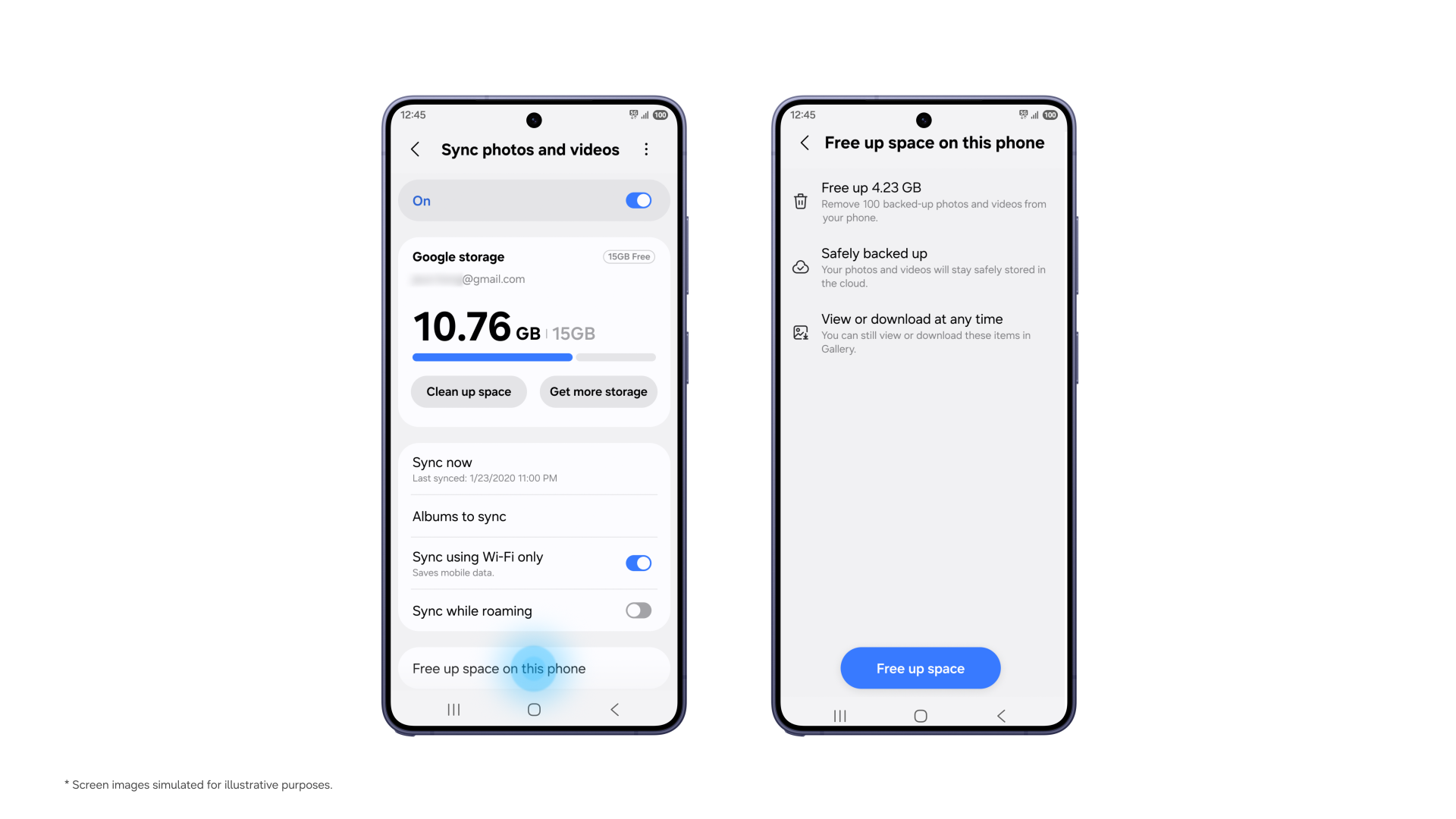
Galaxy devices are also getting a “Free up space” feature
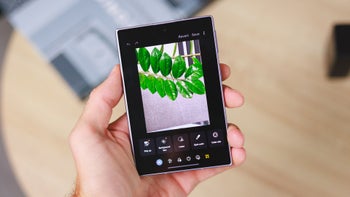
Gallery finally gets a “Free up space” feature. | Image by Samsung
Samsung is also adding a new feature to its Gallery app called “Free up space.” Unsurprisingly, this will let you remove original images and videos from the local storage of your devices once they have been backed up. Once that’s done, you’ll be left with preview thumbnails in your Gallery app, and the original file will be downloaded only if you tap to see them.
Recommended For You
This is a fundamental feature available on practically every modern smartphone, including any Android smartphone that uses Google Photos and every modern iPhone with active iCloud syncing. Getting the feature into the Gallery app will make things easier for Galaxy users, removing the need to download the Google Photos app.
If you are already using Google Photos, they won’t show up in the Samsung Gallery app. Samsung says that its app will only show content that has been synced after the service is enabled.
Which devices are getting the new Samsung Gallery sync features?
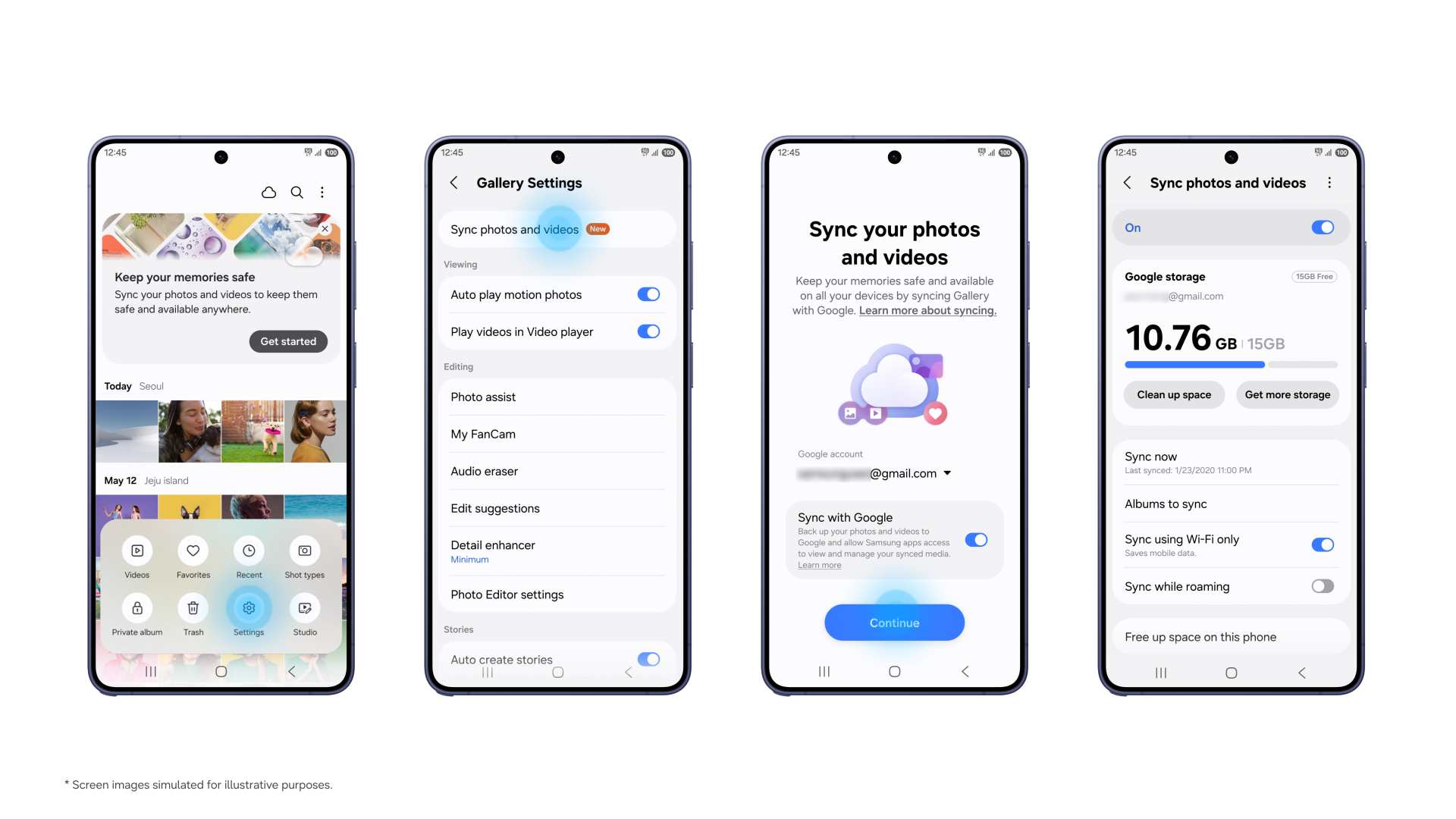
Setting up the new sync feature is easy. | Image by Samsung
Support for the new sync features has already started with select Galaxy devices running One UI 9. Samsung says the feature will expand to more devices in phases, so if you still don’t have it, you may need to wait a bit longer.
Setting things up is straightforward from the Gallery Settings or the tip card that will appear in the app. Once you go to one of the two, you just turn on “Sync photos and videos,” and follow the instructions on the screen.
The most natural change
Considering all the other areas where Samsung and Google cooperate, I think this was the most natural direction for the two companies. I’m sure the vast majority of Galaxy users not only have Google accounts, but they’re already using them on their devices, so the switch should be painless.
Get a free Galaxy A17 with Straight Talk. To claim this deal, you need to pair the phone with activation on a Silver Unlimited Plan or higher. This tier costs $45 per month. Offer valid through 01/10/27 while supplies last online.
Ilia, a tech journalist at PhoneArena, has been covering the mobile industry since 2011, with experience at outlets like Forbes Bulgaria. Passionate about smartphones, tablets, and consumer tech, he blends deep industry knowledge with a personal fascination that began with his first Nokia and Sony Ericsson devices. Originally from Bulgaria and now based in Lima, Peru, Ilia balances his tech obsessions with walking his dog, training at the gym, and slowly mastering Spanish.
A discussion is a place, where people can voice their opinion, no matter if it
is positive, neutral or negative. However, when posting, one must stay true to the topic, and not just share some
random thoughts, which are not directly related to the matter.
Things that are NOT allowed:
Off-topic talk - you must stick to the subject of discussion
Offensive, hate speech - if you want to say something, say it politely
Spam/Advertisements - these posts are deleted
Multiple accounts - one person can have only one account
Impersonations and offensive nicknames - these accounts get banned
To help keep our community safe and free from spam, we apply temporary limits to newly created accounts:
New accounts created within the last 24 hours may experience restrictions on how frequently they can
post or comment.
These limits are in place as a precaution and will automatically lift.
Moderation is done by humans. We try to be as objective as possible and moderate with zero bias. If you think a
post should be moderated - please, report it.
Have a question about the rules or why you have been moderated/limited/banned? Please,
contact us.





Things that are NOT allowed:
To help keep our community safe and free from spam, we apply temporary limits to newly created accounts: