Photos have been quietly vanishing from people's photo libraries, and a Nothing Phone (2a) Plus owner spotted the pattern. It turns out the reason this is happening is less complicated than originally thought, and the fix is one you may or may not appreciate if you use devices such as the Pixel 10 Pro or the Samsung Galaxy S26 Series.
A vanishing-photo mystery on the Nothing Gallery
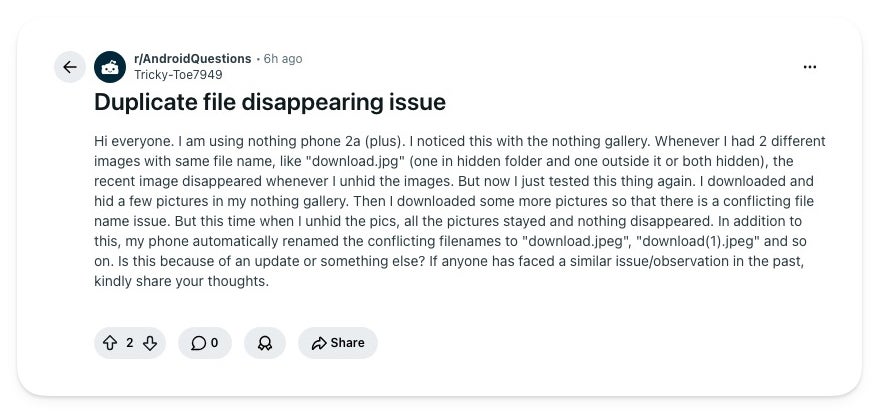
I was scrolling through Reddit when I caught a post in r/AndroidQuestions from a Nothing Phone (2a) Plus owner that stopped me. They noticed that whenever two pictures shared a filename, like download.jpg, the newer one vanished the moment they unhid images in the Nothing Gallery.
A Nothing Phone owner described pictures vanishing when they unhid files that shared a name. | Image by Tricky-Toe7949 via Reddit
On a retest, the behavior flipped. This time the phone kept every picture and renamed the clashing files to download.jpeg and download(1).jpeg instead of eliminating one.
It's a single thread without much traction, so treat it as one person's observation, not a wave. Still, the same disappearing-photos complaint has surfaced on Nothing's own community forum in the past, so this user isn't alone.
How do you keep private photos out of your main gallery?
17 Votes
Google Photos Locked Folder for the cloud safety net
23.53%
The built-in hide feature in my gallery app
23.53%
A dedicated vault or third-party hider app
0%
I don't, they all just live in my gallery
52.94%
Why your photos disappear, and who needs to worry
Here's the short version: hiding or unhiding a photo makes the phone move that file in storage. If something with the same name is already sitting there, the old way let the new file overwrite it, so a copy vanished. Now the phone refuses to overwrite and tacks a number onto the name instead, which is how you get download.jpeg and download(1).jpeg.
Recommended For You
It looks like a software update flipped this, but no Nothing changelog spells that out, so I wouldn't pin it on one patch.
If you're on a Pixel 10 Pro with Google Photos, this isn't your problem, since its Locked Folder keeps items in a private space. Samsung Gallery users on a Galaxy S26 Ultra are clear too, since Secure Folder works the same protected way.
The safer way to keep photos private
If you're hiding photos to keep them from prying eyes, a local gallery toggle is the wrong tool. Google Photos was built for this.
Its Locked Folder tucks pictures behind your screen lock, and we broke down how it works at launch. Switch on backup and those photos follow you to your next phone, but you can leave that off and keep everything on-device.
And if you'd rather not depend on the cloud at all, the simplest local fix is renaming clashing files before you hide them, since the issue only starts when two share a name.
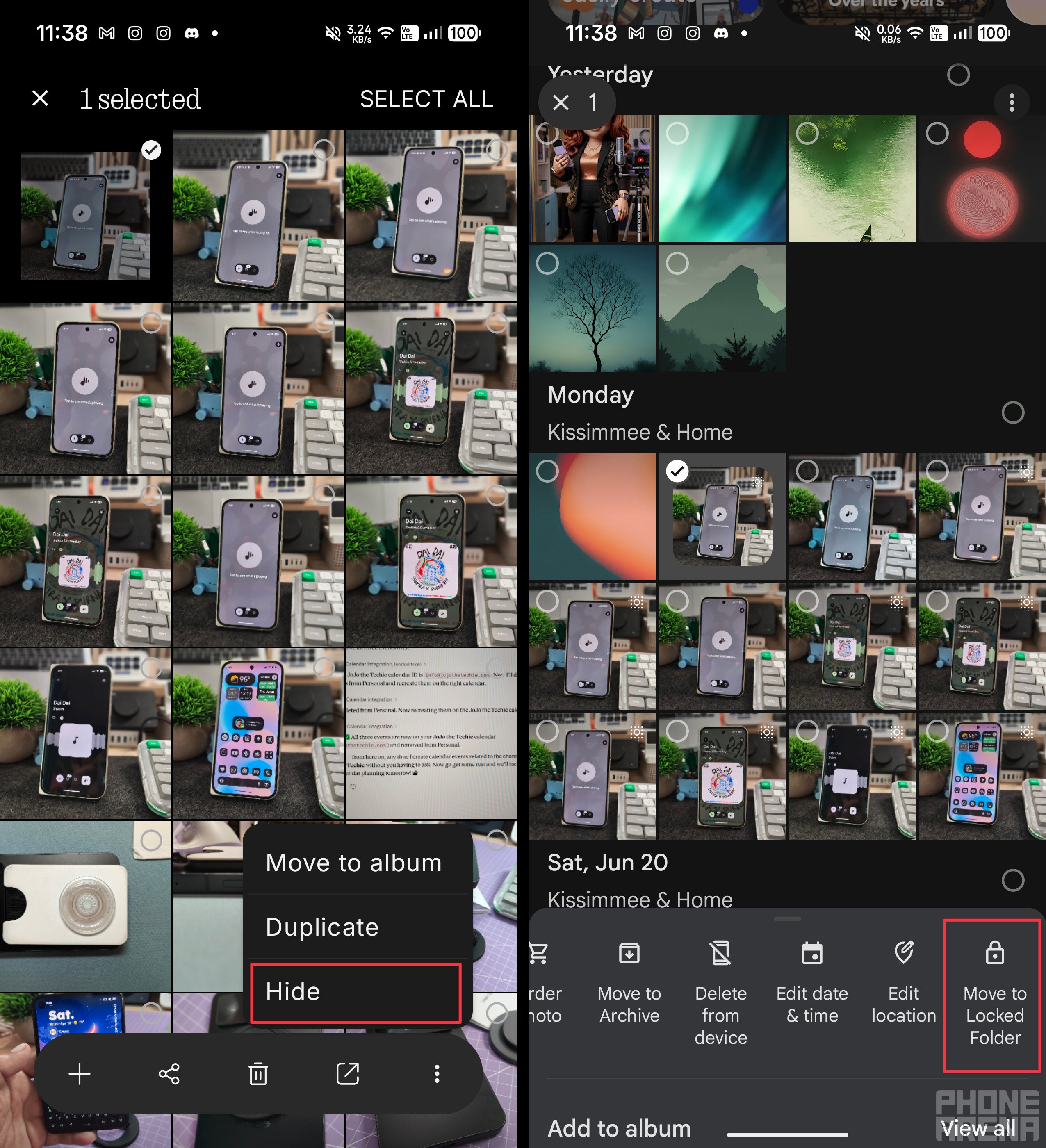
The Nothing Gallery's Hide option on the left, Google Photos' Move to Locked Folder on the right. | Image by PhoneArena
How to move photos to your Google Photos Locked Folder
Open Google Photos and select the picture or pictures you want to secure.
Tap the three-dot menu in the corner.
Choose Move to Locked Folder.
Confirm, and the items leave your main grid for a space gated behind your screen lock.
Hiding photos should not be a gamble
What bugs me is that hiding a photo should be the safe, boring choice, and instead it's been quietly deleting pictures. A built-in toggle looks safe, so people never think to back things up first.
The real takeaway is to stop treating any local hide feature as storage. Move anything you care about into a Locked Folder, and the filename math stops mattering. I'm glad the newer behavior keeps both copies, but a quirk that silently eats photos should never have shipped.
Johanna Romero is a Senior News Writer at PhoneArena, covering mobile technology news across Android, iOS, wearables, and the Google ecosystem she knows best. Drawing on 15 years in IT and tech support from 2007 to 2022, she brings a user-friendly eye for the practical features and lesser-known tricks readers care about. Google named her an official #TeamPixel member in 2022, and she also reviews the latest devices on her YouTube channel, JoJo the Techie.
A discussion is a place, where people can voice their opinion, no matter if it
is positive, neutral or negative. However, when posting, one must stay true to the topic, and not just share some
random thoughts, which are not directly related to the matter.
Things that are NOT allowed:
Off-topic talk - you must stick to the subject of discussion
Offensive, hate speech - if you want to say something, say it politely
Spam/Advertisements - these posts are deleted
Multiple accounts - one person can have only one account
Impersonations and offensive nicknames - these accounts get banned
To help keep our community safe and free from spam, we apply temporary limits to newly created accounts:
New accounts created within the last 24 hours may experience restrictions on how frequently they can
post or comment.
These limits are in place as a precaution and will automatically lift.
Moderation is done by humans. We try to be as objective as possible and moderate with zero bias. If you think a
post should be moderated - please, report it.
Have a question about the rules or why you have been moderated/limited/banned? Please,
contact us.














Things that are NOT allowed:
To help keep our community safe and free from spam, we apply temporary limits to newly created accounts: