How to multitask with the Gemini overlay on Android
Android users can now multitask while Gemini handles their written or vocal prompt in the background.
Gemini overlay adds new multitasking feature | Image by Google
Multitasking with the Gemini overlay on Android is now a possibility thanks to a new option that allows you to shrink the overlay and turn it into a floating bubble. So let's say that you're texting a friend who needs to know the value of a Topps 1968 Horace Clarke baseball card.
First thing you need to do is surface the Gemini overlay
The first thing that you need to do is activate the Gemini overlay by long pressing the power button or by saying "Hey Google." Above the lozenge-shaped prompt bar where you type in your queries to Gemini, you will see a smaller lozenge or pill-shaped element with the word "Minimize." To the left of the word, still inside the pill, is an icon consisting of two half circles facing away from each other diagonally.
Here's an example of how you can multitask with Gemini
The next step is to enter a prompt before you minimize Gemini. You can use a voice prompt or type into the prompt box, "Value of 1968 Horace Clarke Topps baseball card," and then tap the minimize lozenge. The overlay will turn into a black bubble with the Gemini spark inside. You'll see a message from Google that reads, "Gemini is still available while you multitask. Tap to expand. Drag to move or dismiss."
Here are some other articles for you to enjoy:
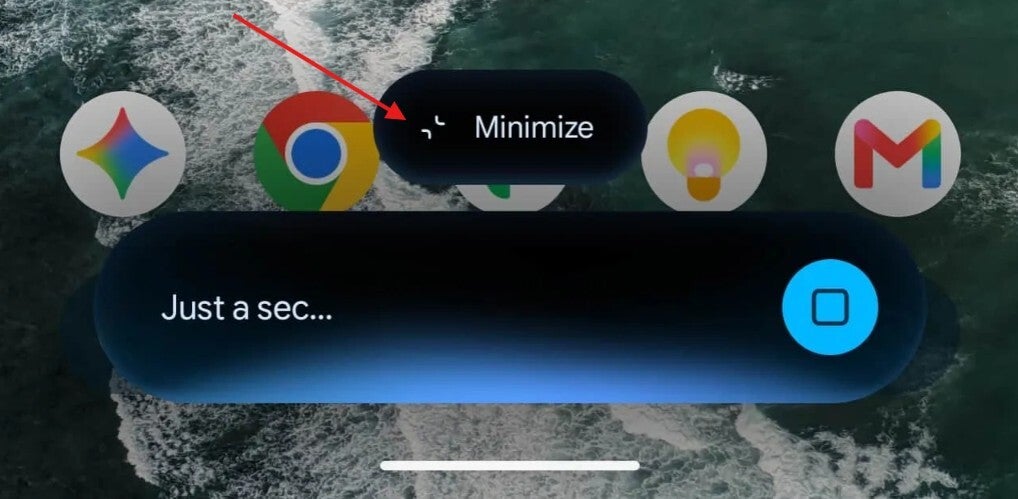
Multitask with the Gemini overlay by turning it into a bubble. | Image by 9to5Google
Text your friend while Gemini comes up with an answer to your query
Typing in the prompt or using a vocal prompt first and then minimizing the Gemini overlay will allow the answer to be ready the moment you expand the bubble. You can text your friend to tell him that you're trying to find out the value of his card while Gemini is doing its thing in the background. After you've sent out the text, you can tap on the Gemini bubble to restore the overlay and get your answer about the value of the card.
Gemini responded by stating that the baseball card that your friend wanted to know about was not going to make him rich as it typically sells for a price between $1 and $3 in fair to good condition. In Mint condition, the card could be worth $25 to more than $100. So you text your buddy this info, or possibly even share the Gemini results directly with your friend via text.
Gemini can be placed in one of six available spots on your Android phone
We should point out that when you minimize the Gemini overlay, the bubble will be placed in one of six positions and won't be allowed anywhere else. Right now, there is a bug that forces the Gemini bubble to be placed in the bottom right corner after the minimize button is pressed.


Popular stories



Latest News



Things that are NOT allowed:
To help keep our community safe and free from spam, we apply temporary limits to newly created accounts: