Google Recorder is working on a setting that lets your recordings show up in regular file manager apps, so they're no longer locked inside the app. It's still hidden in the code, but it could make Recorder on the Pixel 11 Pro and the rest of the best Pixel phones much easier to use, catching up to something Galaxy S26 Ultra owners already take for granted.
Google Recorder's hidden toggle sends recordings to a real folder
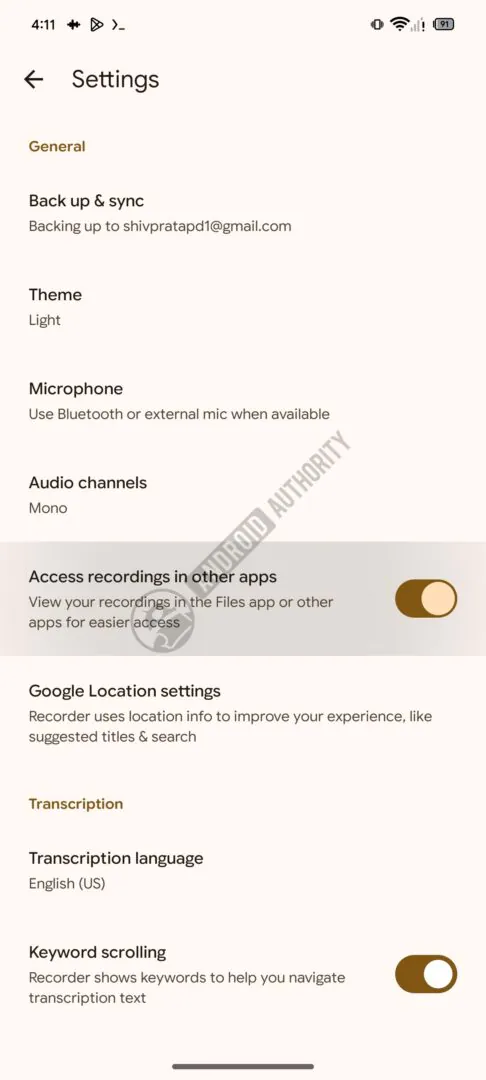
According to a new report, an APK teardown of Google Recorder version 4.2.2 turned up a new toggle in the app's settings called "Access recordings in other apps." The description under it says your recordings will be viewable in Files by Google or any other file manager you like to use.
The new 'Access recordings in other apps' toggle in Google Recorder's settings. | Image by Android Authority
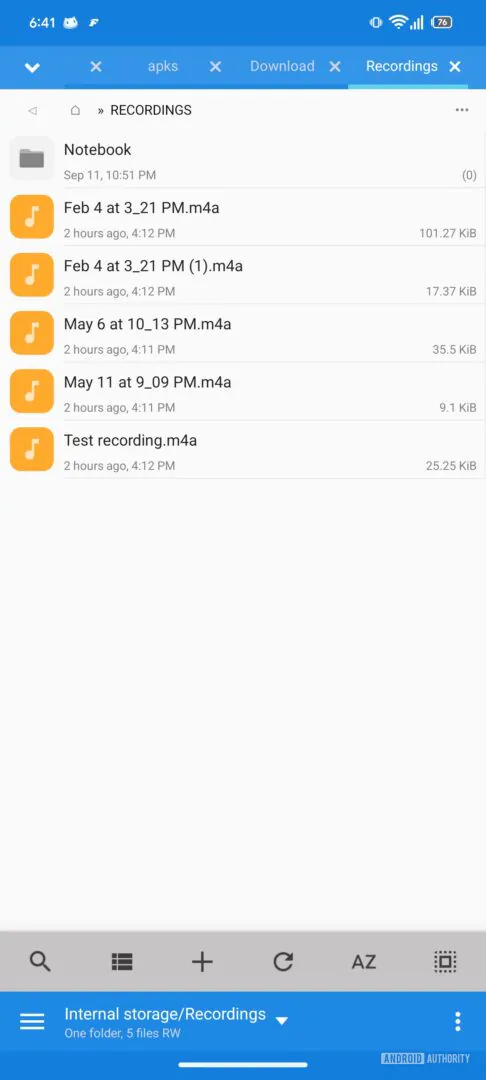
When it's turned on, every new recording is saved to a Recordings folder in your phone's internal storage. It should be noted that the setting only applies going forward, so the recordings you already have stay where they are, although your choice does carry over when you set up the app on a new phone or clear its data.
Google hasn't shared a timeline, and the report expects the toggle to arrive quietly through a server-side update, which is how a lot of Recorder changes tend to roll out.
Recommended For You
What would you do with Google Recorder's new file toggle?
0 Votes
Why Recorder hides your files, and how Samsung and Apple handle it
Right now, Recorder keeps your audio in its own private storage space, which Android walls off from every other app on the phone. Google's Android developer documentation describes this area as the place for data that other apps shouldn't be able to reach, and for something as personal as a recorded meeting, that makes sense as a default.
Samsung has handled this differently for years. Its Voice Recorder app saves straight into a Recordings folder you can open from the My Files app, as Samsung's support page explains, so Galaxy owners have always been able to grab their files without thinking about it.
Apple sits closer to Google here, since Voice Memos keeps recordings inside the app and Apple Support walks you through exporting each one to the Files app by hand. So, if you're on a Galaxy S26 Ultra, this news doesn't change much for you, and Samsung has no reason to worry. iPhone owners hoping for something similar, on the other hand, will likely keep exporting their memos one at a time for now.
What the new Recorder toggle means for your files
Getting a plain audio file out of Recorder today means a trip through the share sheet every single time, which gets old fast if you're moving interviews to a PC or dropping clips into an editor. With the toggle on, new recordings would sit in a normal folder that backup apps, sync tools and your computer can see without any extra steps.
Google Recorder audio files showing up in a file manager's Recordings folder. | Image by Android Authority
Of course, this is apparently is opt-in, so nothing changes unless you flip the switch yourself.
A small Pixel change I'm glad Google is working on
This isn't the flashiest Recorder feature Google has been working on, and we covered a bigger one when Clear Voice first showed up in the app's code. Still, it's the kind of change that makes Recorder fit much better into the way people back up, edit and share their audio.
I like that Google is keeping it optional, since recordings can be sensitive, but I'm hoping it ships soon. I'd personally love to see it arrive with a way to move all of my older recordings over in one go, too.
On the Visible+ Pro plan, you get access to 5G Ultra Wideband data on Verizon's fastest network. Along with unlimited roaming across Mexico and Canada, 2 days of Global Pass per month, 3x hotspot speeds, 4K streaming, and Smartwatch service.
Johanna Romero is a Senior News Writer at PhoneArena, covering mobile technology news across Android, iOS, wearables, and the Google ecosystem she knows best. Drawing on 15 years in IT and tech support from 2007 to 2022, she brings a user-friendly eye for the practical features and lesser-known tricks readers care about. Google named her an official #TeamPixel member in 2022, and she also reviews the latest devices on her YouTube channel, JoJo the Techie.
A discussion is a place, where people can voice their opinion, no matter if it
is positive, neutral or negative. However, when posting, one must stay true to the topic, and not just share some
random thoughts, which are not directly related to the matter.
Things that are NOT allowed:
Off-topic talk - you must stick to the subject of discussion
Offensive, hate speech - if you want to say something, say it politely
Spam/Advertisements - these posts are deleted
Multiple accounts - one person can have only one account
Impersonations and offensive nicknames - these accounts get banned
To help keep our community safe and free from spam, we apply temporary limits to newly created accounts:
New accounts created within the last 24 hours may experience restrictions on how frequently they can
post or comment.
These limits are in place as a precaution and will automatically lift.
Moderation is done by humans. We try to be as objective as possible and moderate with zero bias. If you think a
post should be moderated - please, report it.
Have a question about the rules or why you have been moderated/limited/banned? Please,
contact us.








Things that are NOT allowed:
To help keep our community safe and free from spam, we apply temporary limits to newly created accounts: