Many humans get criticized by their spouses or friends for answering a question too quickly as they respond to a query without thinking. Most AI Large Language Model (LLM) platforms don't do this. In fact, if they can be accused of anything, some of the newer models take a longer time to respond to questions. If you are using the Pro or Thinking Mode options with the Gemini iOS or Android app, you might notice a new listing on the screen.
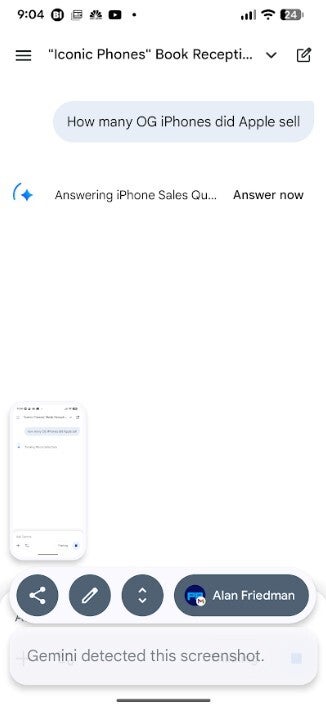
Using the Pro or Thinking Modes in the Gemini app, you might want to tap on "Answer now" for a faster response on Android
Next to the circular status indicator that moves in a circle around the Gemini icon you might see a listing that says, "Answer now." Pressing on that will have Gemini skip "in-depth thinking" in order to get an answer to you faster. You'll be reminded of your decision to press the button as you'll see a confirmation that Gemini is "Skipping in-depth thinking" just before your answer arrives. You can see which Mode Gemini used to answer your query by going to the very end of its response and pressing on the three-dot overflow icon.
The Gemini for Android app shows the "Answer now" option that skips in-depth thinking to get a faster response. | Image credit-PhoneArena
Recommended For You
According to the gang in Mountain View, the "Answer now" feature replaces the "Skip" button on Android. This is rolling out now and is on my Pixel 6 Pro running Android 16 QPR3 Beta 2. It also is on the Gemini app on my iPhone 15 Pro Max powered by iOS 26.3 Beta 2. However, the iOS version of Gemini doesn't use the "Answer now" prompt and says "Skip" instead. Pressing on "Skip" shows the same "Skipping in-depth thinking" result that Android users see when they tap on "Answer now."
Will you use the "Answer now" feature?
10 Votes
Yes. It will give me my answer faster.
60%
No. I usually stick to the Fast Mode on Gemini.
40%
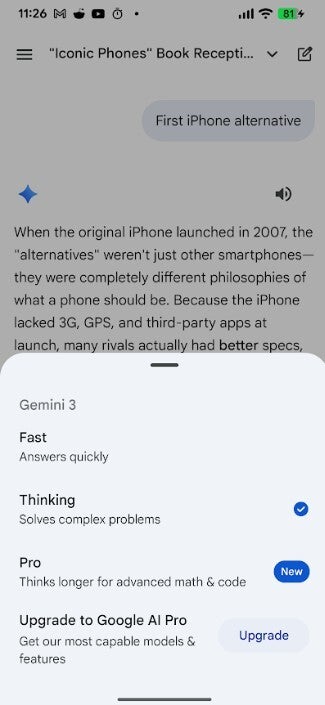
To switch to the Pro or Thinking Modes that include the "Answer now/Skip" features on Android and iOS respectively, open the Gemini app on your handset. In the bottom bar of the app, to the left of the microphone icon, make sure it says Pro or Thinking if you want the option to skip in-depth thinking.
The different Modes available to Gemini users. | Image credit-PhoneArena
Where to find the Gemini app for Android and iOS
If the lozenge to the left of the microphone con says Fast, tap on it to switch to Thinking or Pro. Fast, obviously, answers questions fast. Thinking solves complex questions, while Pro thinks longer for advanced math and code. Instead of changing this setting every time you have a less complex question that you'd rather have answered quickly, the "Answer now" prompt should be used by Android users and the "Skip" prompt by iOS users.
You can install Gemini for iOS by tapping on this link. Tap on this link in order to download the Gemini for Android app.
Six-month unlimited plan is now 57% off
$90
$210
$120 off (57%)
Mint Mobile is now allowing you to get whichever plan you like for either three, six, or 12 months for just $15/mo. If you go for the six-month unlimited service, for instance, you'll now have to pay just $90 upfront instead of $210.
Alan, an ardent smartphone enthusiast and a veteran writer at PhoneArena since 2009, has witnessed and chronicled the transformative years of mobile technology. Owning iconic phones from the original iPhone to the iPhone 15 Pro Max, he has seen smartphones evolve into a global phenomenon. Beyond smartphones, Alan has covered the emergence of tablets, smartwatches, and smart speakers.
A discussion is a place, where people can voice their opinion, no matter if it
is positive, neutral or negative. However, when posting, one must stay true to the topic, and not just share some
random thoughts, which are not directly related to the matter.
Things that are NOT allowed:
Off-topic talk - you must stick to the subject of discussion
Offensive, hate speech - if you want to say something, say it politely
Spam/Advertisements - these posts are deleted
Multiple accounts - one person can have only one account
Impersonations and offensive nicknames - these accounts get banned
To help keep our community safe and free from spam, we apply temporary limits to newly created accounts:
New accounts created within the last 24 hours may experience restrictions on how frequently they can
post or comment.
These limits are in place as a precaution and will automatically lift.
Moderation is done by humans. We try to be as objective as possible and moderate with zero bias. If you think a
post should be moderated - please, report it.
Have a question about the rules or why you have been moderated/limited/banned? Please,
contact us.














Things that are NOT allowed:
To help keep our community safe and free from spam, we apply temporary limits to newly created accounts: