Last May, during Google I/O, the Alphabet subsidiary officially announced the new "Ask YouTube" search tool after premium subscribers were allowed to test it. It first appeared as an experimental conversational tool found in the main YouTube search bar on the streaming platform's website and TV platforms.
"Ask YouTube" allows you to ask questions in a conversational manner
With "Ask YouTube," users ask questions in a conversational manner. Here are some examples of questions you can "Ask YouTube" and how you can ask them:
"Show me a step-by-step tutorial on how to replace the battery on a Google Pixel 8 Pro."
"Find videos explaining how high-bandwidth memory works in simple terms."
"Find comparison videos testing the camera performance of the iPhone 15 Pro Max versus the Pixel 8 Pro."
The feature is rolling out now to Android and iOS users
In a blog post, Google says that the "Ask YouTube" feature is now available for the iOS and Android mobile YouTube app. The search giant added, "This reimagined, conversational search tool allows users to ask complex queries, refine with follow-up questions, and receive results in an interactive format, whether they’re on the go or using voice commands from the couch."
Ask YouTube can be used before, during, and after watching a video
Google added that it has seen search requests using the new conversational format of "Ask YouTube" asking how users could make their own Halloween costumes (a very timely request), and how a user can cut their own bangs.
The conversational Ask YouTube feature can be used to find a video and is now available for the mobile YouTube app. | Image by PhoneArena
How to use "Ask YouTube"
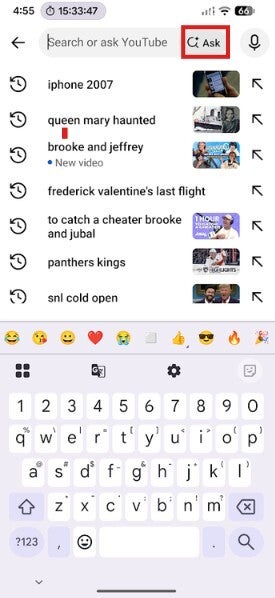
To use "Ask YouTube" on the iOS or Android version of the YouTube app, open the app, tap Search and then tap on Ask. You can use natural language to ask your question or prompt and you'll receive a response that includes the answer, which might include relevant video clips.
If you're watching a video and want to use "Ask YouTube," look for the Ask button (featuring the Gemini "sparkle") found below the video player between the Share and Download buttons. You might also find suggested prompts like "Summarize the video." If you don't see it, tap on the three-dot menu icon.
Recommended For You
Google is also expanding the use of "Ask YouTube" on the watch page to include Shorts and live streams. This will allow users to receive instant answers as the action takes place. It should be pointed out that "Ask YouTube" on web, TV, and mobile is only available in the US.
I use the YouTube app mostly to...
1 Votes
When you open "Ask YouTube," Google's generative AI generates contextual promots based on the content of the video you watched and there is an open text bar at the bottom where you can type in your own custom query.
Whether you are looking for a certain video or watching one and have a question about its content, you can now use natural language to ask YouTube the question you want answered even when on the go..
Check oiut these great articles that you can read now:
Mint Mobile is celebrating its 10-year anniversary with a special offer on its six-month subscription plans. For a limited time, you can get your preferred tier (6GB, 17GB, 23GB or unlimited) for just $10/mo. That saves you between 50% and 71% on the carrier's mobile plans, making it way easier to recommend.
Alan, an ardent smartphone enthusiast and a veteran writer at PhoneArena since 2009, has witnessed and chronicled the transformative years of mobile technology. Owning iconic phones from the original iPhone to the iPhone 15 Pro Max, he has seen smartphones evolve into a global phenomenon. Beyond smartphones, Alan has covered the emergence of tablets, smartwatches, and smart speakers.
A discussion is a place, where people can voice their opinion, no matter if it
is positive, neutral or negative. However, when posting, one must stay true to the topic, and not just share some
random thoughts, which are not directly related to the matter.
Things that are NOT allowed:
Off-topic talk - you must stick to the subject of discussion
Offensive, hate speech - if you want to say something, say it politely
Spam/Advertisements - these posts are deleted
Multiple accounts - one person can have only one account
Impersonations and offensive nicknames - these accounts get banned
To help keep our community safe and free from spam, we apply temporary limits to newly created accounts:
New accounts created within the last 24 hours may experience restrictions on how frequently they can
post or comment.
These limits are in place as a precaution and will automatically lift.
Moderation is done by humans. We try to be as objective as possible and moderate with zero bias. If you think a
post should be moderated - please, report it.
Have a question about the rules or why you have been moderated/limited/banned? Please,
contact us.







Things that are NOT allowed:
To help keep our community safe and free from spam, we apply temporary limits to newly created accounts: