Android 17 Beta 2 is here with new genius multitasking feature
Google has returned the Pixel Launcher search bar to its previous state, fixed 16 bugs, and much more.
Android 17 Beta 2 has arrived. | Image by PhoneArena
Google has released Android 17 Beta 2 only 13 days after dropping the first Beta, a quick turnaround by Google. The latest Beta is focused on security and changes the look of the location, camera, and microphone activity indicators that let you know that your Pixel is using one of these features. Previously shaped like a small pill, in Android 17 Beta 2 the indicator is now a small circle with the appropriate icon inside the circle.
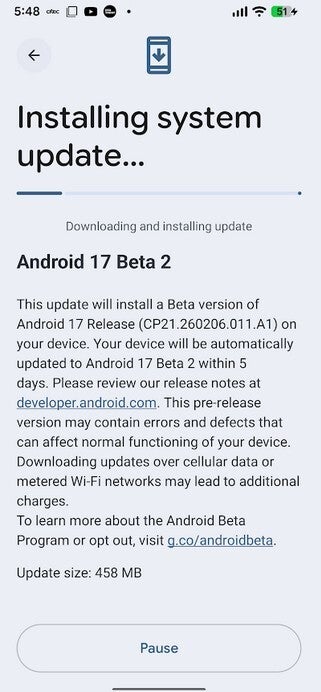
Google releases Android 17 Beta 2. | Image by PhoneArena
You'll see a pin icon to indicate that location data is being used, a camera icon to show that your Pixel is using its camera, and an icon that looks like a microphone reveals that the Pixel's microphone is being used. This feature is not appreciated as much as it should be since it can instantly alert a Pixel user if someone has access to his/her camera, location data, or microphone. If two or more features are used at the same time, the icons show up inside a pill. Android 17 Beta 2 also adds a satellite connectivity tile for Quick Settings.
Google brings back the previous Pixel Launcher Search bar
In Android 17 Beta 1, Google changed the look of the Search bar on the Pixel Launcher, removing the ring around the bar that borrowed a color theme from the user's wallpaper. However, in Android 17 Beta 2, the old Pixel Launcher returns. The AI Mode icon, which was added to the main search bar in the last Beta, is back inside its own circle at the end of the search bar.
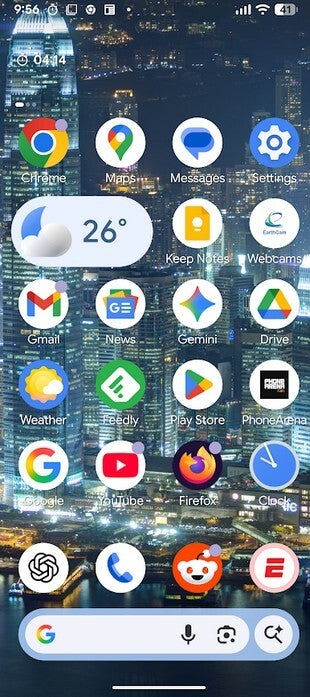
Google brings back the previous Search bar for the Pixel Launcher. | Image by PhoneArena
In a big move for multitaskers, Android 17 Beta 2 turns any app into a Bubble. Long-press an app in the Pixel Launcher, and one of the options you'll see is "Bubble." Tap on it and the app will shrink and become a floating circle that will remain on top of whatever you are doing at the moment. You can move it around the screen, and tapping on it will open the page as a small resizable window.
Foldables, tablets, and large-screened devices will have an anchored taskbar where the app bubbles will dock instead of floating around the screen. Like a taskbar on a desktop, you can have multiple apps "bubbled" and flick between them without ever having to leave your full-screen app. Having 3 or 4 open app bubbles can slow down the performance of your phone.
How to join the Android Beta Program
If you're subscribed to the Android Beta program, go to Settings > System > Storage > Software updates > System update. Enrolling in the Android Beta program is a snap. Just make sure to back up your phone before you install the Beta. Keep in mind that you'll be stuck with the Beta until the stable version of Android 17 is released. If you try to leave the Beta early, you will be forced to wipe your apps.
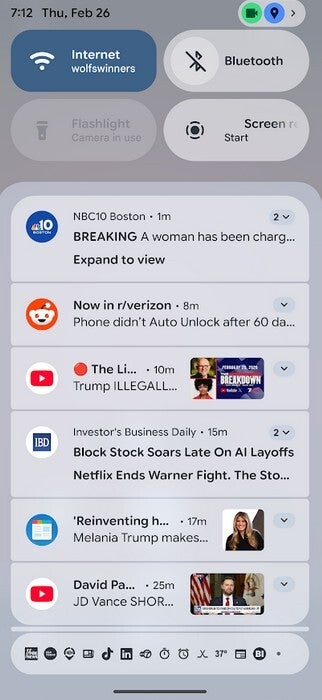
In the profile icon in top right you will see the new circle-shaped privacy indicators. | Image by PhoneArena
Go to google.com/android.beta or tap on this link. Tap the box on the Android Beta Program website that says "View your eligible devices" and you'll be sent to a part of the site that shows a photo of your Pixel model. Tap the "Opt-in" box. Eventually you'll receive a software update containing the latest Beta version of Android 17.
16 bugs are fixed in Android 17 Beta 2
The Android 17 Beta 2 update also contained a rather large number of bug fixes. For example, one bug that caused a system crash and spontaneous reboot that made it nearly impossible to use an impacted device is fixed by installing this Beta release. Another bug that prevented some Pixel users from opening the Wallpaper & Style settings from the home screen is also fixed. So is another bug that prevented Pixel users from playing selected previews.
Another bug caused redundant notifications to appear following a system update. Overall, there are 16 issues fixed in Android 17 Beta 2.


Popular stories


Latest News
Things that are NOT allowed:
To help keep our community safe and free from spam, we apply temporary limits to newly created accounts: