Motorola Moto 360 Review
Introduction
Motorola has been fighting an uphill battle for some time now, that’s just the reality of things. In today’s bustling smartphone industry, one that’s being shaped by the bigger, more renowned players like Apple and Samsung, we have forgotten how Motorola played its part to shape Android’s success in the space. Heck, it was only a few years ago when the Motorola DROID launched to much acclaim – putting the spotlight once again towards the company.
- Wall charger
- Charging dock
- Quick start guides
Design
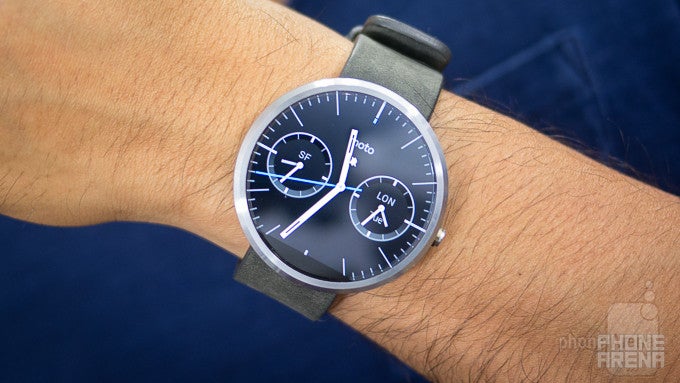
The Moto 360 makes it hip to be circular, making it THE smartwatch we don’t mind resting on our wrist.
Until now, all of the popular smartwatches have been square in shape. Samsung’s line of smartwatches has been squarish for the most part, although, new models like the Gear Live are cut accordingly to contour the wrist more comfortably. Meanwhile, the LG G Watch is simply an ugly duckling with its cheap plastic casing and far-from-ergonomic design. Fortunately, for all of us, Motorola is finally the one to deliver a smartwatch design we don’t mind wearing and showing off!
Huey Lewis and the news argued longingly that it’s “hip to be square” in the band’s memorable song from the 80s, but in today’s smartwatch space, the Moto 360 makes it hip to be circular. In comparison to the design styles of its rivals, the Moto 360 amazes us with its iconic, industrial design – one that’s sturdy and luxurious from head-to-toe. Come to think about it, the design looks more like a traditional timepiece, as opposed to a tech gadget.
Right away, we’re locked into its round display, which is undeniably its standout feature, but before we get into the details regarding that, let’s take a look at some of the design’s qualities. First and foremost, the bezel is constructed from high-quality stainless steel, which not only houses its internal electronic components, but acts to protect it as well. Thankfully, the case has an IP67 certification, making it water resistant in up to 1 meter of water for up to 30 minutes. Washing our hands, jumping into the shower, or using it in the rain doesn’t faze the Moto 360 – so that’s one less thing we have to worry about with this smartwatch.
Of course, the Moto 360’s size can become a nuisance to those with smaller hands. Most men will find its size to be ample, but for females, it proves too much of a distraction. It’s simply too big for some of them! Despite that, we have to applaud Motorola for its efforts, mainly because this is one of the best designed gadgets we’ve seen in recent memory!
Display
Armed with an eye-caching round display, it’s absolutely unique and classy. Still, we wish its resolution was just a smidgen higher.
A first of its kind, the Moto 360 is the first watch powered by Android Wear to feature a round display. Specifically, it’s a 1.56-inch 320 x 290 (205 ppi) LCD display with Gorilla Glass 3 that we’re presented with – and boy does it impress and astound! Technically, it’s not larger or higher resolution than the displays in the Samsung Gear Live or LG G Watch, but nevertheless, we’re most intrigued by its round nature.
Using good old LCD technology, we’re better able to view the screen outdoors, where the sun’s presence can become a distraction. Unlike the AMOLED screen of the Samsung Gear Live, the Moto 360’s round LCD display is still visible under the harsh conditions – further aided by its decent viewing angles. Colors, too, are represented nicely, as it produces tones that are vibrant and lively. Interestingly, there’s an ambient light sensor in the Moto 360, enabling the display to adjust its brightness automatically to adapt to the conditions. That’s something that the aforementioned smartwatches lack.
Tapping and swiping on the screen with our fingers accumulates a fair amount of smudges and fingerprints, but we’re able to remove them easily with a quick wipe from our shirt. Thanks to Gorilla Glass 3, we’re not too concerned about this one getting scratched, but at the same time, it helps to give the screen a very smooth touch. Still, when it’s turned off, the pitch black look of the screen is equally able to attract attention – due to its stone polished look.
Interface and Functionality
For the most part, the Android Wear experience doesn’t differ here from what we’ve seen already, but Motorola throws in two heart rate tracking apps to help motivate us to be active.
Google’s new Android Wear is still in its infancy, but it’s slowly seeing more support from third-party apps. Therefore, the core experience of the Moto 360 doesn’t differ all that much to what we’ve seen already with other Android Wear smartwatches. At the heart of it all, Android Wear has a uniform approach that makes the experience identical between all Android Wear smartwatches. Now, we won’t get into all of the details, seeing that we covered the noteworthy things in previous reviews, but we’ll quickly mention what’s different here on the Moto 360.
Complementing it is the “Heart Activity” app, which tracks our overall health activity over the course of a week. In order to do this, the Moto 360 automatically measures our heart rate every 30 minutes – where it displays the data in a weekly view, so we can gauge our level of engaement. The premise of it all, of course, is to try and get us to become more active throughout our day. It’s definitely going in a good direction, much better than Google Fit, just because it’s doing something to motivate us to improve our results.
Processor and Memory
Compared to its rivals, the performance here is just a notch behind, but it’s nothing terrible.
Crammed into the casing, the Moto 360 is powered by a TI OMAP 3 processor coupled with 512MB of RAM. Playing around with some pre-production units at Motorola’s headquarters in Chicago, we were pretty pleased by the snappy and fluid response of the Moto 360. However, after messing around with our review unit, a final retail one, we do notice that its performance isn’t as buttery smooth. In comparison, the Samsung Gear Live’s performance seems snappier. Well, it’s not sluggish or anything like that, as the Moto 360 handles all operations without any noticeable hitches to its performance, but it’s just a notch behind the performance of its existing competition.
Connectivity
Relying on Bluetooth 4.0 LE connectivity to interact with an Android powered smartphone (a Moto X in our case), the Moto 360 is able to establish the connection for approximately 25 feet indoors – matching the distance of the Gear Live. In order to initially pair it, we’re required to download the Android Wear app from the Google Play Store, which does nothing more than initializing the connection and being a hub to browse for certain compatible Android Wear apps.
Multimedia
Okay, so the only multimedia function that we have access to on the watch is controlling music – and that’s all folks! After selecting a song to play, whether through Android Wear’s “okay Google” function, or merely selecting it through our connected smartphone, the smartwatch is transformed into nothing more than a controller. Not only do we have access to the pause/play function directly from the card, but swiping over gives us forward and reverse functions as well. And that, folks, pretty much sums up the extent of its multimedia offering at the moment.
Calls
When an incoming call is being received, we’re given the choice of accepting or rejecting it. Now, seeing that the Moto 360 doesn’t feature its own built-in speaker, we’re left to using our connected smartphone for all of our chatting. One would think that the smartwatch’s microphone could be used for the occasion, but it’s not.
Battery
You’ll want to set the ambient screen feature to off in order to preserve battery. Typically, it’s able to get us through a solid one-day of usage.
In our experience, the Moto 360’s 320 mAh battery delivers the same results we’ve seen with the other two Android Wear smartwatches we reviewed – so it’s nothing too outstanding. Depending on how you set it up, you’ll be able to achieve easily an entire day without the need to recharge at any point.
Oh yeah, the Moto 360 features wireless charging as well. The included docking station doubles as a nifty bed side alarm clock that gives us visibility to the time and the 360’s charging status. Needless to say, we prefer this method over the proprietary cable methods of the Samsung Gear Live and LG G Watch.
Conclusion
Finally, we have a smartwatch we can enjoy wearing on our wrist! Everything about the Moto 360’s design screams cutting-edge, putting to shame the designs of its rivals. On top of being a premium looking contemporary timepiece, there’s this futuristic appeal that radiates exquisitely from its round display. Until now, everyone has been going with a traditional squarish display – so it’s refreshing to find a circular one here!
Even though it certainly gets our attention for its impressive design, its functionality still adheres to the principles of Google Wear. Knowing that, there’s nothing terrible new that we haven’t seen before, or on other Android Wear smartwatches – so the Moto 360’s usefulness will hinge solely on how the platform matures.
Priced at $249.99 for the base model, one that comes with a leather band, it’s more expensive than the $200 Samsung Gear Live and $230 LG G Watch. Considering that the three share the same core experience, the deciding factor here is the Moto 360’s supreme design. Sure, it’s an extra $50 over the formidable Samsung Gear Live, but it’s one we’re happy to dish out to have our wrist graced with such an elegant timepiece. Without a doubt, it’s a marvelous masterpiece that makes it hip to be circular.
Software version of the review unit:
Software Version: 4.4W.1
Build Number: KGW42N

Follow us on Google News


Things that are NOT allowed:
To help keep our community safe and free from spam, we apply temporary limits to newly created accounts: