Apple iPad mini 4 Review

Update: You can now read our iPad Pro 9.7-inch review!
Introduction
Apple’s latest iPad mini, the 4th generation model to be exact, helps to diversify the company’s portfolio, which recently got expanded with the introduction of the iPad Pro, but for those looking to keep it slim, compact, and simple, the iPad mini 4 is always worth the look. However, are there enough improvements and upgrades to warrant a refresh, or an incentive to upgrade?
The package contains:
- Apple iPad mini 4
- Wall Charger
- Lightning Cable
- Apple decals
- Users start guide
Design
Same premium iPad mini design, but with additional trimmings.
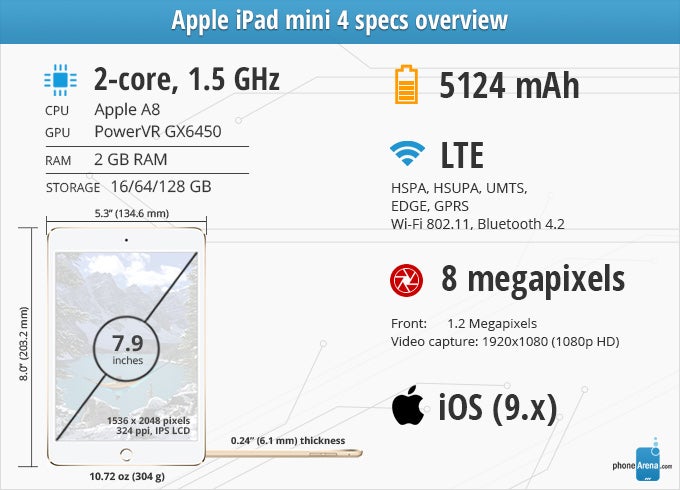
Did we really expect anything drastic or different with its design, especially when the iPad line as a whole has its own characteristic look and feel? Not really, but for anyone upgrading from the iPad mini 3 or 2, you might find it a bit surprising to know that your existing set of cases and covers won’t be compatible, despite its overall design DNA being relatively unchanged. Technically speaking, the iPad mini 4’s dimensions have subtle changes that in many aspects trim off the fat to give it an incremental improvement, like its lighter weight (304 g) and slimmer profile (0.24” thin). So yeah, you’re going to need to buy new cases for this one.
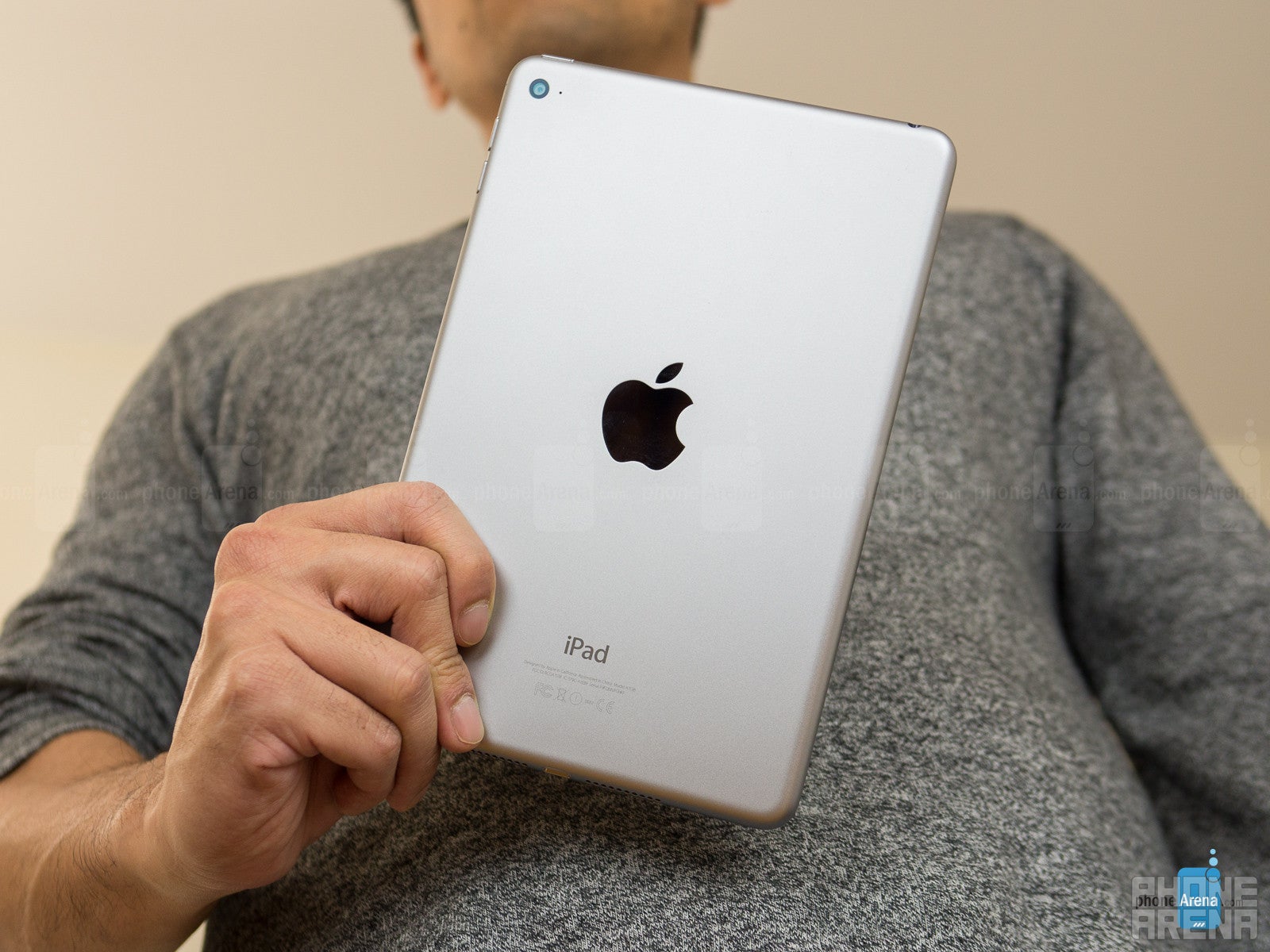
True to its form, it’s the same aluminum chassis that we’ve seen before – with the chamfered beveled edge running the entire perimeter of the tablet. While its design is a recycled one, it’s nonetheless still one of the more premium-made tablets on the market, which is a comforting sight to behold. It’s thin, incredibly light in weight, and for the most part, it’s also easy to handle despite being on the wider side. Everything else about the tablet is unchanged from before, too, so its various ports, buttons, and Touch ID finger sensor are situated in all their usual locations.
Display
Brighter and more color accurate, this Retina Display is definitely an improvement.
With the iPad mini 4, it’s no shock to find a display with the same characteristics – a 7.9-inch 1536 x 2048 IPS-LCD based panel with an oleophobic coating. Details, naturally, are rich and plentiful here once again, ensuring that our eyes won’t have any issues making out what’s on screen.
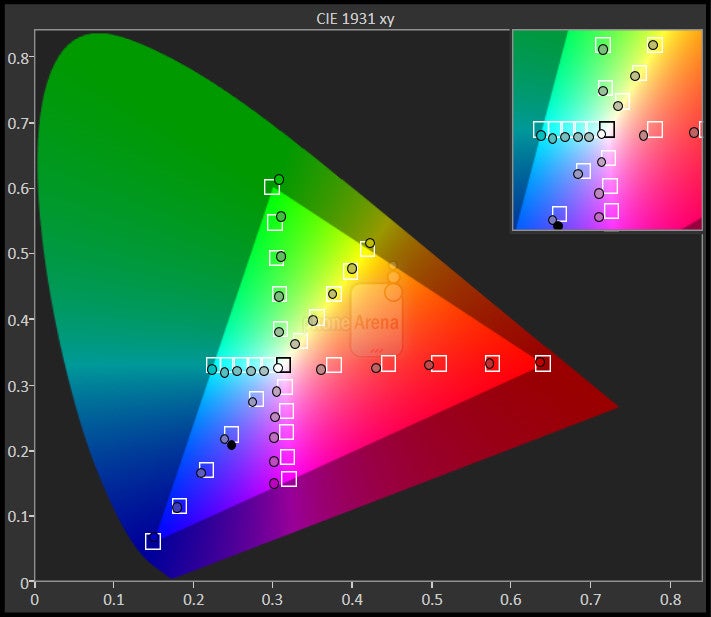
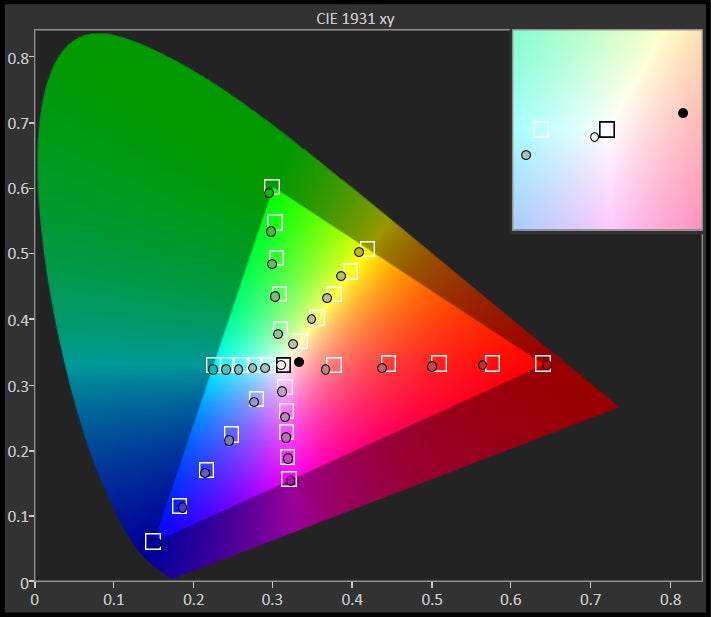
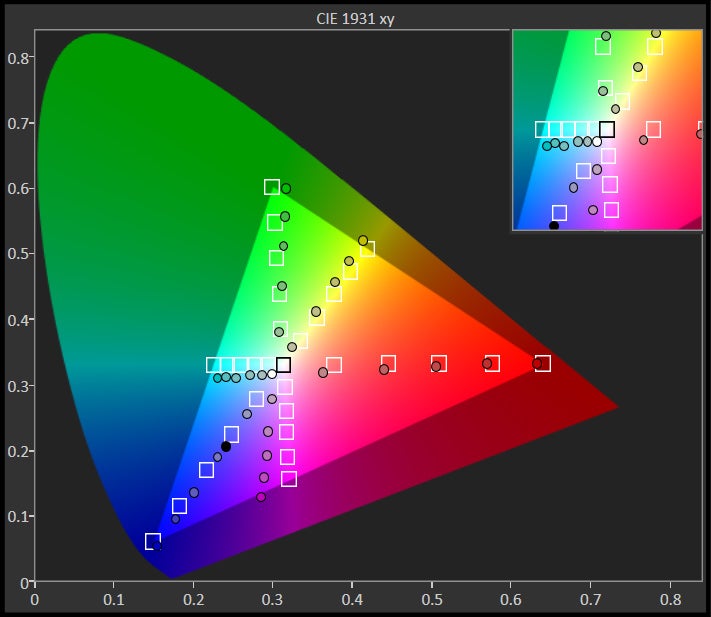
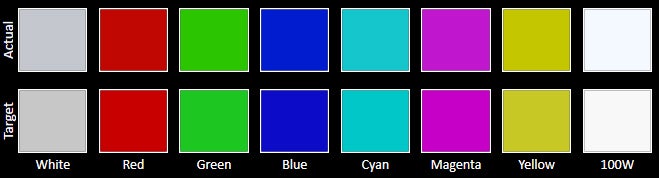
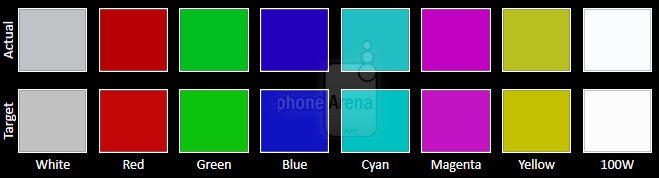
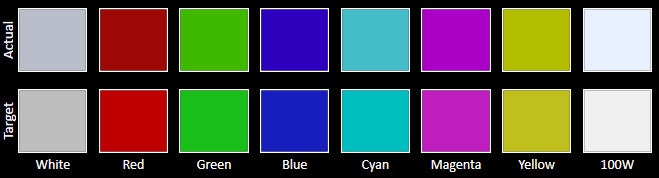
Even though it seems that nothing has really changed here as our eyes look on, we should point out that the display is noticeably brighter and more accurate with its color reproduction. This time, it achieves a peak luminance of 426 nits, which makes it far more visible outdoors when compared to last year’s reach of 312 nits. In addition, Apple improved its calibration in the sRGB color gamut chart, as both the color blue and green are more accurate – hitting each reference value squarely this time.
Contrast is a bit lacking, with darker greys being brightened a bit, but overall, we welcome this brighter and more color accurate Retina Display.



Interface and Functionality
All of iOS 9’s multi-tasking features give this iPad some serious productivity that we haven’t seen before.
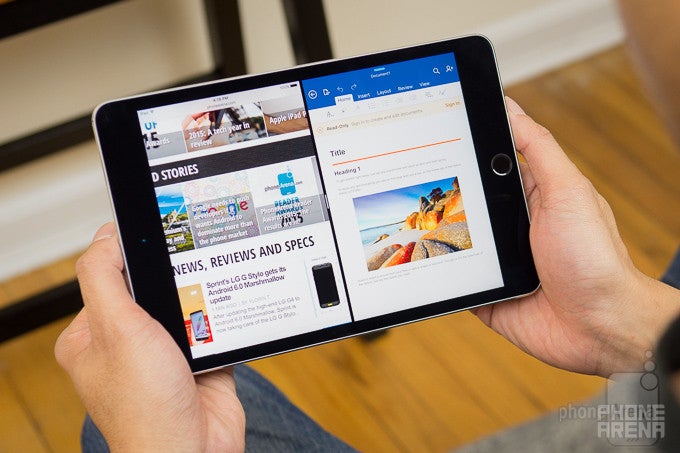
Thanks to the introduction of Apple’s new iOS 9 software, the iPad mini 4 gets treated to an even more advanced multi-tasking experience – a key feature that prevented it from competing on the same level of productivity as Samsung’s tablets. The new multi-tasking enhancements are detailed below. There are three multitasking features, and of the mini iPads, only the iPad mini 4 supports all three of them.
Judging its effectiveness is deceiving when you try and compare it to the iPad Pro, which benefits more in the multi-tasking department due to its vast amount of screen real-estate. Naturally, our pace is a little lax when it comes to heavy duty work with the mini 4, but rest assured, there’s nothing that prevents the iPad mini 4 from getting stuff done on the road too. And yeah, it’s better for reading as well.
Slide Over
Split View
Using the Slide Over feature in landscape opens up the invitation to get into Split View, which merely dishes up equal layouts for the two apps in use – so it’s essentially split screen operation down the middle. In this mode, the space occupied by the two apps are the same, presenting us with a more ideal representation of multi-tasking. Still, the limitation here, just like Slide Over, is the fact that not every app is optimized for this.
Picture in Picture
The last element in iOS 9’s enhanced multi-tasking portfolio is Picture in Picture. As its name so happily implies, we can FaceTime or watch a video in a separate, shrunken down window – similar to how many Android devices have done for a long time now.
Messaging
Due to its smaller footprint, the iPad mini 4 poses a challenge when it comes to typing stuff up with its on-screen keyboards. Honestly, we never reach that area of comfort using either orientations, since it’s just too cramped for our liking with the landscape option, and conversely, too wide for our thumbs to encompass the entire layout with the portrait one. Still, with some patience and diligence, we can type up long passages with few mistakes along the way.
System Performance
There’s no shortage of peppiness with this one!
Better, faster, and yes, it’s stronger too, thanks to the new Apple A8 chipset that’s under the hood and powering the iPad mini 4. This dual-core 1.5GHz configuration based on 64-bit architecture, accompanied by 2GB of RAM and the PowerVR GX6450 GPU, is claimed to deliver a 30% improvement with its processing performance – and up to 60% faster graphics rendering as well.
The claims, by default, are noteworthy in every respect, but unnecessary to say the least. That’s because its real-world performance substantiates what we already know, and it’s that the iPad mini 4, just like all the other iPads in Apple’s portfolio, delivers an unprecedented responsiveness to everything. Whether it’s juggling a couple of apps with its new multi-tasking features, or running any of today’s benchmark gaming titles, the iPad mini 4 is a beast with its performance.
Camera
With a slight hardware upgrade, its performance is still top-notch amongst tablets.
After several years of donning a 5-megapixel rear camera, Apple has finally upgraded it to an 8-megapixel one for the iPad mini 4. However, it’s still accompanied by an f/2.4 aperture lens, BSI, and digital image stabilization. The new upgrade is fine and dandy, but the front-facing iSight camera is still at a mere 1.2-megapixels, so it’s not as likely to replace your smartphone any time soon for selfies.
Beyond the hardware, there’s nothing out of the ordinary with the camera interface, since it’s basically the same exact one used by all other iPads. While it’s simple and straightforward, allowing shutterbugs to quickly snap shots without much delay, we’ve grown accustomed to seeing just a little bit of flexibility and leeway given to us by the manual controls of other camera interfaces – like Samsung’s in particular. The only things we can tinker with are the focus and exposure, which are enabled by tapping anywhere on the screen. As for shooting modes, it’s all the same from before, so that includes HDR, panoramic, and a few others.
Image Quality
In terms of quality, it suffices for a tablet, especially if it’s the sole thing at our disposal when an opportunity arises. Outdoor shoots with bright lighting conditions come out sharp looking as always, filled with plentiful fine details, natural colors, and they’re evenly exposed for the most part. The only time its quality degrades is when it’s used under low light, which much like any device, is the expected outcome.
Therefore, it doesn’t surprise us that photos come out softer toned with some digital noise present in the shot, but it’s not entirely a wash in comparison to some budget tablets we’ve come across. Overall, the performance is absolutely above average for a tablet, but nothing terribly outstanding in comparison to the performance of today’s high-end smartphones.
Apple iPad mini 4 sample images
Video Quality
Over on the video recording front, it’s rather unfortunate that it tops out at 1080p capture. Don’t get us wrong, it’s effective at recording some decent footage, but for something equipped with a powerful chipset under the hood, we were expecting to have 4K recording as an option, as well as slo-mo capture at 1080p too, but we don’t. On top of all that, it’s still quite maddening to find that there’s no continuous focus either here, which is something we were rallying to get ever since last year’s iPad mini 3.
Apple iPad mini 4 sample videos
Multimedia
The speakers might emit a weaker output, but it still has some bite to it.
With the dual-speaker setup, it’s unfortunate to find out that its overall volume output is lessened – giving it a weaker tone in comparison to its predecessor. In our audio test, it musters up 73.1 dB of audio power, a lower result than the iPad mini 3’s achievement of 76.6 dB. After relishing over the iPad Pro’s immersive audio experience, it’s really unlikely that the iPad mini 4 will command the same respect. Regardless, there’s some punchiness that somehow manages to give its quality some substance.
For those who view the iPad mini 4’s screen size as being comfortable for watching videos, they’ll appreciate that there’s now a multi-tasking element in play with the experience, as videos can be ‘minimized’ and overlaid over other apps in its own separate window. Luckily, the iPad mini 4 is monster with its performance, since it’s endowed with incredible power to playback all sorts of videos flawlessly and without hitches.
Battery
It might be a lower capacity battery than last year, but it’s longer with its performance.
This easily translates to an all-day battery life, especially for power users who are more demanding. Even though its recharge time of 191 minutes is decent for a tablet of its caliber, it’s by comparison slower to some its direct rivals – like the Samsung Galaxy Tab S2 8.0-inch, which takes only 152 minutes to achieve full charge.
Conclusion
Anyone looking for a compact sized tablet will be delighted by what the iPad mini 4 brings to the table. It’s premium in its construction, nearly flawless with its processing performance, and all the new goodies included with iOS 9 undeniably elevates it to a higher level that we haven’t seen before in the series – one that finally gives us true multi-tasking, as opposed to the apps switching experience we’ve been accustomed to having. Everything about the iPad mini 4 points to a solid recommendation.
But is it a compelling upgrade option? At the very least, you’re going to shell out $399.00 to pick up the iPad mini 4, which is a Wi-Fi only model with a pathetic 16GB of internal storage. The price, of course, can go up to as much as $729.00 for the 128GB model with cellular connectivity. Needless to say, if you're currently sporting an iPad mini 3, or even 2, and don't notice any meaningful problems with their operation, you might want to hold off from getting the mini 4 – sure, it upgrades the hardware across the board and has side by side multitasking, but that doesn't seem to be that much of an incentive to upgrade from its still rather solid predecessors.
Software version of the review unit: 9.2

Popular stories



Latest News


Things that are NOT allowed:
To help keep our community safe and free from spam, we apply temporary limits to newly created accounts: