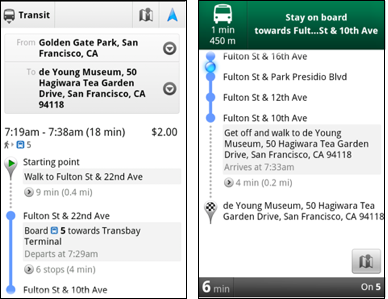
Transit Directions without Navigation (L) and with it (R)
Google Maps 5.7 is now available in the Android Market and comes with some awesome new features to help you get where you want to go. One feature, still in beta, is Transit Navigation. This service gives you turn-by-turn directions using GPS while using public transit. This is available for more than 400 cities around the globe. While you are riding a city bus, for example, you can find out when to exit the vehicle or transfer to another bus. Even if you put your handset away or start using another app, your notification bar will alert you when you have reached your stop and you can also set up your phone to vibrate at the same time.
The updated Google Maps app for Android now supports one click access to Navigation. If you click on the driving or walking icon and you have selected a route that is supported by Google Navigation, the familiar blue icon will appear and when clicked, will take you to the turn-by-turn directions. Google has also added category icons for search suggestions such as a pin for a Google Places recommendation or a star for a 'starred' place or location; a previously used search term will get a clock icon, a person icon appears for contacts while a magnifying glass appears for all others.
Recommended For You
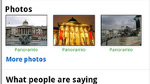
Finally Google has added a photo viewer for Places which allows Google Maps for Android users to look at pictures of possible destinations before deciding where to go. Google Maps 5.7 can be downloaded for free from the Android Market and requires a phone running Android 2.1 or higher.
Alan, an ardent smartphone enthusiast and a veteran writer at PhoneArena since 2009, has witnessed and chronicled the transformative years of mobile technology. Owning iconic phones from the original iPhone to the iPhone 15 Pro Max, he has seen smartphones evolve into a global phenomenon. Beyond smartphones, Alan has covered the emergence of tablets, smartwatches, and smart speakers.
A discussion is a place, where people can voice their opinion, no matter if it
is positive, neutral or negative. However, when posting, one must stay true to the topic, and not just share some
random thoughts, which are not directly related to the matter.
Things that are NOT allowed:
Off-topic talk - you must stick to the subject of discussion
Offensive, hate speech - if you want to say something, say it politely
Spam/Advertisements - these posts are deleted
Multiple accounts - one person can have only one account
Impersonations and offensive nicknames - these accounts get banned
To help keep our community safe and free from spam, we apply temporary limits to newly created accounts:
New accounts created within the last 24 hours may experience restrictions on how frequently they can
post or comment.
These limits are in place as a precaution and will automatically lift.
Moderation is done by humans. We try to be as objective as possible and moderate with zero bias. If you think a
post should be moderated - please, report it.
Have a question about the rules or why you have been moderated/limited/banned? Please,
contact us.













Things that are NOT allowed:
To help keep our community safe and free from spam, we apply temporary limits to newly created accounts: