PhoneArena is looking for new authors! To view all available positions, click here.
  • Home
  • News
  • How to connect a USB accessory to an Android smartphone or tablet

How to connect a USB accessory to an Android smartphone or tablet

Share:

Discuss 8
How to connect a USB accessory to an Android smartphone or tablet
With Android 3.1, Google's mobile platform added a new trick to its repertoire – USB host functionality. In plain words, that allows for Android devices to work with a broad range of USB peripherals, such as keyboards, mice, USB flash memory sticks, and even gamepads. But what about smartphones and tablets that don't have a full size USB port? Well, they still can get along well with such accessories too, with the help of an inexpensive gizmo.

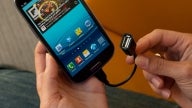
The USB On-The-Go cable adapter plugs into the microUSB port of an Android device and provides a standard size USB port on its other end. All you have to do is to plug in the desired USB accessory in there and you should be good to go. 
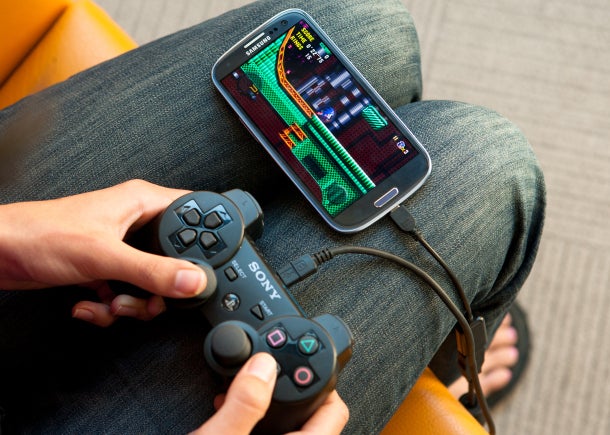
PS3 controller connected to a Samsung Galaxy S III using a USB OTG adapter

PS3 controller connected to a Samsung Galaxy S III using a USB OTG adapter

Be aware, however, that not all devices are compatible with USB OTG adapters. The list of the smartphones and tablets that are known to work includes:


For anyone who is interested, Amazon has cheapo USB On-The-Go adapters in stock and they only cost a few dollars. Those of you who might get one, what USB accessory would you connect to your smartphone? Drop a comment below and let us know.

source: CNET

Share:

Discuss8

8 Comments

  • Options
    Close


Want to comment? Please login or register.

1. speckledapple posted on 20 Jul 2012, 03:00

I use one on my xoom for playstation games on trips. Quite a useful little tool.

2. valapsp posted on 20 Jul 2012, 04:31

Will Nexus 7 get USB flash drive support via a software update? If I'm not making mistake right now it's possible if rooted. Anyone confirms?
This is the most important factor before buying the Nexus 7 since you don't want to pay $50 more for that extra 8gb. You can easily hook up a flash drive if it supports.

4. Croxy posted on 20 Jul 2012, 09:54

Just leaving a comment so I can get notified if someone replies to you :D

7. Asasindude26 posted on 01 Aug 2012, 15:00

Yeah when rooted yes :D But I have a question.... If I root my nexus 7 but don't install any custom ROMS will i recive Android OS updates from Google as I would without rooting? :) Thnx for replies

8. valapsp posted on 01 Aug 2012, 15:15

I'm not so sure but i think you wont get the OS updates automatically since this doesn't have to do anything with custom ROMs. And this is the main obstacle preventing me from rooting.

3. rd_nest posted on 20 Jul 2012, 05:44

If anyone has SGS3, just check this:

http://www.youtube.com/watch?v=46IiRyigUH0

It's long, but you won't need anything else.

5. borganwa posted on 20 Jul 2012, 12:23 1

It works with all 2011 and 2012 Xperia (2011' Xperia needs root to access USB flash drives)

6. shayan posted on 23 Jul 2012, 01:08

what about galaxy note?

Want to comment? Please login or register.

Hot Phones

  • Samsung Galaxy S4Samsung Galaxy S4
  • Apple iPhone 5Apple iPhone 5
  • Samsung GALAXY Note IISamsung GALAXY Note II
  • HTC OneHTC One
  • Sony Xperia ZSony Xperia Z
  • Google Nexus 4Google Nexus 4
  • LG Optimus GLG Optimus G
  • Nokia Lumia 920Nokia Lumia 920