Feature: Android 4.2 "Daydream" mode
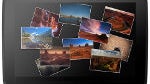
One of the new features of Android 4.2 that hasn't gotten much mention recently is the new "Daydream" mode. It hasn't gotten much play because unlike the other major updates like the gesture keyboard, Daydream mode is a flashy extra, but it is quite a nice one. If you've gotten the Android 4.2 update, you'll find Daydream kind of hidden in Settings>Display>Daydream.
It is essentially a screensaver, although it will only turn on under certain conditions. You can set your Android device to start Daydreaming either when the device is docked, when it is charging, or both. As the Daydream mode, users can choose between having the device display the clock, shifting colors, Google Currents headlines, or photos.
The clock and colors are fairly basic (although the clock has a nice feature to set the display to a "very dim mode", which is great for a bedside table), but this may be the first interesting use of Google Currents that we've seen. Currents has always been somewhat overshadowed by other apps that do the same sort of thing like Flipboard, Pulse News, or Feedly. Unfortunately, we say it is an interesting use of Currents because it isn't exactly useful. While it is nice to see the headline scroll of Currents in Daydream, it isn't interactive at all, so you can't tap an interesting headline to jump into the story. So, the whole thing ends up feeling a bit pointless.
Photos can be displayed in two different modes, either a slideshow, or as a "photo table" (basically a collage). For either option, users can choose to show photos that are on the device, or select any or all of your Google+/Picasa photo albums to cycle through. That is a great option for anyone who uses Google+/Picasa, or keeps all of their photos on their Android device at all times. But, if you use Flickr, Facebook, or Instagram, and don't keep copies on your device, this feature won't really do much for you.
Overall, Daydream mode is a nice new feature, and we can see some pretty interesting potential there for offering more options, but it definitely feels like a first attempt, and there is a reason why the feature is a bit buried. We'd love to see more services be able to hook into it, and we'd love to see the displays be more interactive, especially with headlines.

Follow us on Google News


Things that are NOT allowed:
To help keep our community safe and free from spam, we apply temporary limits to newly created accounts: