PhoneArena is looking for new authors! To view all available positions, click here.
  • Home
  • News
  • And the Verizon Galaxy Nexus OTA is now actually rolling out

And the Verizon Galaxy Nexus OTA is now actually rolling out

Posted: , by Scott H.

Categories:

Share:

Discuss 24
And the Verizon Galaxy Nexus OTA is now actually rolling out
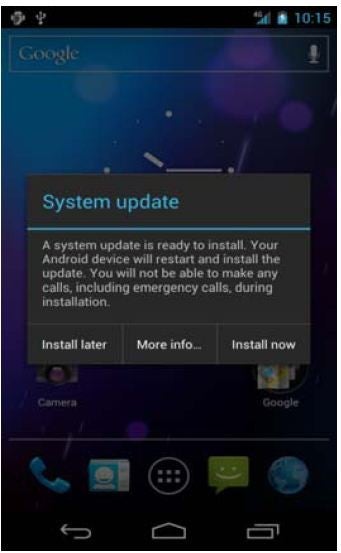
We reported two days ago that Verizon had finally made the Android 4.0.4 update official on its website, and now, perhaps 5 months after many people were expecting and update, the OTA is getting pushed out to actual phones owned by real flesh and blood people. Of course owners of the GSM version are already rocking 4.0.4, even the Sprint version (which is actually identical save for different branding and the presence of Google Wallet) have enjoyed the update for a month.

Of course Verizon can’t just give it to all of you at once – they instead began rolling it out in very small batches starting last night, and there have been continuing reports throughout the day. Remember that geography and date of purchase have nothing to do with the timing on when your update will arrive. Nor, it seems, does mashing the “Check for Update” button repeatedly, although we realize it’s a source of therapy for some of you, so we won’t berate you for doing it.

It you’re a Verizon Galaxy Nexus owner let us know if you’ve received your update.

And the Verizon Galaxy Nexus OTA is now actually rolling out

source: Droid-Life

Share:

Discuss24

24 Comments

  • Options
    Close


Want to comment? Please login or register.

1. CommentBoxEnforcer posted on 31 May 2012, 17:39 1

Im still mad

2. Twitch016 posted on 31 May 2012, 17:43

Nothing yet. I'll believe it when I get a notification, honestly. Too many instances of false hope.

3. RORYREVOLUTION posted on 31 May 2012, 17:50 2 1

lol 20 bucks says this update gets pulled.

What good is a Nexus if it isnt up to date and working? I would rather be on a stable and smooth Gingerbread build like I had when I had the SGS2 or the RAZR.

4. medicci37 posted on 31 May 2012, 18:47 1

I thought when I bought a Google phone, I would get updates immediately after they were released. Google should have sold this phone in Google Play, from the start. This phone has been a major disappointment.

8. RORYREVOLUTION posted on 31 May 2012, 21:27 2

It's Verizon to blame but Google needs to step it up and make Verizon allow updates. The GSM and even Sprint version both have had 4.0.4 forever now. I am not waiting another 6 freaking months just to get another small bug fix update when the other two Galaxy Nexus will probably have Jelly Bean by then.

15. sgogeta4 posted on 01 Jun 2012, 13:08

Custom ROM anyone?

5. itzmando posted on 31 May 2012, 19:24

I hope I'm in those early small batches. Even if they pulled it I want it before that happens. I need to research what improvements were made:

1.I suffer the 3G/4G cycling, thus, losing a solid data connection
2.Keyboard delays
3.Music playing when screen is off creating a problem with audio constantly pausing and cracking.
4.Phone calls have high pitch, garbled sound on strong signal.
and
5.my internet pages freezing if i scroll too fast. :(

Would like to see them bring back the playing youtube video and shut the screen off feature that my GB Moto D2G had.

6. dmbfan42 posted on 31 May 2012, 19:34

still waiting here in milwaukee

7. Cha7520 posted on 31 May 2012, 20:10 1

Bought my Nexus in Feb, finally got rid of it! I'm SO Glad I did. I was SSSOOO Tired of the OTA 4.0.4 lies and drama! I got me a REAL HD phone with a better Carrier with twice the Data Speeds for $26 less!

9. ehlocal posted on 31 May 2012, 21:37

Received the update earlier today.

10. RORYREVOLUTION posted on 31 May 2012, 21:40

Does your device function any better?

11. shnibz posted on 31 May 2012, 21:46

Are they sure this time???

12. ehlocal posted on 31 May 2012, 22:01

Phone seems to be running a bit smoother. Was never fully made aware of all of the improvements that were forthcoming as a result of the update, but initial results seem promising. One difference that I haven't seen yet is an improvement in the accuracy of the signal strength, but I'll keep you advised.

13. RORYREVOLUTION posted on 31 May 2012, 22:40

My main issues were random reboots, general unexplained lag, and horrible lag transactions to landscape mode.

14. ehlocal posted on 01 Jun 2012, 07:22

I never had the random reboot or lag transition issues, but lagging itself was an issue. That being said, it seems to have been fixed.

On a separate note, I had major issues with the cell signal. The problem appeared to happen as a result of going out of range, but once returning to a well-known strong signal area the phone would not "grab" and I would be forced to reboot in order to regain service. I'm not sure if this too has been fixed as a result of the update, but would love to know if this issue has been prevalent with other users of this device.

16. RORYREVOLUTION posted on 01 Jun 2012, 20:59

Still no update for me. Ugh

17. structureman116 posted on 02 Jun 2012, 00:28

I just ran my "check for updates" and am currently downloading IMM76K...I've had none of the issues with my GNEX that this is supposed to fix, except for maybe the signal strength issues! Lets see what happens!

18. RORYREVOLUTION posted on 02 Jun 2012, 00:48

Wow the web browser is WAY WAY WAY SMOOTHER HOLY CRAP!

Everything is much smoother but yes signal is still poor and I don't know of battery life has improved but the lag is gone completely. Much much better.

19. itzmando posted on 02 Jun 2012, 09:22

Any improvement with the keyboard rotation and input lagging?
Or
Call quality since apparently it was expected to get fixed in the next update

20. RORYREVOLUTION posted on 02 Jun 2012, 15:17

Yes rotation to landscape has improved. Tho I haven't really called anyone since the update but signal strength hasn't improved. However general scrolling and web page browsing has improved 100 times. I haven't had any random reboots and battery life seems a little better as well.

21. Chrisvazquez777 posted on 03 Jun 2012, 00:45 2

I read this on another forum, and since I had nothing better to do I gave it a shot...........and it worked.

Home/menu/settings/apps/all/google services framework/

Touch this.

Once it opens clear data and force stop it.

Hit home/settings/about phone/check for updates.

It took me 7-8 times doing it, and then it started downloading the update, installed, and no problems at all. Some of the other people on that forum did it 3 times and it worked, some did it 15 and it worked, and of course some did it a lot and nothing happened.

Nothing is lost by clearing the data and force stopping it, so no fear there.

Give it a shot, you really have nothing to loose but about 10 minutes of time............and you have a lot to gain if it works.

22. itzmando posted on 03 Jun 2012, 01:35

Thanks it worked after 8 times of repeating your process hope it doesn't screw up future updates. Now on 4.04

23. blazee posted on 03 Jun 2012, 06:46

This should be added to the article, it most definitely works. When you follow the steps, it says the last time checked for an update was in 1969 lol. Took me 4 tries to get it

24. HockeyDood posted on 04 Jun 2012, 18:37

Just got it to work after trying this method a second time. Currently downloading...

Want to comment? Please login or register.

Hot Phones

  • Samsung Galaxy S4Samsung Galaxy S4
  • Apple iPhone 5Apple iPhone 5
  • Samsung GALAXY Note IISamsung GALAXY Note II
  • HTC OneHTC One
  • Sony Xperia ZSony Xperia Z
  • Google Nexus 4Google Nexus 4
  • LG Optimus GLG Optimus G
  • Nokia Lumia 920Nokia Lumia 920