Samsung Galaxy Buds 4 Pro vs Galaxy Buds 4: no need to Pro?
Do you need the Buds 4 Pro or are the Galaxy Buds 4 good enough?
We may earn a commission if you make a purchase from the links on this page.
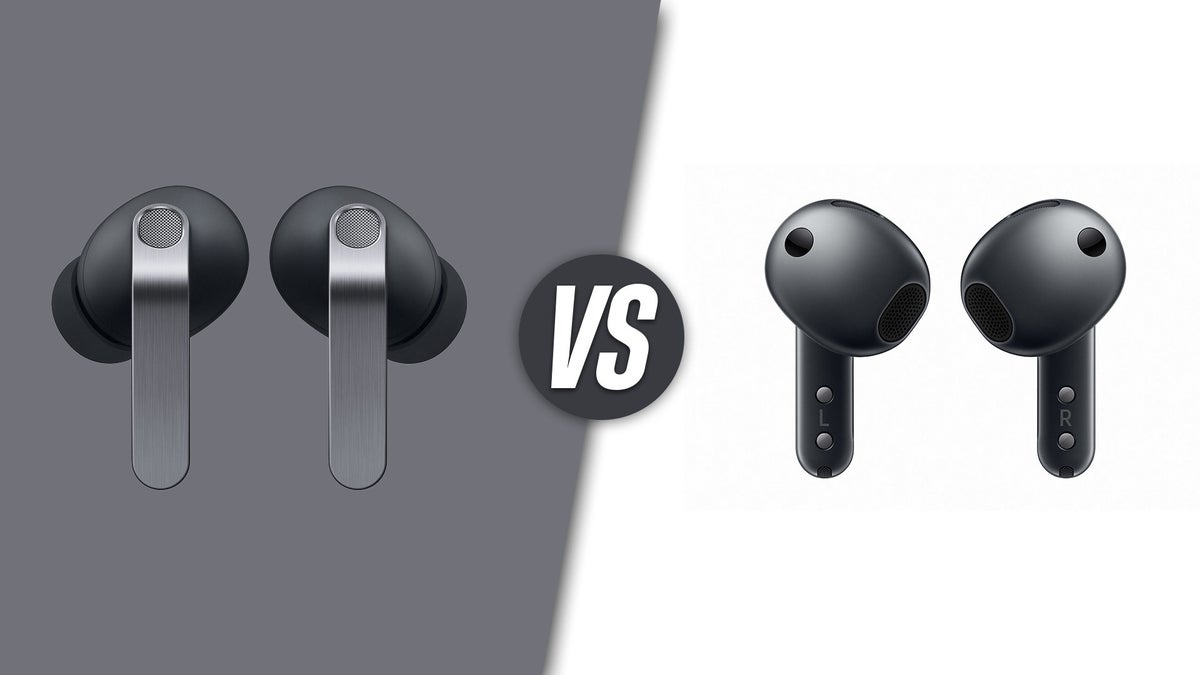
To in-ear or not to in-ear? | Image by Samsung
Samsung just casually dropped the Galaxy Buds 4 series at the Galaxy S26 event, and we do have to talk about them!
They follow the same scheme, where the Pros are in-ear, while the Buds 4 don’t have a silicone tip for an open fit. But they come with a new design, supposedly improved fit, upgraded sound, and multi-device connectivity. Well, that last point is conditional but still exciting.
Here’s everything we know so far about the Galaxy Buds 4 Pro vs the Galaxy Buds 4:
Table of contents:
They follow the same scheme, where the Pros are in-ear, while the Buds 4 don’t have a silicone tip for an open fit. But they come with a new design, supposedly improved fit, upgraded sound, and multi-device connectivity. Well, that last point is conditional but still exciting.
Here’s everything we know so far about the Galaxy Buds 4 Pro vs the Galaxy Buds 4:
Table of contents:
Galaxy Buds 4 Pro vs Galaxy Buds 4 specs:
| Galaxy Buds 4 Pro | Galaxy Buds 4 | |
|---|---|---|
| Color options | Black, White, Pink Gold | Black, White |
| Audio | Dual driver: 11 mm woofer 5.5 mm planar tweeter | Single driver: 11 mm |
| Codecs | SSC, SSC UHQ, AAC SBC, LC3 | SSC, SSC UHQ, AAC SBC, LC3 |
| Connectivity | Bluetooth 6.1 Auto-switch (Samsung account) | Bluetooth 6.1 Auto-switch (Samsung account) |
| Battery life | ANC On: Buds - 6 hours With case - 26 hours ANC Off: Buds - 7 hours With case - 30 hours | ANC On: Buds - 5 hours With case - 24 hours ANC Off: Buds - 6 hours With case - 30 hours |
| Ingress protection | IP57 | IP57 |
Galaxy Buds 4 Pro vs Galaxy Buds 4 design
Last generation reworked the Galaxy Buds from a stemless design to a more AirPods-like look. The new Galaxy Buds 4 series continues down this path but certainly refines the looks.
Both the Buds 4 models have flat stems finished with a brushed metal plate for some premium flair. There’s still a control area on the side of the sides of the stems, where you can pinch or swipe to control multimedia and volume.
Samsung says that the fit of both has been improved. While it did delve deeper with the Buds 4 Pro, explaining it was designed after 100 million ear scan data points and 10,000 virtual simulations, the Galaxy Buds 4 was also said to have a slightly better fit and seal (as much as that can be applied to an open bud design).
The charging cradles are now back to being horizontal, and fit the earbuds in a speaker-down position. The lid is transparent on both, which looks cool, but let’s hope it doesn’t scratch easily.
For durability, the Buds 4 suffered a slight downgrade. While the Galaxy Buds 4 Pro still have IP57 like the previous model, the Galaxy Buds 4 fell down to IP54.
Galaxy Buds 4 Pro vs Galaxy Buds 4 Sound and ANC
The Galaxy Buds 4 Pro got a more meaningful upgrade here. It still has a dual-speaker system with a dynamic woofer and planar tweeter, like on the Buds 3 Pro. The woofer grew a bit to 11 mm, from 10.5 mm, and its tweeter is now 5.5 mm. That’s smaller than the previous model’s 6.1 mm but that doesn’t mean much by itself, especially when talking about high frequencies. Acoustics and tuning will be important, so testing is required.
The Galaxy Buds 4 still have an 11 mm driver — no word on any change in the hardware, but I’d imagine there may have been some, considering that an all-new design presents all-new acoustics. On paper, a two-way speaker should sound better than single-driver earbuds, but I’ve heard plenty of one-speaker earbuds that made my jaw drop, so… final critique pending.
Otherwise, both sets come with Adaptive EQ, which monitors earbud placement and ear shape to fine-tune the frequency response. And, the Galaxy Wearable app has a custom EQ for you to fine-tune to your needs.
And, again on both, you can listen to 24-bit, 96 kHz audio. That’s courtesy of the Samsung Seamless Codec, so yes, you will need a Samsung phone for that. For other phones, they support AAC.
Voice calls
Another point for the Galaxy Buds 4 Pro upgrade — now with dual-band Bluetooth to transfer the frequencies of your voice all the way up to 16 kHz. This should, in theory, remove the “lisp effect” and make sounds like “s”, “z”, “th” much more distinguishable.
The Galaxy Buds 4 don’t have the fancy dual-band Bluetooth, but do support LC3 for voice that is much clearer than the SBC of old times (that is embarrassingly still in use).
Special features
Nod and shake — taking a page off the AirPods’ book, the Galaxy Buds 4 Pro will now be able to accept or reject calls via a head nod or shake, respectively. It is currently unknown if this will be added to the Buds 3 Pro via an update.
What the Buds 3 Pro did have, though, was voice commands, such as “next song”, “volume up”, et cetera. These were surprisingly handy while carrying two bags of groceries and I see no reason they wouldn’t also be on the Buds 4 Pro.
Dual AI support — on the Galaxy Buds 4 series, you will be able to call up both Gemini and Bixby. So, ask Google questions or tell it to play your playlist. For Galaxy Home applications, you can just say “Hey, Bixby, turn on the lights”.
Galaxy Buds 4 Pro vs Galaxy Buds 4 connectivity
Both of these devices are compliant with the new Bluetooth 6.1 standard from 2025. It improves device connectivity and offloads work from the processor, making operation smoother. Bluetooth 6 specifically targeted spatial audio applications, but if you don’t care about that, you should at least enjoy a smoother SmartThings Find experience, as well as know that Bluetooth 6.1 has better security protocols in place.
Unfortunately, there’s no LDAC codec on board here. If you don’t have a Samsung device to use that Samsung Seamless Codec 24-bit 96 kHz, you will have to use AAC. Which is pretty good anyway, so maybe not a huge problem?
Multi-device
The Galaxy Buds 3 series were a bit too ecosystem-y. They didn’t support Bluetooth multipoint and only allowed easy switching between devices if all you had was Samsung tech.
The Galaxy Buds 4 models ease up a little bit. No, they still don’t offer multipoint for dual-device connectivity. But if you download the Samsung Wearable app on your non-Samsung Android device, and you log in with your Samsung account, you should be able to seamlessly switch to and off of that device. Kind of like AirPods and iCloud.
Galaxy Buds 4 Pro vs Galaxy Buds 4 battery life
No huge improvements or changes here, compared to the previous models.
The Galaxy Buds 4 Pro give you 26 hours total use with ANC on, 30 hours with it off. The buds themselves offer 6 hours and 7 hours of play time, respectively.
The regular Galaxy Buds 4 offer up to a total of 24 hours with ANC and 30 without. From the buds alone, you should be able to squeeze out 5 hours and 6 hours, respectively.
Galaxy Buds 4 Pro vs Galaxy Buds 4: which ones should you get?
The first major choice here is between the in-ear design and the open bud design. While the Buds 4 have ANC, the mere fact that they don’t mechanically seal your ear means they will inevitably let more sound in.
But there are plenty of users out there that actually prefer a design that is not in-ear. I am happy to see that companies are back to offering high-quality models for that niche. For a while there, the market was all about silicone tips, “in-ear or over-ear” approach.
As for general functionality — these earbuds seem to have more or less the same “brain” and set of extra perks. The core Samsung experience should be there on both, specifically if you do have a Samsung phone to pair them to.


Popular stories

Latest News


Things that are NOT allowed:
To help keep our community safe and free from spam, we apply temporary limits to newly created accounts: