Even though the Pixel 10 was my first personal Google smartphone, my sister is a huge Pixel fan, and she has owned the Pixel 5 and every successor released since then. Obviously, she let me use her phones, which basically means I've gotten to see firsthand how much Google's smartphones have evolved from the Pixel 5 to the latest Pixel 11.
Honestly, I like most of the upgrades the Big G has brought to its smartphones. However, there's one particular feature the company introduced a while ago that I think is the worst feature ever added to the Pixel lineup.
Let me control the volume, Google, please
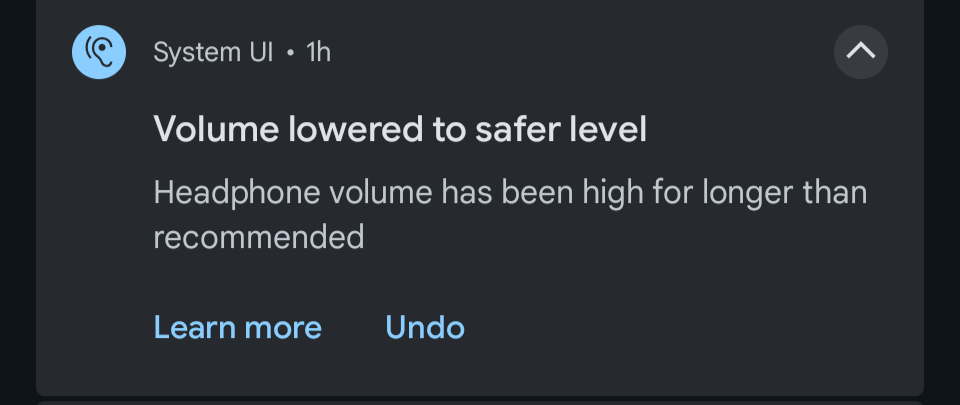
Continued exposure to loud music might cause permanent hearing damage. To prevent this from happening, Google released a very interesting accessibility feature with Android 14 that basically reminds you periodically to lower your volume to a safe level. While the feature is undoubtedly very helpful, most users consider it one of the most annoying capabilities that Google has introduced.
The problem with this accessibility trick is that you have no option to escape it. Once its pop-up appears, asking you to lower the volume, you have no choice but to obey. The feature is designed in such a way that your phone will automatically bring down the volume to a safer level even if you try to ignore the warning.
Recommended For You
Volume lowered to safer level warning in Pixel phones. | Image by Google community forum
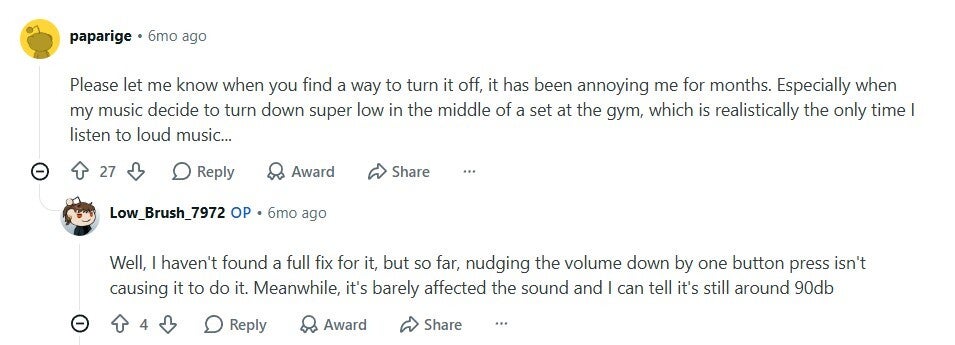
Users who find this capability annoying believe that they are adults and should have the freedom to decide whether they should listen to a song at full volume or not. Online community forums are filled with posts from users calling out Google for adding such a frustrating feature to its smartphones.
User comment about hating Pixel volume control. | Image by Reddit
A related post on the Google Community forum has received 2,269 upvotes, suggesting that the number of Pixel users who do not like this feature is definitely huge. A user mentioned that it really frustrates them when this function automatically lowers the volume of music while they are in the middle of their gym session.
What else do you want Google to change about Pixel phones?
6 Votes
Is Google doing something to improve things?
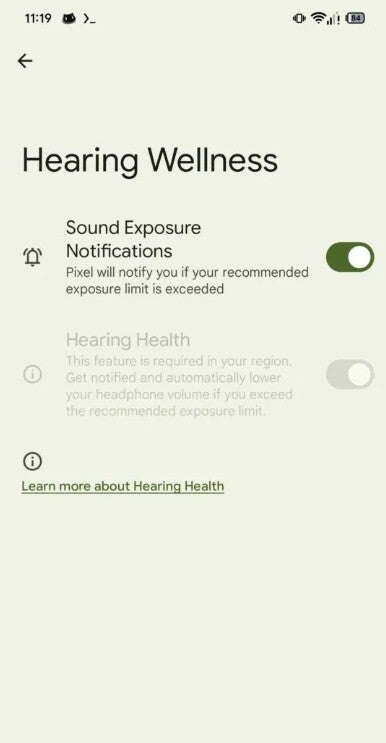
Hearing Wellness option in Pixel. | Image by Android Authority
It would be a lot better if users had control over whether they wanted their Pixel to remind them to lower the volume. A report that surfaced more than a year ago suggested that Google actually had something like this in the making.
A new Hearing Wellness option was spotted in the Settings app on Pixel phones. It contained toggles that let you decide whether you wanted your Pixel to notify you about prolonged exposure to loud music. The option was reportedly spotted in a beta version of Android, but unfortunately, it has not been made live yet.
You can try this workaround
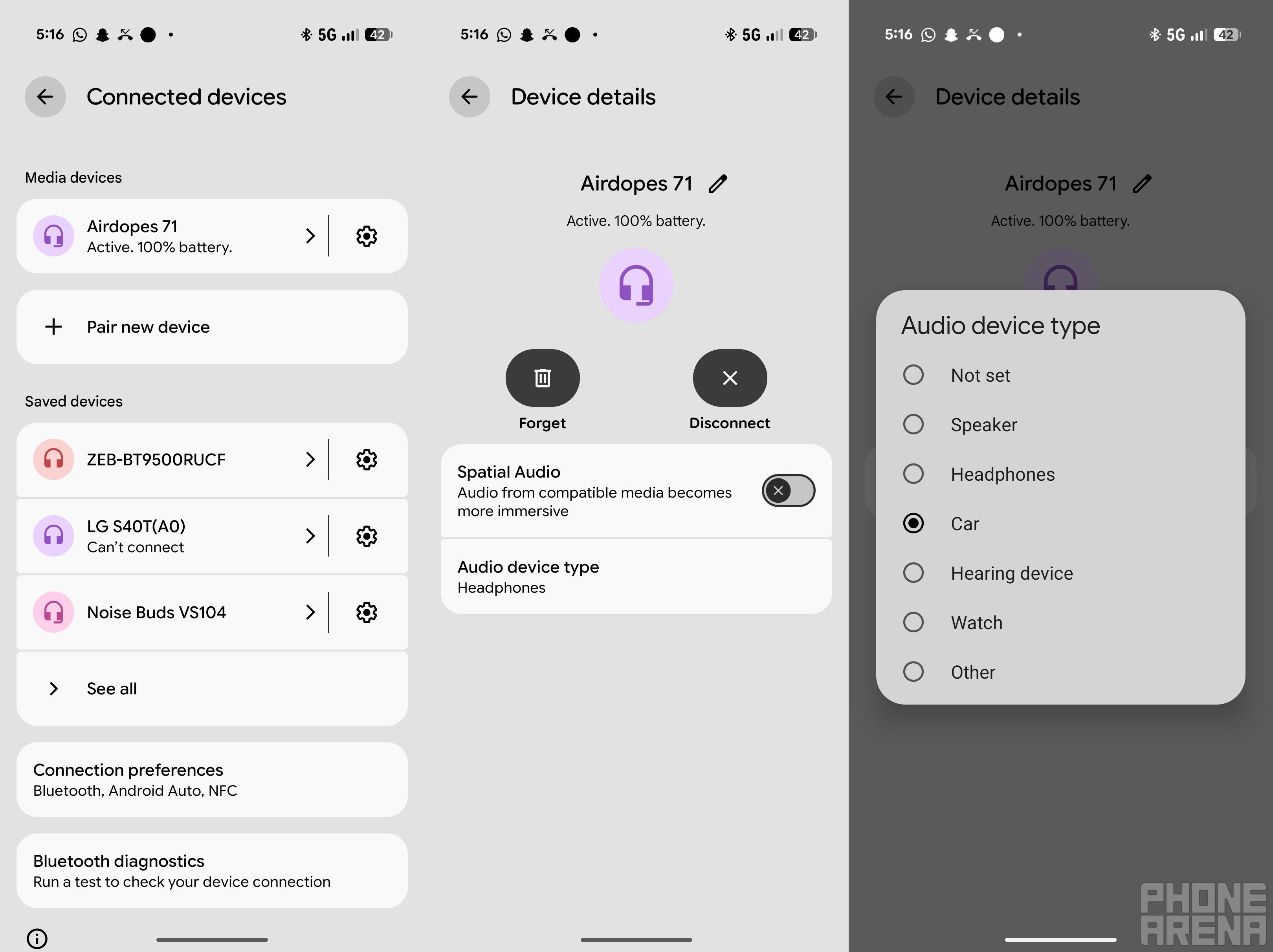
Steps to change Audio device type. | Image by PhoneArena
The good news is that there is a workaround that you can try. According to some of the affected users, the problem can be solved by changing the audio device type to car stereo. Here's how to do that:
Connect your Bluetooth headphones to a Pixel smartphone
Open the Settings app and choose Connected devices
Tap the gear icon next to the name of your Bluetooth device, and then select the Audio device type option
Choose Car from the menu that appears
This trick has apparently worked for most users. However, I was also able to spot a few comments basically saying that the Car option is grayed out for certain headphones, such as the Pixel Buds Pro 2. In this case, users recommend using the MacroDroid app, which automatically resets the volume whenever the accessibility feature reduces it.
Google should come up with a permanent solution soon
While the above-mentioned workarounds did work, at the end of the day, they did not permanently solve the frustration that the feature has been causing users for many years. I really get that you care about your customers' ear health, Google, but don't you think people should have the right to decide whether they want your health tip or not? And even if you are recommending something, let it be a simple recommendation instead of forcing it on users.
The Big G really needs to introduce the Hearing Wellness function that was spotted on Pixel phones almost a year and a half ago. At that time, all the related options looked fully baked, so I really can't understand what's taking Google so long to add it to its Pixel phones.
Aman Kumar is a news writer at PhoneArena covering Google Pixel phones, Android features, AI-powered smartphone tools, and mobile tech news. Before joining PhoneArena, he spent over five years writing about consumer technology for publications like MakeUseOf, How-To Geek, and Guiding Tech. His current daily drivers are the Pixel 10 and Samsung Galaxy S26 Plus, while his red iPhone SE (2nd gen) remains a personal favorite. Aman also appreciates bold smartphone experiments and still considers the Nokia N-Gage one of the industry’s most iconic designs.
A discussion is a place, where people can voice their opinion, no matter if it
is positive, neutral or negative. However, when posting, one must stay true to the topic, and not just share some
random thoughts, which are not directly related to the matter.
Things that are NOT allowed:
Off-topic talk - you must stick to the subject of discussion
Offensive, hate speech - if you want to say something, say it politely
Spam/Advertisements - these posts are deleted
Multiple accounts - one person can have only one account
Impersonations and offensive nicknames - these accounts get banned
To help keep our community safe and free from spam, we apply temporary limits to newly created accounts:
New accounts created within the last 24 hours may experience restrictions on how frequently they can
post or comment.
These limits are in place as a precaution and will automatically lift.
Moderation is done by humans. We try to be as objective as possible and moderate with zero bias. If you think a
post should be moderated - please, report it.
Have a question about the rules or why you have been moderated/limited/banned? Please,
contact us.






![Another batch of Galaxy S26 series users in the US are getting a nice surprise today [UPDATED]](https://m-cdn.phonearena.com/images/article/183643-wide-two_350/Another-batch-of-Galaxy-S26-series-users-in-the-US-are-getting-a-nice-surprise-today-UPDATED.webp)
Things that are NOT allowed:
To help keep our community safe and free from spam, we apply temporary limits to newly created accounts: