Google is reportedly working on two useful and desired Gboard features
One feature is great for those with a certain handicap, and the other might help everyone.
Google works on two new Gboard features | Image by PhoneArena
Google's Gboard keyboard is working on an exciting new feature that Android Authority discovered in version 17.8.3.939743344-beta-arm64-v8a of the Gboard app. A new Sign-to-text input tool states that once this is up and running, your Android phone will be able to translate sign language into text for messages, emails, web searches, and more.
Sign-to-text is a great feature when communicating with someone that has a hearing problem
Google writes that Sign-to-text captures a video of you signing using your phone's camera. It then uses AI to translate the sign language. To maintain users' privacy, the original video never leaves their devices, and the video is processed on-device to separate the gestures and words that you are signing. Those are sent on to Google for processing and analysis and are deleted once Google has no need for them.
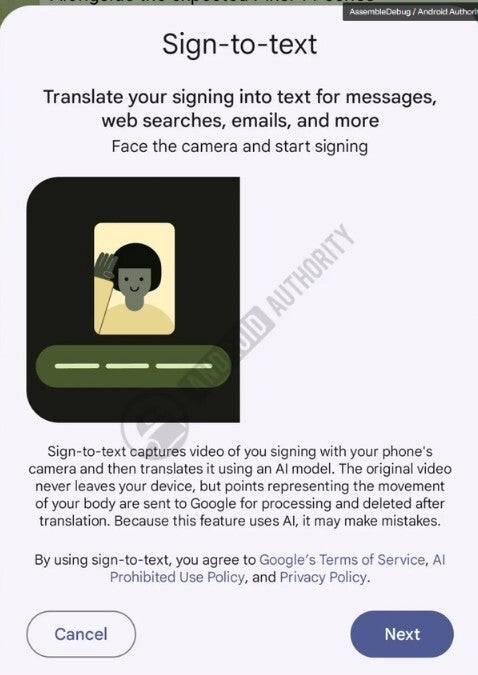
Google is planning to allow certain devices to convert sign language into text. | Image by Android Authority
A text string related to the feature was discovered, and it said, "Poor lighting. Try moving to a brighter spot." Obviously, these are directions aimed at improving the viewability of the video recording the signing.
We assume the feature will work with American Sign Language (ASL)
It isn't clear which sign language standards will work with the system. We would assume that American Sign Language (ASL) will be supported by Sign-to-text as it is the most studied sign language and is used as the international language for signing among parties that don't speak the same language. There are several different sign languages in existence.
Which one of the possible two new features did you like best?
9 Votes
Sign and text using sign language
44.44%
Option to remove automatic spacing with recommended word
55.56%
It is another typical Google UI upgrade
This is just typical Google, always looking to make changes and improvements to Android to make users' lives easier. As for Gboard, another change is coming as Google is reportedly testing yet another feature. You probably know by now that when you tap on a recommended word in the autocorrect bar, it automatically inserts a space. If you are typing a sentence, having that space is useful. But suppose you want to add punctuation or connect something to the recommended word?
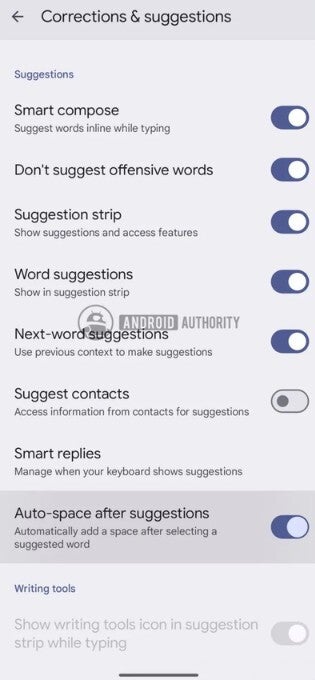
Get rid of the automatic space created when a suggested word is selected from the autocorrect bar. | Image by Android Authority
Google obviously felt that something should be done here, and Android Authority was able to activate a toggle in Gboard's Corrections & suggestions settings labeled "Auto-space after suggestions." With this feature toggled on, tapping the autocorrect bar will add the recommended word you pressed and will leave the automatic space so you can continue typing your sentence.
How to install Gboard on your Android phone if you don't already have it
If you don't want a space after the recommended word is added, make sure to disable the feature before you tap the autocorrect bar. Testing by Android Authority shows that the feature it was able to activate actually does work. This is another feature that might be considered useful, although less useful than the Sign-to-text feature we mentioned at the start of this article.
Gboard is the default QWERTY keyboard on most Android phones. If for some reason you don't have Gboard, you can install it from the Google Play Store by tapping on this link.


Popular stories

Latest News
Things that are NOT allowed:
To help keep our community safe and free from spam, we apply temporary limits to newly created accounts: