
Google brings Confidential mode to Gmail for Android

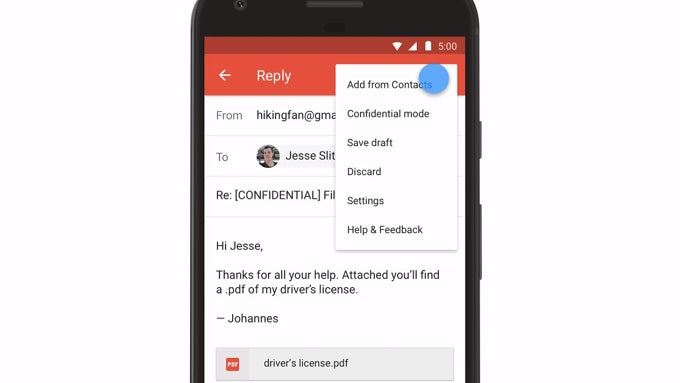
Gmail users on Android have just been given access to a brand new feature that will allow them to send messages and attachments in the most secure manner. Confidential mode has been recently added to Gmail for Android, which is meant to help users protect sensitive information from unauthorized access.
For example, with the new Confidential mode, users can set an expiration date for messages or revoke access at any time. Also, recipients of the confidential message will have many of the options that might compromise it disabled, so they won't be able to forward, copy, print, or download the message.
However, those who have malicious programs on their computer may still be able to copy or download your messages or attachments. In order to start using Confidential mode, you must open Gmail, click Compose, and from the bottom right of the window tap Turn on confidential mode.
You can also set an expiration date and passcode for a message or attachment that you're sending. If you choose “No SMS passcode,” those using the Gmail app will be able to open your message/attachment directly, while those who don't have a Gmail account will get emailed a passcode.
Keep in mind that this is a server-side update, so don't go looking for an update in the Google Play Store, just wait a few days for Google to make it available to everyone.
For example, with the new Confidential mode, users can set an expiration date for messages or revoke access at any time. Also, recipients of the confidential message will have many of the options that might compromise it disabled, so they won't be able to forward, copy, print, or download the message.
You can also set an expiration date and passcode for a message or attachment that you're sending. If you choose “No SMS passcode,” those using the Gmail app will be able to open your message/attachment directly, while those who don't have a Gmail account will get emailed a passcode.
source: Gmail (Twitter)

Popular stories


Latest News

Things that are NOT allowed:
To help keep our community safe and free from spam, we apply temporary limits to newly created accounts: