
Minor update fixes signal problem on GSM variant of the Samsung GALAXY Nexus
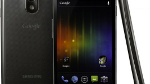
A minor fix for the GSM variant of the Samsung GALAXY Nexus has been sent out to owners of the device. It takes the build of the OS to IMM76I, from the older IMM76D. The problems that the handset has been having are minor, but are a nuisance. For example, one bug caused the screren lock to lag whenever the automatic brightness was engaged. Some owners had been having a problem receiving a steady signal,
The update should be rolled out over the next few weeks. If you don't want to wait around for the OTA notification, you can attempt to update manually your GALAXY Nexus as long as it is of the "yakju" variety. Let us know what changes you've spotted after the update.
source: AndroidCentral
The update should be rolled out over the next few weeks. If you don't want to wait around for the OTA notification, you can attempt to update manually your GALAXY Nexus as long as it is of the "yakju" variety. Let us know what changes you've spotted after the update.
The prerequisites:
- You need a GSM Galaxy Nexus with the product codename 'yakju'. NOT the Verizon Galaxy Nexus, or 'yakjuxw', or 'yakjusc' or any of the other variants we've heard about. Check your product name before you begin using this app.
- You need to be running stock Android 4.0.2 (ICL53F) rather than any custom ROM.
- You need the Android SDK installed. Note the path.
- You need fastboot. (Windows or Mac)
- You need to unlock your bootloader. If you haven't done that (and you really should), here's how. (Note that if you haven't already completed this step, unlocking your bootloader will wipe all data on your phone.)
- Download the Android 4.0.2 to 4.0.4 update from Google here.
- Download the latest ClockWorkmod recovery image from here.
Now, the instructions:
- Copy the OTA package above to the /sdcard folder on your Galaxy Nexus
- Drop the ClockworkMod file in the same folder you have fastboot in on your computer in the SDK folder (either /tools or /platform-tools). Rename it to cwm.img to make things easy.
- Reboot your Galaxy Nexus to bootloader mode (hold volume-up and volume-down, then press power).
- Plug your phone into your computer, and open a command prompt or terminal. Navigate to the folder with fastboot and the cwm.img inside it.
- At the command line, type the following: fastboot-windows.exe boot cwm.img (or just fastboot.exe if that's what you've got)
- Use the ClockWorkMod recovery menu to flash a zip file from the SD card, and choose the OTA zip file you downloaded earlier.
- Let things run their course.
source: AndroidCentral


Popular stories


Latest News


Things that are NOT allowed:
To help keep our community safe and free from spam, we apply temporary limits to newly created accounts: