We've hit a landmark moment in the life of Google Maps for Android, the first features to ever graduate from Labs status to full feature settings has finally happened. As you know, Labs is where Google puts all of the features that aren't quite ready for prime time, but could be pretty useful. It's a test-bed for features really.
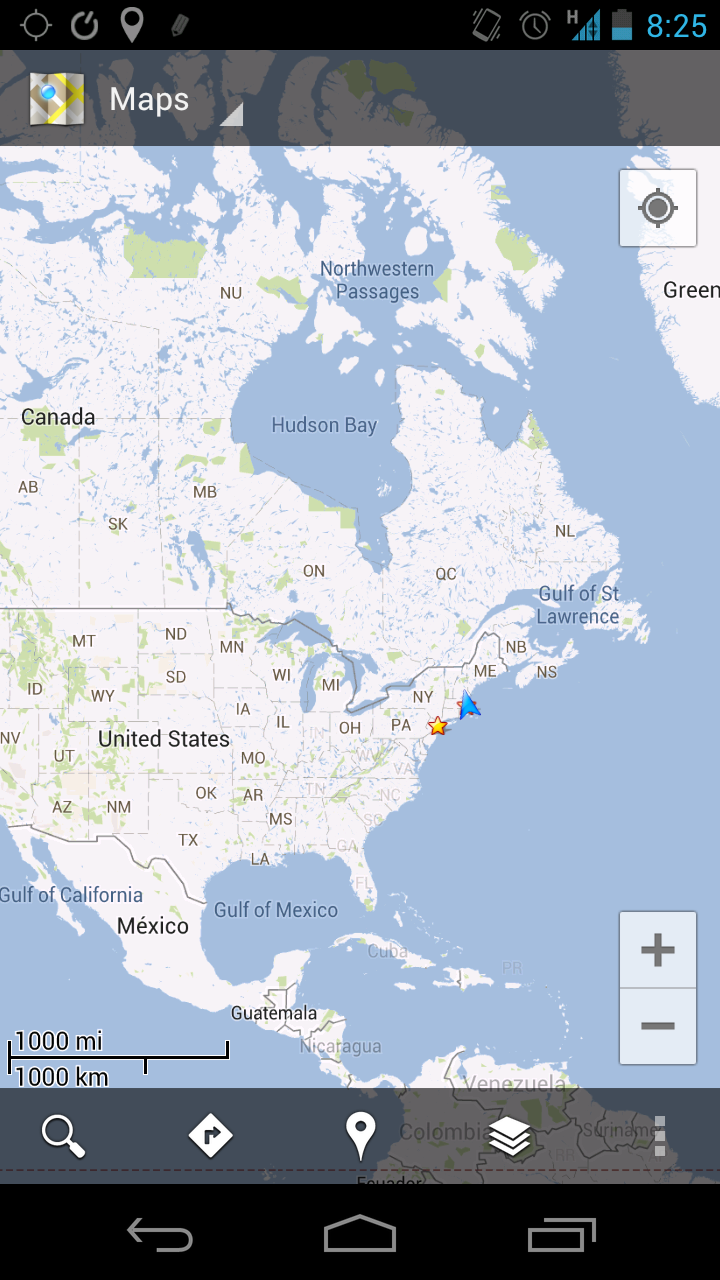
Now, two former Labs options have graduated into full settings: the Scale Bar, and Zoom Buttons. The Scale Bar toggles an on-screen key that gives you the scale of the map, which is useful as you change how far in or out you are zoomed, since the scale could be anywhere from 20ft to 2000 miles. Zoom Buttons are very useful for those who tend to use Maps a lot one-handed. It can be awkward to zoom in one-handed, and it is normally impossible to zoom out, but this setting puts buttons in the bottom right of the screen for easy access... unless you're left-handed. Both options can now be found under the Display menu in the app settings.
There is also an update to the existing Measure option which is still in the Labs. Measure has allowed for measurement of distance between two points, and now it will also give the elevation change as well.
Mint Mobile is now allowing you to get whichever plan you like for either three, six, or 12 months for just $15/mo. If you go for the six-month unlimited service, for instance, you'll now have to pay just $90 upfront instead of $210.
Michael Heller is known for his clear and informative articles on mobile technology. He explores important topics such as the rollouts of 5G networks and the advancements in mobile payments, offering readers insights into the evolving tech landscape.
COMMENTS (1)
COMMENTS (1)
All comments need to comply with our
Community Guidelines
PhoneArena Community Rules
A discussion is a place, where people can voice their opinion, no matter if it
is positive, neutral or negative. However, when posting, one must stay true to the topic, and not just share some
random thoughts, which are not directly related to the matter.
Things that are NOT allowed:
Off-topic talk - you must stick to the subject of discussion
Offensive, hate speech - if you want to say something, say it politely
Spam/Advertisements - these posts are deleted
Multiple accounts - one person can have only one account
Impersonations and offensive nicknames - these accounts get banned
To help keep our community safe and free from spam, we apply temporary limits to newly created accounts:
New accounts created within the last 24 hours may experience restrictions on how frequently they can
post or comment.
These limits are in place as a precaution and will automatically lift.
Moderation is done by humans. We try to be as objective as possible and moderate with zero bias. If you think a
post should be moderated - please, report it.
Have a question about the rules or why you have been moderated/limited/banned? Please,
contact us.













Things that are NOT allowed:
To help keep our community safe and free from spam, we apply temporary limits to newly created accounts: