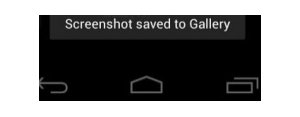
The big reveal for Ice Cream Sandwich is happening tomorrow, but as always, that won't stop us from giving you some new info tonight. There is new word coming from Android Police that Ice Cream Sandwich will finally be getting native screenshots.
Screenshots have so far been relegated to certain manufacturer UIs like Samsung's TouchWiz, or to the root community through apps like Shoot Me. With Gingerbread, Google had built in the capability for developers to add the option of taking screenshots within an app, but there hasn't been options for system-wide screenshots. Now, it seems that we'll be able to do just that in ICS by simply pressing the power and volume down buttons.
Behind this process are two binaries: screenshot and screencap, which apparently existed in Honeycomb, but weren't hooked to a specific key combo. So, there we go, native screenshots will finally be in Android.
New members get $5/mo off the $35/mo Visible+ plan or $5/mo off the $45/mo Visible+ Pro plan for the first 60 months when they port-in from an eligible carrier. Use code 5OFF5 at checkout to save up to $300.
Michael Heller is known for his clear and informative articles on mobile technology. He explores important topics such as the rollouts of 5G networks and the advancements in mobile payments, offering readers insights into the evolving tech landscape.
Recommended For You
COMMENTS (12)
COMMENTS (12)
All comments need to comply with our
Community Guidelines
PhoneArena Community Rules
A discussion is a place, where people can voice their opinion, no matter if it
is positive, neutral or negative. However, when posting, one must stay true to the topic, and not just share some
random thoughts, which are not directly related to the matter.
Things that are NOT allowed:
Off-topic talk - you must stick to the subject of discussion
Offensive, hate speech - if you want to say something, say it politely
Spam/Advertisements - these posts are deleted
Multiple accounts - one person can have only one account
Impersonations and offensive nicknames - these accounts get banned
To help keep our community safe and free from spam, we apply temporary limits to newly created accounts:
New accounts created within the last 24 hours may experience restrictions on how frequently they can
post or comment.
These limits are in place as a precaution and will automatically lift.
Moderation is done by humans. We try to be as objective as possible and moderate with zero bias. If you think a
post should be moderated - please, report it.
Have a question about the rules or why you have been moderated/limited/banned? Please,
contact us.















Things that are NOT allowed:
To help keep our community safe and free from spam, we apply temporary limits to newly created accounts: