Google offers plenty of Pixel-exclusive apps on its smartphones. These include names like My Pixel, Now Playing, Pixel Studio, Screenshots, and more.
I, personally, really like the Pixel Screenshot app, which uses the power of AI to save and organize the screenshots that you capture on your smartphone. The app was already great, but it has become significantly better with the new update that introduces a couple of new filters to it.
Much-needed organization tools are here
If you are someone who takes plenty of screenshots, the Pixel Screenshot app can turn out to be a lifesaver. It automatically organizes your screen captures based on their type so that you don't have to go through your gallery, which contains hundreds of photographs, to find one particular screenshot. There's also a "Search your screenshots with AI" toggle, which you can manually enable to use natural language to search for the screenshot you are looking for.
For instance, you can type "dog" in the search box, and then the screenshot app will display all the screenshots that contain a dog or a related figure. Not only this, there's also a filter option where you can filter screenshots based on their type. For instance, you can choose the social media tag in the filter option, and the app will then display all the screenshots that you have taken in the social media apps like Instagram.
Recommended For You
While the option already contained plenty of tags, some basic ones were missing, such as the date. Fortunately, in the new update for the Pixel Screenshot app (version 1.26.281.05), Google has added three new tags: Date range, Collections, and Sources.
Which Pixel-exclusive app do you find the most useful?
17 Votes
Now Playing.
52.94%
Pixel Studio.
5.88%
Pixel Screenshots.
29.41%
My Pixel.
11.76%
How helpful are the new tags
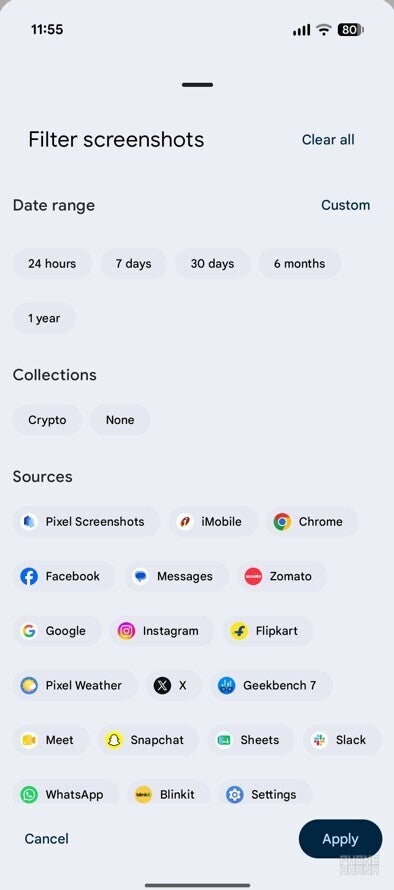
New tags in the Pixel Screenshots app. | Image by PhoneArena
The date range tag, as you can guess, allows you to see screen captures that you have taken within a time frame. By default, it offers five different options: 24 hours, 7 days, 30 days, 6 months, and 1 year. For instance, if you select the 7-day option, the app will display all the screenshots you have taken in the last 7 days.
There's also a Custom button, which you can use to select a particular date. For instance, if you select 18th August 2026, the app will display all the screenshots you have taken on that date.
The Sources tag is the one I find the most interesting. It basically features all the apps that are installed on your smartphone, and selecting any of the displayed apps shows the screenshots that you have taken in that app. For instance, if you select the Messages app from the list, the Screenshots app will display all the screenshots you have taken in the Messages app.
The Collections tag ensures you don't have to browse and search across your collections by opening each folder one by one. All that said, you can make your search even faster by selecting multiple tags, like Messages from the Sources tag and a particular duration like 24 hours from the Date range tag.
It looks well organized
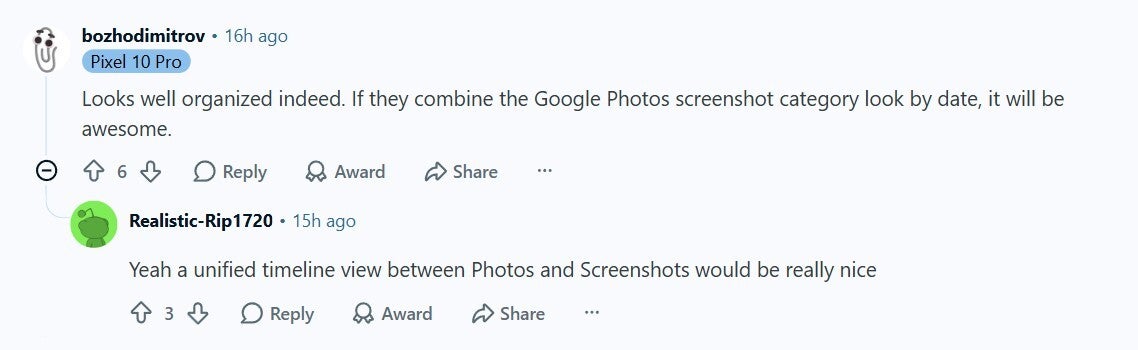
Reddit user appreciating the change in Pixel Screenshots app. | Image by Reddit
Following this change, the Screenshots app really looks well organized. It's now easier than ever to quickly search for the screenshot you were looking for, provided you know when it was taken or the app on which it was taken.
Users on online platforms like Reddit also believe the same. A Redditor commented that the new update has indeed made the Screenshots app more organized. They further requested Google to introduce a similar change to its Photos app as well. For reference, there's currently no date range tag in the Google Photos app.
Finding old screenshots on your Pixel is ridiculously easier now
As mentioned above, the update is available in version 1.26.281.05 of the Pixel Screenshots app, which is available for download on the Google Play Store. In case you don't see the changes, which happened in my case, I would advise you to restart your device after installing the update.
Don't miss out on the following Pixel-related stories:
The power button might become obsolete following this change in Pixel phones.
Should you really buy the Pixel 11?
What's the Pixel Tag?
Give me a follow on my social to remain updated on what's happening in the Pixel world:
On the Visible+ Pro plan, you get access to 5G Ultra Wideband data on Verizon's fastest network. Along with unlimited roaming across Mexico and Canada, 2 days of Global Pass per month, 3x hotspot speeds, 4K streaming, and Smartwatch service.
Aman Kumar is a news writer at PhoneArena covering Google Pixel phones, Android features, AI-powered smartphone tools, and mobile tech news. Before joining PhoneArena, he spent over five years writing about consumer technology for publications like MakeUseOf, How-To Geek, and Guiding Tech. His current daily drivers are the Pixel 10 and Samsung Galaxy S26 Plus, while his red iPhone SE (2nd gen) remains a personal favorite. Aman also appreciates bold smartphone experiments and still considers the Nokia N-Gage one of the industry’s most iconic designs.
A discussion is a place, where people can voice their opinion, no matter if it
is positive, neutral or negative. However, when posting, one must stay true to the topic, and not just share some
random thoughts, which are not directly related to the matter.
Things that are NOT allowed:
Off-topic talk - you must stick to the subject of discussion
Offensive, hate speech - if you want to say something, say it politely
Spam/Advertisements - these posts are deleted
Multiple accounts - one person can have only one account
Impersonations and offensive nicknames - these accounts get banned
To help keep our community safe and free from spam, we apply temporary limits to newly created accounts:
New accounts created within the last 24 hours may experience restrictions on how frequently they can
post or comment.
These limits are in place as a precaution and will automatically lift.
Moderation is done by humans. We try to be as objective as possible and moderate with zero bias. If you think a
post should be moderated - please, report it.
Have a question about the rules or why you have been moderated/limited/banned? Please,
contact us.







Things that are NOT allowed:
To help keep our community safe and free from spam, we apply temporary limits to newly created accounts: