RCS is not working with Google Messages on new Android phones (UPDATE: Google responds)
There is a weird workaround that will supposedly fix this issue.
Key Google Messages feature breaks | Image by PhoneArena
UPDATE: Google has reached out to give us a statement. While it might be brief, it is the exact answer that those impacted by this bug will be happy to read. A Google spokesperson said, "We’re aware of this issue and are working with our carrier partners to get it fixed as soon as possible."
The original story follows:
Remember when you would share a photo or video you took using the camera on your iPhone with a friend or loved one using an Android phone? Back in the day when cross-platform messaging was done over SMS, those images and videos you'd share looked awful on an Android handset. Of course, the videos and photos shot on an Android phone looked just as bad on an iPhone. Once Apple started supporting Rich Communication Services (RCS) with iOS 18, that issue was over.
What Rich Communication Services (RCS) does for your cross-platform messaging
With RCS, cross-platform messaging allows Android and iOS users to enjoy features that were previously found only on dedicated chat apps such as:
- High-Quality Media: Without the compression used with SMS/MMS, users are able to share high-resolution videos and pictures as we mentioned above.
- Longer chats: While SMS messages are limited to 160 characters, RCS users can include 2,000 to 250,000 characters in one message depending on the carrier and app.
- Typing Indicators: These allow you to see when the other party in a chat is in the process of typing you a message.
- Read Receipts: You will find out when a message you've sent has been delivered and whether it has been read.
- Improved Group Chats: Group chats are more reliable and participants can be added or removed from the group.
- Reactions: Message reactions now have cross-platform support.
RCS stops working for some Google Messages users with a new Android phone
You can check to see whether you have E2EE by looking for the lock icon next to the "Encrypted" status at the top of active threads. Overall, RCS works as intended and allows iOS and Android users to exchange messages and images on a level playing field.
Do you like reading about Google Messages as much as I like writing about it? If so, check out these articles:
Google Messages gets Apple-style makeover
Chat to Google directly and talk to the company about their Google Messages app
On Reddit, some Google Messages users are complaining that RCS is not working on newer Android phones. For example, a Redditor with the username Gobluin switched from a Galaxy Z Fold 6 with RCS working to a new Galaxy Z Fold 8 and the status of RCS is trying to connect with error code 3100.
Error code 3100 means that there is trouble connecting to the messaging servers. This happens when switching to a new phone, particularly a Samsung Galaxy phone. It can be caused by cache files that are corrupted from a data transfer or by porting over an incomplete phone number.
Google suggests installing the latest version of the Google Messages app (which you can get by tapping on this link), turn off RCS, clear the data for "Carrier Services," restart your phone, and then turn RCS back on. This did not work for Gobluin who apparently wore out a Verizon tech trying to get this issue fixed.
Do not downgrade the Google Messages app on your phone
A Googler responded with a warning for those who threatened to downgrade the version of Google Messages used on their device in the hopes that RCS would work. But Google says that using legacy versions of the app can wipe your database and permanently erase data.
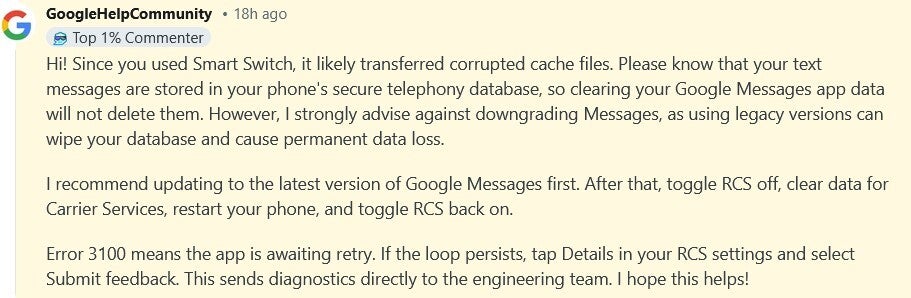
Google employee explains why RCS stops working when an Android user switches to a new phone. | Image by Reddit
The Google employee also suggested that if you continue to receive error code 3100, open your RCS settings and click on the "submit feedback" option. This will send diagnostics directly to Google's engineering team. Hopefully that might help the gang at Mountain View come up with a way to exterminate this bug.
This workaround seems to have fixed the issue
Strangely enough, a Reddit user with the username starcowboy26 found a solution that sounds weird but he claims that it is the only thing that helped. Try this:
- Turn off RCS
- Connect to any vpn server in paris france
- Turn RCS back on, voila it connects
- Turn VPN off
If you have tried everything to turn RCS back on your Android phone, it can't hurt to give the above directions a shot. Let us know if it helped.


Popular stories

Latest News
Things that are NOT allowed:
To help keep our community safe and free from spam, we apply temporary limits to newly created accounts: