Believe me, I could feel it up here in Massachusetts. Summer has been over as temperatures have dropped from the 80s to the 70s and now to the 60s during the day, and into the 50s at night. One way to keep those summertime activities fresh in your mind is to open the Google Photos app and refresh your memory by going back over the photos you've taken.
Google introduces some new features for the Google Photos app
Google today posted a blog to tell you how to use five updates to the Google Photos app to bring back those lazy, crazy, carefree days of summer. Available to eligible Google AI Pro and Ultra subscribers in the US, you can have Gemini easily edit an image from the Google Photos app. It's as easy as typing in a prompt or using a voice prompt.
First, make sure you have Google Photos connected to Gemini. Open the Gemini app and tap Spark in the top corner. Now, you can edit and curate your albums. You can say or write something like this, "Find all my vacation selfies, erase the background crowds, and center me in every shot before adding to a new album."
You can use a photo of a concert banner to ask, "Check my calendar for conflicts with that concert flyer, then get it scheduled." With this feature, you can even have your parents get timely photos of their grandchildren.
Recommended For You
For a while now, I’ve relied on @GeminiApp and @antigravity agents across a wide range of use cases—spanning creativity, productivity, and analysis. But I’ve always dreamed of having a power agent to help me get the most out of my 143,206 photos and videos. And that day has come!… pic.twitter.com/WbnkYpattQ
Simply type a written prompt or use a voice prompt that says, “Every Sunday, pull the best shots of the kids, drop them into a shared album, and draft a recap email for the grandparents." Believe me, your parents will be looking forward to each Sunday.
The Photos in Spark feature is rolling out over the next few weeks in the US to eligible AI Pro and Ultra subscribers.
Create a digital closet and virtually try on your outfits
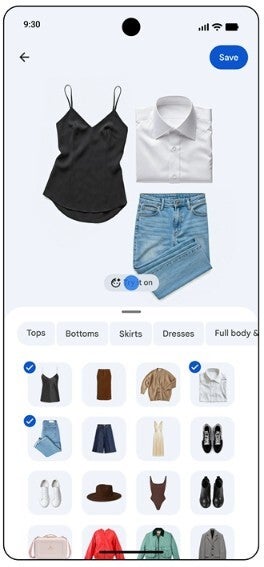
A new Google Photos feature called Wardrobe is going to make it easier for you to get dressed. Google will create a digital closet that is filled with pieces of the clothes that you are wearing in various photographs in your photo library.
Wardrobe creates a digital closet filled with the clothes you wore in photographs. | Image by Google
You can even filter the images down to a specific category such as jewelry, tops, or bottoms. You might get lucky and find some long-forgotten items that might still be in your closet.
You’ll be able to mix and match outfits and share them. Lastly, when you’ve put together an ensemble you like, you can try it on virtually by clicking the “Try it on” button.
Available globally on the Android version of Android, you can give your photos a nostalgic look with Moods. You can make an image appear as though you shot it using 35mm film, or shot it using a digital camera from the 2000s, and more.
Remix has new templates users can choose from
Google has added 15 new Remix templates to users of the Google Photos app for Android and iOS in select countries. Users must be over 18. You’ll be able to create whimsical birthday cards, photo booth shots, and red carpet moments.
The Markup feature in the Google Photos app. | Image by Google
Lastly, Google has created an upgraded markup tool that includes a redact pen that allows you to blur sensitive info and employ fresh fonts that will make your text really stand out. This is rolling out on Android worldwide.
How to get the Google Photos app if it is not on your phone
If you don’t have the Google Photos app, you can download it from the App Store for the iPhone by clicking on this link. If you have an Android device, click on this link to install the app from the Play Store.
On the Visible+ Pro plan, you get access to 5G Ultra Wideband data on Verizon's fastest network. Along with unlimited roaming across Mexico and Canada, 2 days of Global Pass per month, 3x hotspot speeds, 4K streaming, and Smartwatch service.
Alan, an ardent smartphone enthusiast and a veteran writer at PhoneArena since 2009, has witnessed and chronicled the transformative years of mobile technology. Owning iconic phones from the original iPhone to the iPhone 15 Pro Max, he has seen smartphones evolve into a global phenomenon. Beyond smartphones, Alan has covered the emergence of tablets, smartwatches, and smart speakers.
A discussion is a place, where people can voice their opinion, no matter if it
is positive, neutral or negative. However, when posting, one must stay true to the topic, and not just share some
random thoughts, which are not directly related to the matter.
Things that are NOT allowed:
Off-topic talk - you must stick to the subject of discussion
Offensive, hate speech - if you want to say something, say it politely
Spam/Advertisements - these posts are deleted
Multiple accounts - one person can have only one account
Impersonations and offensive nicknames - these accounts get banned
To help keep our community safe and free from spam, we apply temporary limits to newly created accounts:
New accounts created within the last 24 hours may experience restrictions on how frequently they can
post or comment.
These limits are in place as a precaution and will automatically lift.
Moderation is done by humans. We try to be as objective as possible and moderate with zero bias. If you think a
post should be moderated - please, report it.
Have a question about the rules or why you have been moderated/limited/banned? Please,
contact us.













Things that are NOT allowed:
To help keep our community safe and free from spam, we apply temporary limits to newly created accounts: