Apple has announced that it is going to increase the fees it charges for instantly transferring funds to your bank or debit card through Apple Cash.
You'll still have some time left
Apple Cash has long been the go-to option for iPhone users to transfer money. It was initially integrated only into the Wallet app, but with the iOS 26 update, it has been added to iMessage as well. While it is mainly used to pay on platforms that accept Apple Pay, it also allows you to send the payment to your bank account.
There are basically two ways to perform the latter action. The first is the completely free Automated Clearing House (ACH) transfer, but the catch is that it takes one to three days to complete. If you want to move the money instantly to your bank account, you can use the second option, which is instant transfer. However, this approach also has a catch—it charges a fee to transfer the funds instantly, which is basically set by Apple and its banking partners.
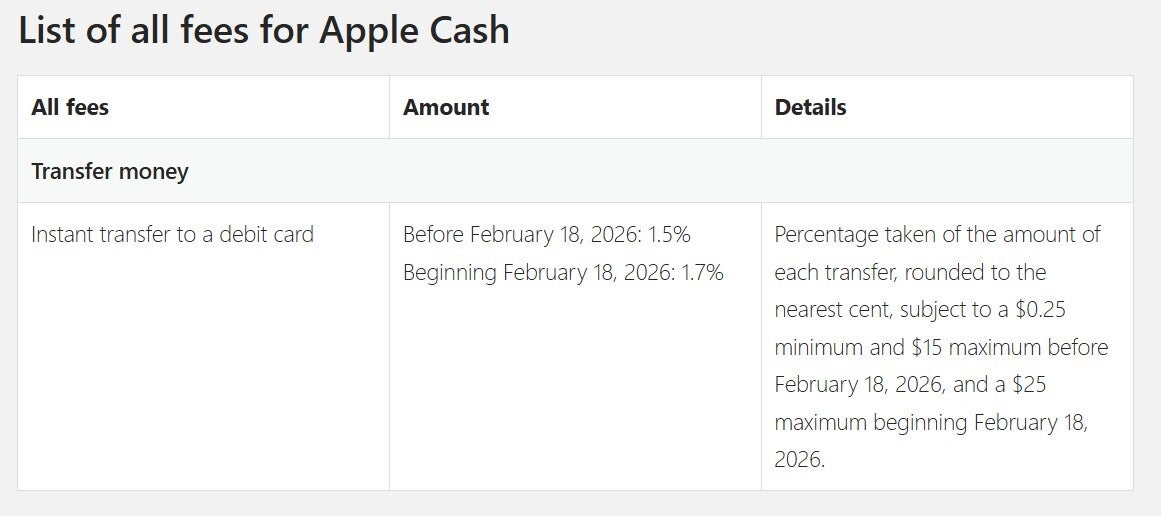
Currently, you're charged 1.5% of the transaction amount as a fee for using the instant transfer method, with a minimum 0.25% fee and a maximum $15 fee. This means that if you want to instantly transfer $1,000 to your bank account, you'll need to pay $15 as the transaction fee.
Recommended For You
The rate and maximum fee will, however, change from February 18. Starting on that date, you will be charged 1.7% of the transaction amount as the transfer fee, with a maximum of $25. The minimum fee is going to remain the same as before. While the percentage increase is very small (0.2%), you will mainly feel the impact of this change when transferring large sums due to the maximum fee cap.
Following this change, you'll be charged $17 to move $1,000 to your linked account right away. If you want to transfer $2,000, the fee should ideally be $34 at a 1.7% deduction rate. However, since the maximum deduction fee will be $25, you'll pay $25 instead of $34 to move $2,000 to your bank or debit account.
Apple Cash is currently exclusive to the United States. The tech giant has already started sending notices to all registered users about this change. The fee section of the Apple Cash terms and conditions page has also been updated with the new fee structure, along with the date when it will take effect.
Which payment service do you use to transfer funds?
8 Votes
PayPal.
12.5%
Apple Pay.
50%
Venmo.
0%
Cash App.
12.5%
Google Pay.
25%
A change that's occurring across all the payment services
Fee structure of Apple Cash. | Image Credit - Apple Cash
Apple Cash isn't the only platform that's increased its transfer fee. In the last few months, most of its competitors, whether they be Venmo, PayPal, or Cash App, have all slightly raised their respective transfer fees. For instance, if you want to instantly transfer funds to your bank or debit account through Venmo, you'll have to pay 1.75% as the transfer fee. This is slightly more than what Apple Cash is about to charge, but the maximum fee is the same on both platforms: $25.
Since the change will occur on February 18, you still have plenty of time in between, which you must utilize if you want to transfer a large amount of money to your account. ACH is definitely there as a free option, but having to wait days to transfer funds to your own account seems unacceptable in today's time.
That said, I'm definitely not an economist, but I really don't understand why instant transfers even have a transfer fee. This is completely free in most other countries. I live in India, and I can confirm that here we have banking apps and UPI (Unified Payments Interface) platforms that allow moving funds without any kind of fee. Hopefully, it becomes free in the US as well sometime in the future.
Mint Mobile's 6-month plans now cost $10/mo
$10
/mo
$35
$25 off (71%)
Mint Mobile is celebrating its 10-year anniversary with a special offer on its six-month subscription plans. For a limited time, you can get your preferred tier (6GB, 17GB, 23GB or unlimited) for just $10/mo. That saves you between 50% and 71% on the carrier's mobile plans, making it way easier to recommend.
Aman Kumar is a news writer at PhoneArena covering Google Pixel phones, Android features, AI-powered smartphone tools, and mobile tech news. Before joining PhoneArena, he spent over five years writing about consumer technology for publications like MakeUseOf, How-To Geek, and Guiding Tech. His current daily drivers are the Pixel 10 and Samsung Galaxy S26 Plus, while his red iPhone SE (2nd gen) remains a personal favorite. Aman also appreciates bold smartphone experiments and still considers the Nokia N-Gage one of the industry’s most iconic designs.
A discussion is a place, where people can voice their opinion, no matter if it
is positive, neutral or negative. However, when posting, one must stay true to the topic, and not just share some
random thoughts, which are not directly related to the matter.
Things that are NOT allowed:
Off-topic talk - you must stick to the subject of discussion
Offensive, hate speech - if you want to say something, say it politely
Spam/Advertisements - these posts are deleted
Multiple accounts - one person can have only one account
Impersonations and offensive nicknames - these accounts get banned
To help keep our community safe and free from spam, we apply temporary limits to newly created accounts:
New accounts created within the last 24 hours may experience restrictions on how frequently they can
post or comment.
These limits are in place as a precaution and will automatically lift.
Moderation is done by humans. We try to be as objective as possible and moderate with zero bias. If you think a
post should be moderated - please, report it.
Have a question about the rules or why you have been moderated/limited/banned? Please,
contact us.











Things that are NOT allowed:
To help keep our community safe and free from spam, we apply temporary limits to newly created accounts: